Passwordless Implementation Step-by-Step: The 2026 Enterprise Deployment Playbook
Enterprise passwordless implementation runs on a specific eight-step deployment sequence — workforce inventory, credential-class selection per segment, IdP configuration, pilot enrollment, workforce rollout with change management, help desk pre-scaling, monitoring and iteration, and passwordless-fallback residual planning. The 2026 enterprise reference on the step-by-step deployment playbook, the go/no-go criteria at each phase gate, and the discipline that produces successful passwordless rollout at workforce scale.
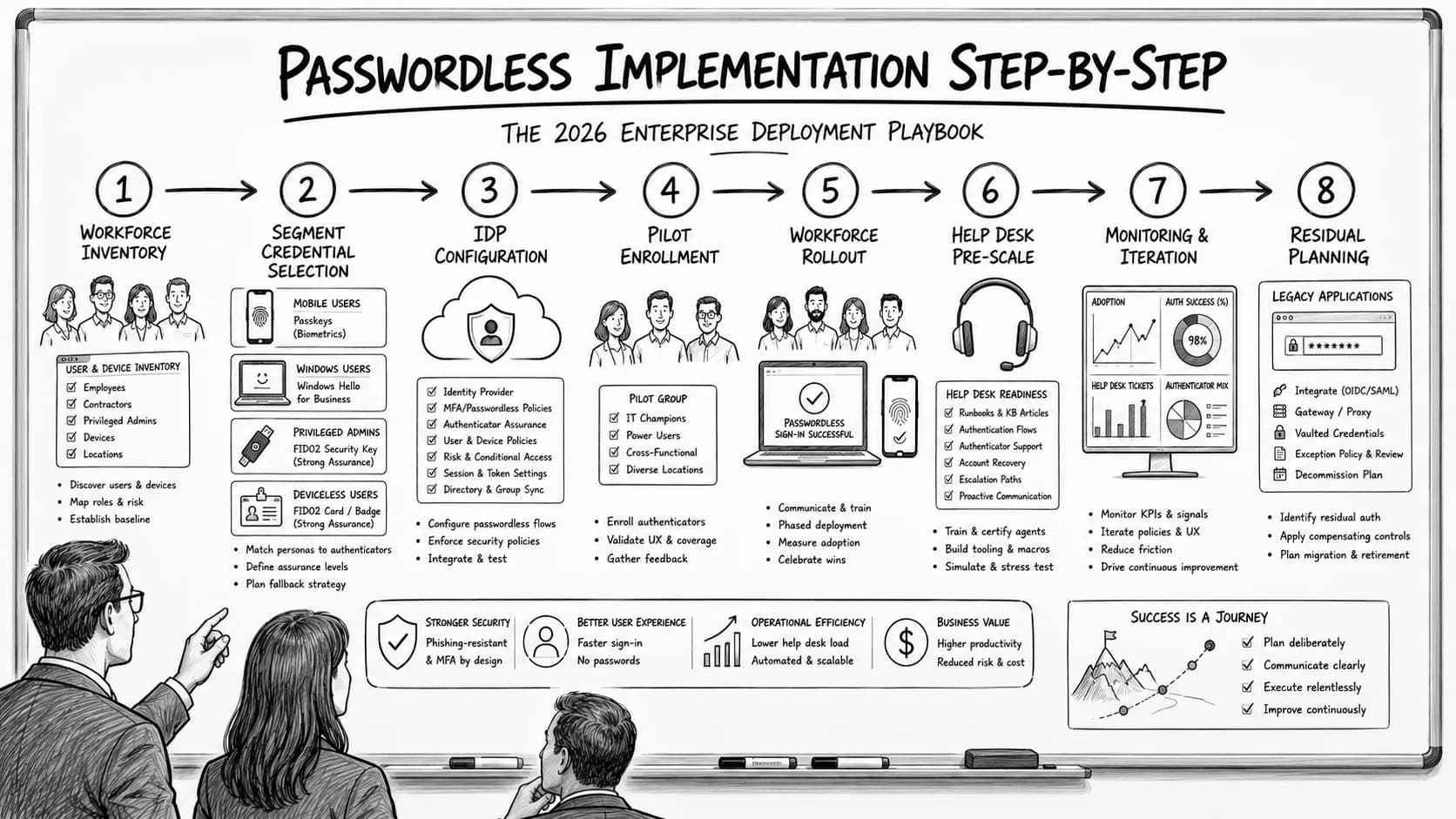
Enterprise passwordless implementation runs on a specific eight-step deployment sequence — workforce inventory, credential-class selection per segment, IdP configuration, pilot enrollment, workforce rollout with change management, help desk pre-scaling, monitoring and iteration, and passwordless-fallback residual planning. The 2026 enterprise reference on the step-by-step deployment playbook, the go/no-go criteria at each phase gate, and the discipline that produces successful passwordless rollout at workforce scale.
- Enterprise passwordless implementation runs on an eight-step deployment sequence. Step 1 — Workforce inventory and segmentation. Step 2 — Credential-class selection per segment. Step 3 — IdP configuration for Conditional Access and passkey enrollment. Step 4 — Pilot enrollment with 5-15% of workforce. Step 5 — Workforce rollout with change management. Step 6 — Help desk pre-scaling. Step 7 — Monitoring and iteration. Step 8 — Passwordless-fallback residual planning.
- The credential-class selection per segment is where most deployments succeed or fail. Platform passkeys + biometric on smartphone-managed workforce. Windows Hello for Business on Windows workstations ([Passwordless for Microsoft Enterprise piece](/en/blog/passwordless-authentication-microsoft-enterprise-2026/)). Hardware FIDO2 keys for privileged step-up ([Hardware FIDO2 vs Passkeys piece](/en/blog/hardware-fido2-keys-vs-passkeys-enterprise-2026/)). Deviceless FIDO2 via Identity Challenge Card for smartphone-unavailable segments (healthcare bedside, manufacturing floor, contact center shared workstations, defense classified). The selection depends on workforce composition, operational context, and compliance requirements.
- The eight-step sequence has seven phase gates with go/no-go criteria. Gate 1 — workforce segmentation coverage complete (post-Step 1). Gate 2 — credential-class selection validated per segment (post-Step 2). Gate 3 — IdP configuration tested against production traffic (post-Step 3). Gate 4 — pilot enrollment > 90% success rate with < 5% help desk escalation (post-Step 4). Gate 5 — workforce rollout tracking against milestone plan (post-Step 5). Gate 6 — help desk capacity validated at 3-5x baseline for first 90 days (post-Step 6). Gate 7 — monitoring feedback loops driving iteration (post-Step 7).
- Successful passwordless deployments follow the eight-step discipline; unsuccessful deployments typically skip Step 1 (workforce inventory), producing coverage gaps that surface at Step 5 (workforce rollout) as the 'why doesn't this work for the healthcare frontline / manufacturing floor / contact center' cases. The [Passkey Deployment Playbook piece](/en/blog/passkey-deployment-playbook-enterprises-2026/) covers the passkey-specific migration architecture; this piece covers the enterprise-wide step-by-step deployment sequence across all credential classes.
- The residual planning in Step 8 matters. Passwords remain for legacy applications that don't support passwordless, service accounts that authenticate differently, and specific compliance cases where the workforce hasn't moved off passwords. SSPR ([SSPR Enterprise Deployment piece on CGov](https://credentialgovernance.avatier.com/en/blog/self-service-password-reset-enterprise-deployment-2026/)) handles the residual password reset volume; the residual should shrink over the deployment horizon as passwordless coverage expands.
Enterprise passwordless implementation is a multi-year architectural migration for most large enterprises — but the sequence of specific deployment steps is well-defined enough that mature deployments follow a common eight-step playbook. Unsuccessful deployments typically skip specific steps, producing predictable failure patterns that surface at workforce rollout as coverage gaps, help desk overwhelm, or resistance to the new authentication flow. The step-by-step discipline is what turns passwordless from an aspirational architectural goal into a shipped enterprise capability.
This piece is the 2026 enterprise reference on step-by-step passwordless implementation. The eight-step deployment sequence, the credential-class selection per workforce segment, the seven phase gates with go/no-go criteria, and the deployment discipline that produces successful passwordless rollout at workforce scale. Companion pieces cover adjacent layers — the Passkey Deployment Playbook piece covers passkey-specific migration architecture; the Passwordless for Microsoft Enterprise piece covers Microsoft-stack passwordless; the Biometric Authentication Mobile Devices piece covers mobile biometric architecture; the Hardware FIDO2 vs Passkeys piece covers the credential-class comparison.
Step 1: Workforce inventory and segmentation
Enumerate the workforce by role, department, and operational context. Identify segments with different credential-class needs. This step is where unsuccessful deployments most commonly fail — teams jump to credential-class selection without inventory, assign platform passkeys universally, and hit the "why doesn't this work for the healthcare frontline / manufacturing floor / contact center" case at workforce rollout.
Segment identification. Four segments recur across enterprise workforce populations:
- Segment A: Smartphone-carrying knowledge workers. Workforce with corporate or personal smartphones, functional mobile biometric, primarily working from personal devices or laptops
- Segment B: Windows workstation desk workers. Workforce with domain-joined or Entra ID-joined Windows workstations as primary computing surface
- Segment C: Privileged administrators. Workforce requiring step-up authentication for administrative access to production systems, privileged Entra ID operations, high-value financial transactions
- Segment D: Smartphone-unavailable frontline. Workforce where mobile biometric authentication isn't operationally available — healthcare bedside clinicians, manufacturing floor operators, contact center shared workstations, defense classified environments
Gate 1 criteria (post-Step 1):
- Every workforce member assigned to a segment
- Segments cover 100% of the workforce
- Segments align with operational reality, not org chart abstraction
Common Step 1 failure: teams use org chart segmentation (department X gets credential Y) rather than operational segmentation (workforce with smartphones + biometric enrollment gets platform passkeys). Operational segmentation is what produces successful rollout.
Step 2: Credential-class selection per segment
Map credential classes to segments. Each segment gets a specific credential class assignment based on operational context and technical feasibility.
Segment A → Platform passkeys + biometric. iOS Face ID / Touch ID, Android biometric via WebAuthn, Windows Hello for Business on Surface devices. Passkeys sync across the user's device fleet via iCloud Keychain / Google Password Manager / Microsoft Entra ID. The Biometric Authentication Mobile Devices piece covers the mobile biometric architecture.
Segment B → Windows Hello for Business. WHfB as the primary Windows authentication factor with TPM 2.0-backed biometric or PIN. Entra ID as the identity broker for cloud application access. The Passwordless for Microsoft Enterprise piece covers the Microsoft-stack architecture.
Segment C → Hardware FIDO2 keys for step-up. YubiKey, Feitian, Google Titan, and other FIDO2-certified keys for administrative access, privileged Entra ID operations, high-value financial transactions. Step-up composes with the base authentication factor from Segment A or B. The Hardware FIDO2 vs Passkeys piece covers the hardware-vs-platform comparison.
Segment D → Deviceless FIDO2 via Identity Challenge Card. Tap-and-go authentication without smartphone dependency. The Identity Challenge Card provides FIDO2 authentication for workforce segments where mobile biometric isn't operationally available.
Gate 2 criteria (post-Step 2):
- Each segment has a credential class assigned
- Assignment is technically feasible (device inventory supports the credential class)
- Assignment covers compliance requirements for the segment's operational scope
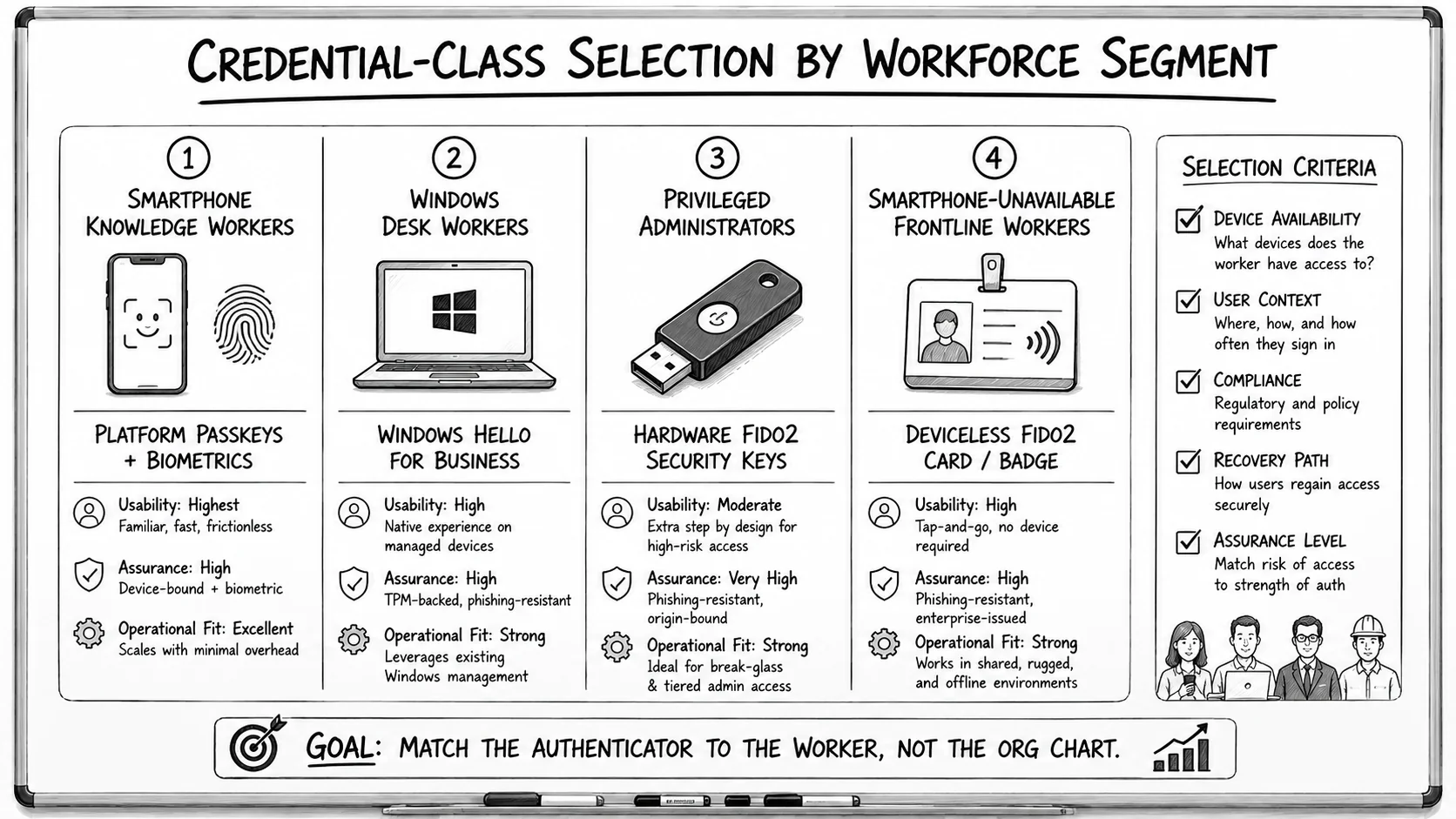 Four segments, four credential classes. The selection criteria that matter — device availability, user context, compliance scope, recovery path, assurance level — are operational, not organizational. Match the authenticator to how the worker actually works.
Step 3: IdP configuration for Conditional Access and passkey enrollment
Configure the identity provider (Entra ID, Okta, Ping Identity, or equivalent) to enforce the credential class per segment through Conditional Access policies, enable enrollment workflows for each credential class, and configure revocation workflow.
Conditional Access configuration. Policies enforce the credential class per segment — Segment A users must authenticate with passkeys, Segment B with WHfB, Segment C with hardware FIDO2 step-up on privileged operations, Segment D with the Identity Challenge Card. Policy composition determines workforce coverage — a policy that requires the credential class universally produces full coverage; a policy that permits password fallback produces partial coverage that undermines the passwordless guarantee.
Enrollment workflows. Each credential class has an enrollment ceremony:
- Segment A — mobile passkey enrollment via IdP mobile app or portal
- Segment B — WHfB enrollment via Windows Autopilot or self-service ceremony
- Segment C — hardware FIDO2 key registration via IdP portal with in-person verification for privileged accounts
- Segment D — Identity Challenge Card enrollment via documented ceremony
Revocation workflow. Device loss, employee departure, and credential compromise events trigger revocation across the segment's authentication surface.
Gate 3 criteria (post-Step 3):
- Conditional Access policies enforce credential class per segment
- Enrollment workflows complete successfully in staging environment
- Revocation workflow tested against representative scenarios
Step 4: Pilot enrollment with 5-15% of workforce
Enroll a representative pilot population. Pilot size at 5-15% of workforce depending on enterprise scale — smaller enterprises benefit from higher percentage pilots for statistical significance; larger enterprises can use smaller percentages that still produce meaningful sample sizes.
Pilot composition. Representative population including edge cases. Rotating workforce (contractors, seasonal staff), international users (different network paths, different regulatory contexts), shared stations (multi-user workstations), international device configurations, workforce roles that weren't obvious in Step 1 segmentation.
Pilot metrics. Enrollment success rate per segment. False-rejection rate at authentication events. Help desk ticket volume from pilot participants. Time-to-enrollment per user. Workforce feedback (survey + qualitative interviews).
Gate 4 criteria (post-Step 4):
- Enrollment success rate > 90%
- Help desk escalation < 5% of pilot participants beyond expected baseline
- Pilot feedback captured for Step 5 iteration
Common Step 4 failure: pilots that don't include edge cases produce false success signals; Step 5 workforce rollout hits the edge cases at scale and surfaces the coverage gaps.
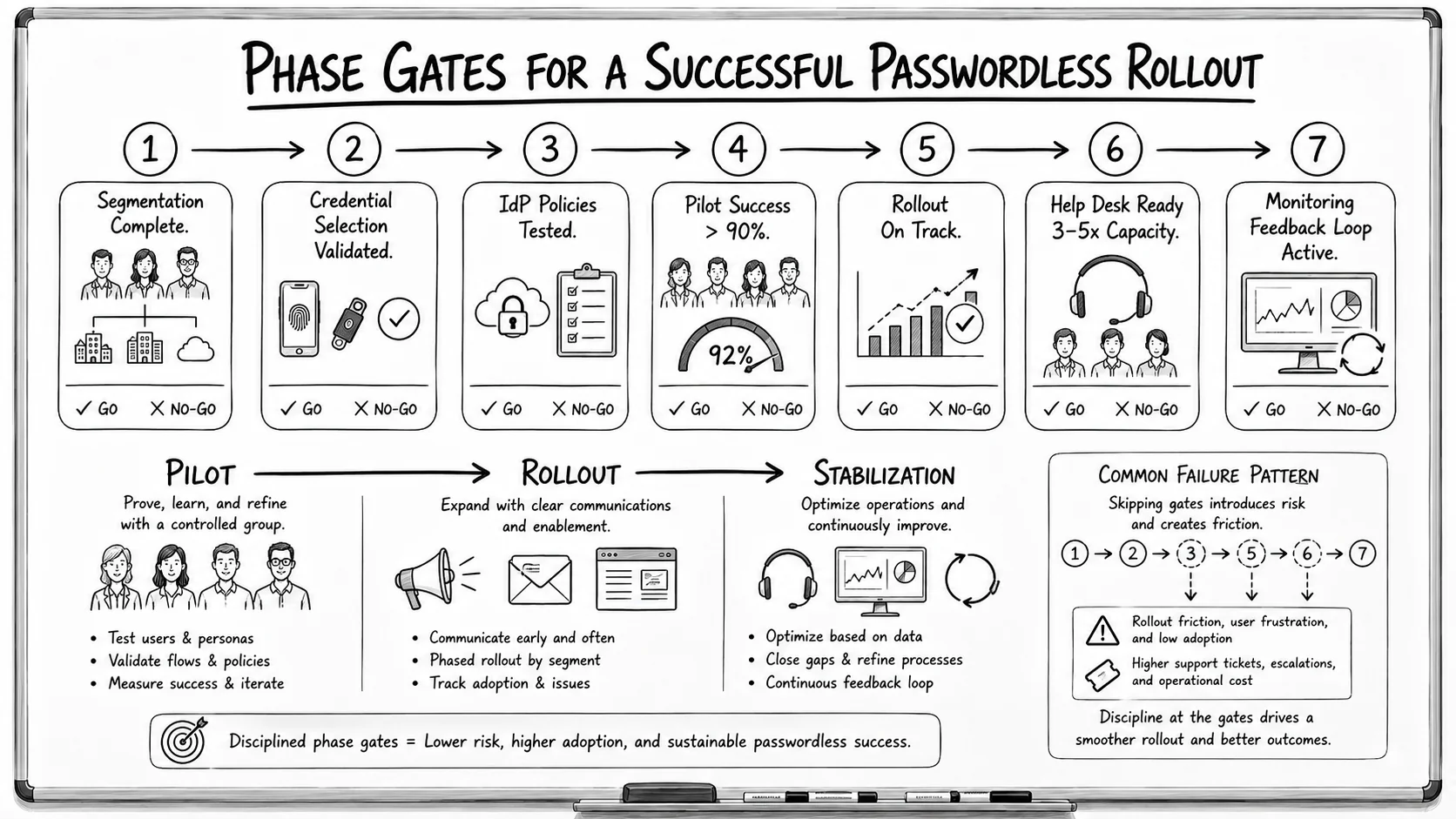 Seven gates, each with an explicit go/no-go. The failure pattern is always the same shape — a skipped gate doesn't surface as a problem at the gate, it surfaces two steps later as adoption friction and support volume.
Step 5: Workforce rollout with change management
Roll out passwordless across the workforce with role-targeted change management. Phased rollout by segment produces the most controllable operational load.
Change management discipline. Role-targeted communication (not generic workforce-wide messaging) reduces confusion tickets 40-60%. Workforce training tailored to each segment's specific enrollment ceremony. Manager engagement for each segment during rollout. Documented FAQ and self-help resources.
Phased rollout sequence. Segment A first (typically largest, most straightforward). Segment B next (Windows workstation-dependent). Segment C third (privileged step-up added on top of existing authentication). Segment D last (specialized credential class, longer enrollment ceremonies).
Rollout tracking. Enrollment progress by segment. Ticket categories from help desk. Workforce feedback loops.
Gate 5 criteria (post-Step 5):
- Rollout progressing against milestone plan
- Segment-specific enrollment rates within expected ranges (target > 85% at rollout end)
- Change management feedback loops functional
Step 6: Help desk pre-scaling for first 90 days
Any workforce authentication cutover produces 3-5x normal help desk ticket volume during the first 90 days. Pre-scaling means increasing capacity temporarily to absorb the surge.
Staffing patterns. Contract help desk support at 200-400% of normal capacity for the first 90 days, or overtime allocation to existing staff. Contract support scales more cleanly; overtime is simpler to coordinate but produces burnout risk.
Ticket category preparation. Common ticket categories to prepare help desk for:
- Enrollment ceremony questions (Segment-specific)
- Biometric false-rejection cases (see OTP Failure Case Scenarios piece)
- Device loss and replacement workflows
- Cross-device access questions
- Legacy application authentication (passwords remain here — see Step 8)
Gate 6 criteria (post-Step 6):
- Help desk capacity at 3-5x normal for cutover period
- Ticket queue backlog under 24-hour resolution SLA
- Escalation paths functional
Step 7: Monitoring and iteration
Track deployment metrics; close gaps identified in monitoring; iterate on the enrollment and authentication workflow based on operational feedback.
Metrics dashboard. Enrollment rate by segment. Authentication success rate. False-rejection rate by device class. Help desk ticket categories. Workforce satisfaction (survey + NPS-style tracking). Coverage gap identification.
Iteration cycles. Weekly for first 90 days; monthly thereafter. Iteration items typical: enrollment ceremony refinement, help desk training updates, workforce communication refresh, device-configuration edge case documentation.
Gate 7 criteria (post-Step 7):
- Metrics dashboards operational
- Iteration cycles closing gaps
- Workforce feedback captured and incorporated
Step 8: Passwordless-fallback residual planning
Passwords remain for legacy applications that don't support passwordless, service accounts that authenticate differently, and specific compliance cases. Step 8 is the residual planning that covers the remaining password surface.
Residual surface. Legacy applications without passkey / FIDO2 support (typically older on-premises applications). Service accounts (non-human identities — see the Service Account Governance piece on CGov). Break-glass emergency access flows. Specific compliance cases where regulatory framework hasn't yet caught up to passwordless.
Residual reset architecture. SSPR (SSPR Enterprise Deployment piece on CGov) handles the residual password reset volume. Help desk assisted reset handles privileged residual cases. The residual should shrink over the deployment horizon as passwordless coverage expands.
Residual monitoring. Track residual password volume; identify legacy applications that could migrate to passwordless; sunset residual as coverage expands.
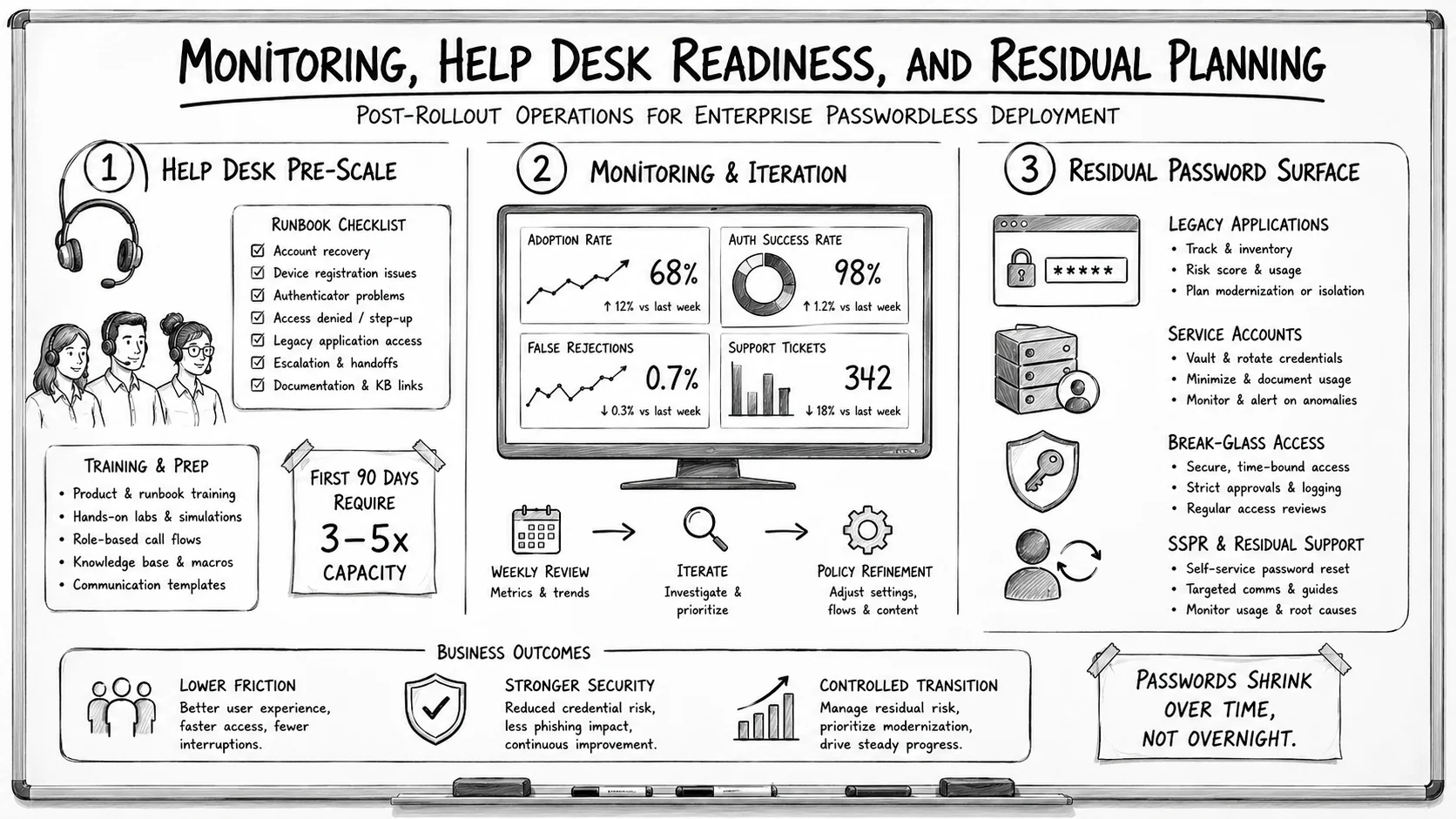 Steps 6, 7, and 8 are one operational block. Help desk capacity absorbs the cutover surge, monitoring drives the iteration cycles, and residual planning manages the password surface that shrinks over time rather than disappearing on cutover day.
The 2026 reference path
Follow the eight-step sequence. Skipping steps produces predictable failure patterns; sequential discipline produces successful rollout.
Apply operational segmentation, not org chart segmentation. Segments should reflect how the workforce actually operates, not how the organization is structured on paper.
Match credential classes to segments. Platform passkeys for smartphone workforce. WHfB for Windows workstations. Hardware FIDO2 for privileged step-up. Deviceless FIDO2 via Identity Challenge Card for smartphone-unavailable segments.
Enforce phase gates. Don't proceed to Step N+1 until Step N gate criteria are met. Gates produce controllable rollout; skipping gates produces cascading failure patterns.
Pre-scale help desk for the first 90 days. Cutover produces 3-5x normal ticket volume; capacity planning is what prevents ticket-queue backlog.
Plan the residual. Passwords remain for legacy applications, service accounts, and specific compliance cases. SSPR handles the residual reset volume as passwordless coverage expands.
Point auditors at the Trust Center for Avatier's own posture. The Avatier Trust Center with the SecurityScorecard grade view — SOC 2 Type II with zero exceptions, ISO/IEC 27001:2022, PCI DSS v4.0.1, CSA STAR Level 1, NIST 800-53 Rev. 5 aligned, CISA Secure-by-Design Pledge signatory.
About the author

More from Passwordless

Passwordless Authentication in Healthcare: The HIPAA Case (2026)
Passwordless authentication doesn't earn HIPAA certification — HIPAA doesn't certify vendors — but it directly strengthens the §164.312 access-control safeguards clinical IT teams are graded on.

Windows Hello Limitations 2026: Where It Works and Where It Stops
Windows Hello does one thing extremely well — it produces a strong, TPM-bound, biometric or PIN sign-in on the specific Windows device a user enrolled on. The limitations show up the moment authentication needs to leave that device: shared and kiosk workstations, roaming across machines, cross-platform access, and the per-device enrollment burden. The 2026 practitioner reference on how Windows Hello actually works, exactly where its device-bound model falls short, and the FIDO2 and passkey patterns that extend it to the endpoints Hello was never designed to cover.
Passwordless Authentication for Microsoft Enterprise: The 2026 Reference
Microsoft enterprise environments have a specific passwordless deployment architecture — Windows Hello for Business as the primary Windows authentication factor, Entra ID as the identity broker for cloud application access, Windows Autopilot and Intune for device provisioning, and the hybrid deployment patterns that bridge on-premises AD to Entra ID. The 2026 enterprise reference on the Microsoft-stack passwordless architecture, the WHfB enrollment ceremony discipline, and the deployment pattern that produces phishing-resistant workforce authentication across the Microsoft estate.