Biometric Authentication for Workforce MFA in 2026: From Sci-Fi to Production
Biometric authentication is no longer a Hollywood prop — it's the dominant unlock mechanism for every passkey deployed in 2026. The honest enterprise guide to which biometrics are production-grade, which are still demo-only, and how biometrics fit into the workforce MFA architecture.
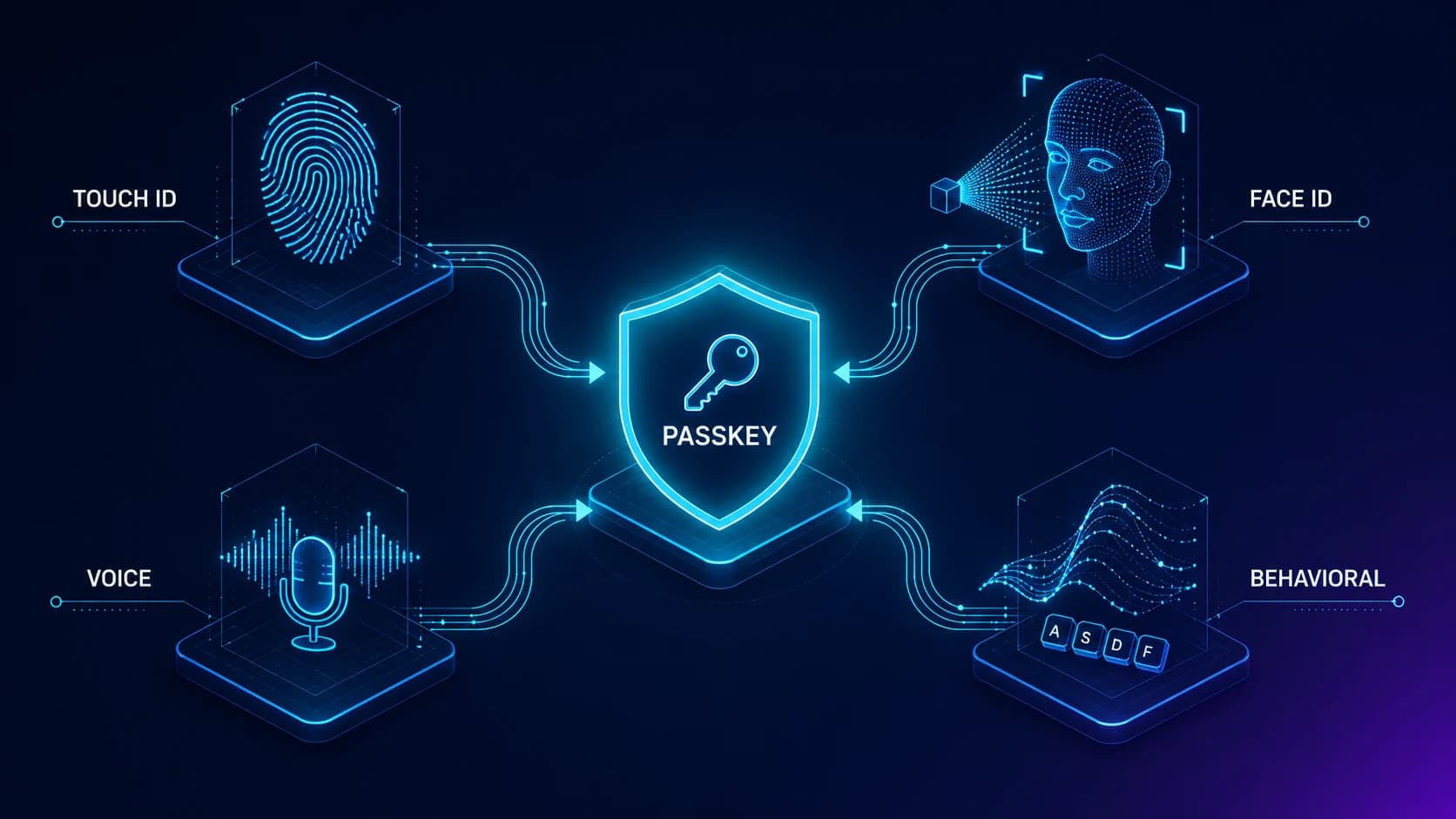
Biometric authentication is no longer a Hollywood prop — it's the dominant unlock mechanism for every passkey deployed in 2026. The honest enterprise guide to which biometrics are production-grade, which are still demo-only, and how biometrics fit into the workforce MFA architecture.
For a decade, biometric authentication was the Hollywood version of the security story — the retinal scanner, the gleaming fingerprint reader, the dramatic face-recognition zoom. Real enterprises mostly stayed with passwords plus an SMS code, and the biometric story sat in the demo room. That changed in 2026.
Biometric authentication is now the dominant unlock mechanism for every passkey deployed in enterprise workforces. Touch ID and Face ID on Apple devices, Windows Hello fingerprint and face on managed laptops, Android biometric unlock on the mobile fleet — these are the friction-free credentials production users actually authenticate with hundreds of times per day. The question for an enterprise IAM team is no longer whether to use biometrics. It is how to deploy them across a mixed workforce, where they fit and where they don't, and how to avoid the marketing claims that don't survive contact with production.
This piece is the operational refresh on biometric authentication for a 2026 audience. The companion pieces handle the adjacent topics: Beyond Foundational MFA in 2026 covers the architectural pattern biometrics fit into, Best Passwordless Solutions covers the vendor landscape, and the Passkey Deployment Playbook covers the phased rollout that uses biometrics as the unlock pattern. This piece is the biometric-specific layer that runs underneath all three.
Why biometrics finally matter in enterprise in 2026
The thing that changed between the demo decade and 2026 production is not biometric accuracy. The thing that changed is the standard biometrics now bind to. Before passkeys, a biometric authentication had to either send the biometric template over the wire (which created a catastrophic data-protection problem) or rely on vendor-specific protocols that the enterprise identity stack didn't speak natively. Neither model scaled into mixed-workforce reality.
The FIDO2/WebAuthn standard solved the binding problem. A passkey credential is a public-key pair stored on the device. The biometric ceremony — Touch ID match, Face ID match, Windows Hello face match — happens locally to unlock the private key, which signs a cryptographic challenge from the corporate identity provider. The biometric template never leaves the secure enclave. The corporate IdP never sees the user's fingerprint or face. The standard works the same way across Apple, Microsoft, Google, and every major hardware-key vendor. That standardization is what made biometric authentication deployable.
The other thing that changed is platform support. In 2020, deploying biometric authentication required device-by-device hardware procurement, custom integration work, and ongoing maintenance overhead. In 2026, every modern enterprise laptop and phone ships with biometric hardware out of the box, the operating systems handle the cryptographic ceremony, and the corporate IdP just needs to support the FIDO2 standard at the IdP side. The deployment friction is now bounded enough that biometric workforce authentication is the default pattern for the managed device segments, not an exception.
The strategic point is that biometrics in 2026 are not a separate authentication technology. They are the unlock mechanism for the cryptographic credential the corporate IdP actually authenticates against. The IAM team that approaches biometrics as "we'll add biometric login" usually ends up with a parallel system that doesn't integrate. The pattern that works is treating biometrics as the local unlock for a passkey credential the IdP authenticates against — which means the rollout architecture is the passkey deployment architecture covered in the companion piece.
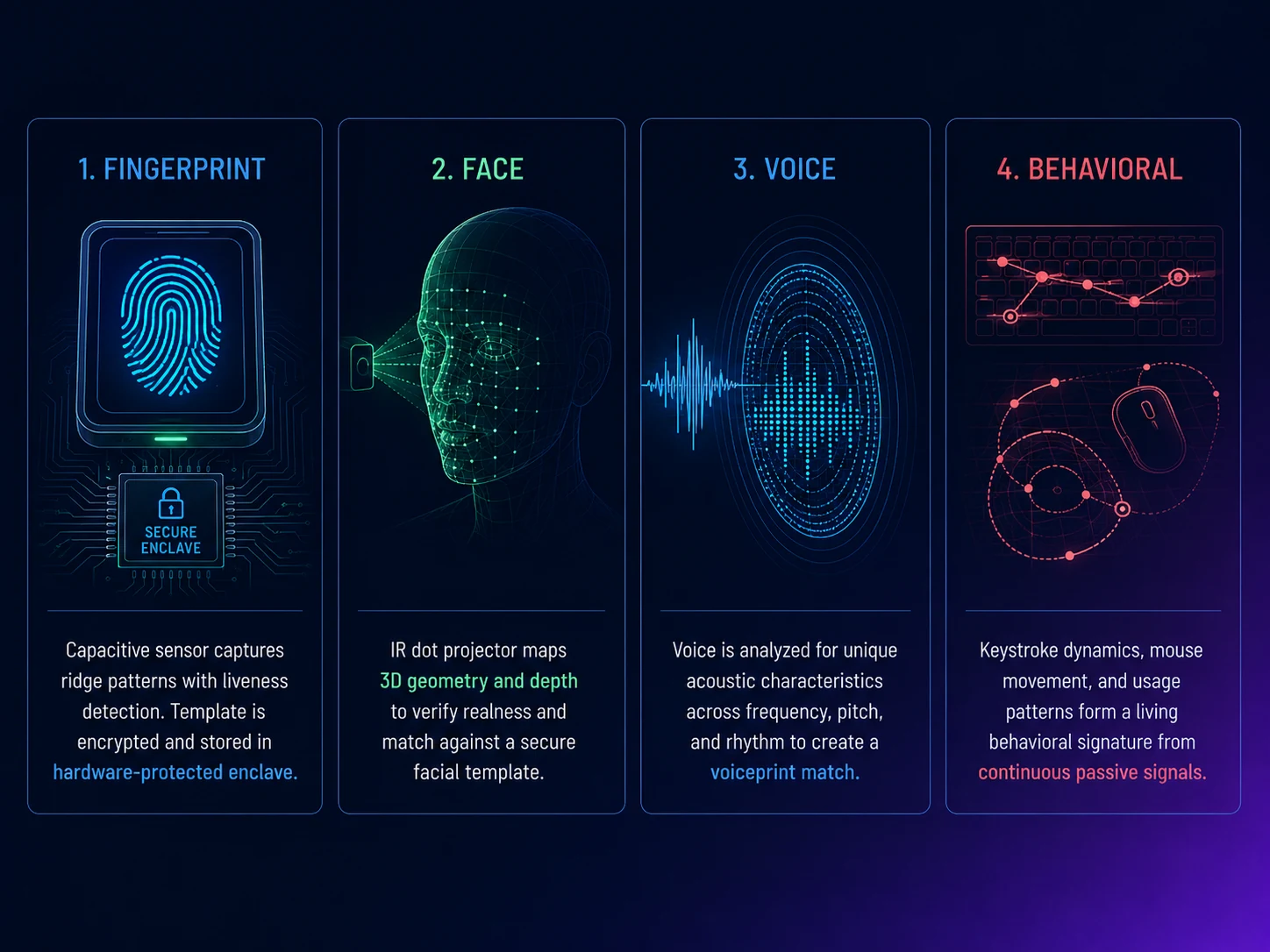 Four biometric flavors, four deployment envelopes. The architecture decision is which flavor the user's device hardware best supports and where the operational fit lands for each workforce segment.
The four biometric flavors that ship in production
Enterprise workforce deployments in 2026 rely on four biometric flavors. Each has a different security posture, deployment envelope, and operational maturity.
Fingerprint biometrics are the most mature and most widely deployed. Apple Touch ID, Windows Hello fingerprint, and Android fingerprint authentication all use capacitive sensors that measure the ridges and valleys of a fingerprint. The matching template is stored in a hardware-protected secure enclave; the matching ceremony runs on the device. The false-match rate is on the order of 1 in 50,000 with the standard sensor calibrations, which is substantially better than a 6-digit PIN. The user experience is excellent — touch sensor, unlock in under a second, no friction. The deployment posture is strong for managed laptops, knowledge workers, and any segment with personal devices that have fingerprint sensors.
Face recognition is the second most-deployed flavor. Apple Face ID, Windows Hello face authentication, and Android face unlock use infrared structured-light or time-of-flight depth sensors to build a 3D depth map of the user's face, plus a 2D image. The combination is what makes the system resistant to photo-and-video spoof attacks — a flat picture doesn't produce a depth map, so the match fails. Apple's Face ID uses a 30,000-point infrared dot projector; Windows Hello uses similar IR-based depth sensing. The false-match rate is on the order of 1 in 1,000,000 — better than fingerprint. The deployment envelope is the segments where the device has the necessary hardware (newer iPhones, iPads, MacBooks with Face ID, modern Windows laptops with IR cameras). The friction is even lower than fingerprint — the user just looks at the device.
Voice biometrics are the third flavor, used primarily in service-desk and call-center contexts. Voice biometrics analyze the spectral characteristics of the user's voice and produce a voiceprint. The deployment in workforce MFA is narrower than fingerprint or face — voice biometrics are commonly used as a recovery-channel verification at help-desk recovery flows, not as a primary authentication factor. The threat model includes synthetic-voice attacks, which have improved substantially in 2024-2025 — deepfake voice synthesis now produces audio that can fool weak voice-biometric matchers. The enterprise pattern in 2026 is to use voice biometrics only when paired with liveness detection (challenge-response phrases that the synthetic-voice system cannot prepare in advance) and as one signal among several, not as the sole authentication.
Behavioral biometrics are the experimental frontier. Keystroke dynamics analyze the speed and rhythm of how users type. Mouse-movement patterns analyze the trajectory and timing of cursor motions. Touchscreen behavioral biometrics analyze swipe gestures, scroll velocity, and tap pressure. The vendor claims are aggressive — continuous authentication, frictionless identity assurance, anomaly detection at the millisecond level. The production reality is that behavioral biometrics work well as a passive risk signal feeding adaptive authentication decisions, but they do not yet work well as a sole authentication factor for enterprise workforce. The false-positive rate (legitimate users being flagged as anomalous) is too high for sole-factor decisions. The 2026 pattern is behavioral biometrics as a risk-scoring layer that triggers step-up MFA when the behavior pattern is unusual — not as a replacement for the cryptographic factor.
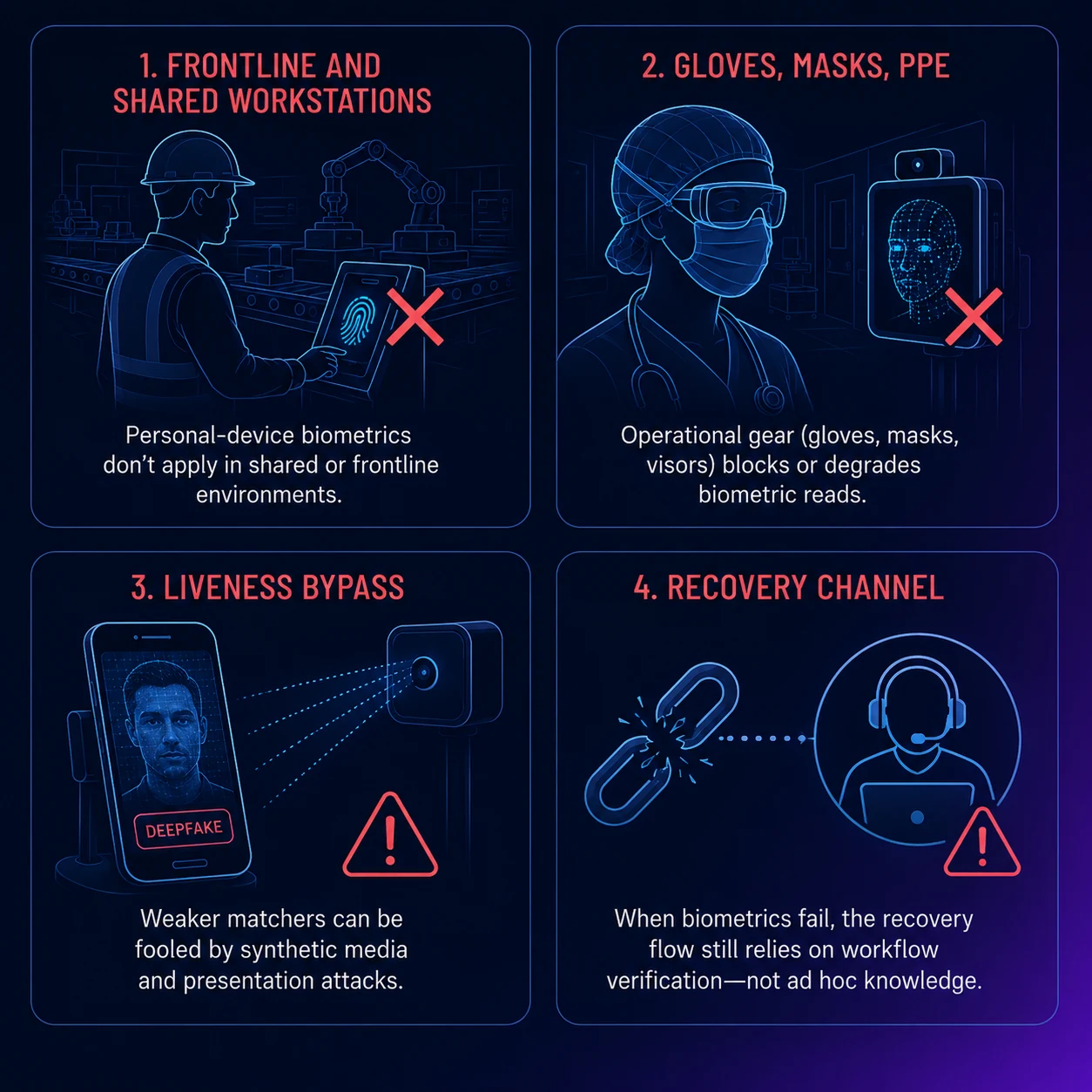 Biometric deployments work cleanly for the segments they fit and break in predictable ways for the segments they don't. The architecture decisions are about the breakage cases — not the segments where biometrics already work.
Where biometrics break in enterprise production
Biometric deployments work cleanly for the segments they fit and break in predictable ways for the segments they don't. The architecture decisions are about the breakage cases.
Frontline and shared-workstation workforces are the first predictable breakage. Biometric authentication assumes the user has a personal device with their biometric template enrolled. A frontline worker on a manufacturing floor that prohibits phones, a clinical worker at a shared healthcare workstation, a contractor at a kiosk — none of these segments have a personal device the biometric template can enroll on. The deployment pattern for these segments is deviceless: the Avatier Identity Challenge Card pattern, where authentication happens via a physical card the worker carries and a card reader at the shared workstation. The card is FIDO2-compatible — the same cryptographic ceremony as biometric-unlocked passkeys — but the unlock factor is the card itself plus an optional PIN, not a biometric.
Gloves, masks, and operational realities are the second predictable breakage. Healthcare workers in clinical environments wear gloves and masks routinely. Manufacturing workers wear safety glasses and protective gear. Construction and field workers operate in conditions where fingerprint sensors don't read reliably (wet hands, oily fingers, frozen fingers in cold storage). Face recognition fails when the user is wearing a respirator, safety glasses, or appropriate PPE. The deployment pattern for these segments is fallback to a non-biometric factor — a hardware key, a card-and-PIN deviceless flow, or a workforce-segmented authentication policy that accepts the operational constraints rather than fighting them.
Liveness-detection bypass is the third breakage. Modern face-recognition systems include liveness detection (the system verifies the face is a live person, not a photo or video). The liveness detection in Apple Face ID and Windows Hello with IR-based depth sensing is strong; the liveness detection in some older Android face-unlock implementations and in some webcam-based systems is weaker. The 2026 risk surface includes deepfake video attacks against weaker face matchers — the attacker generates a realistic synthetic video of the user's face and presents it to the camera. Enterprise deployments should use only the depth-sensing face authenticators (Face ID, Windows Hello with IR) and avoid the basic webcam-based face unlock that ships on some lower-tier devices.
Recovery channel attacks are the fourth predictable breakage — and the most important. Biometric authentication does not by itself fix the recovery channel. When a user loses access to their biometric device (broken iPhone, lost laptop, finger injury), the recovery flow needs to issue a new credential to a new device. If the recovery flow relies on knowledge-based questions ("mother's maiden name") or on the help-desk verifying the caller's identity through unstructured questioning, the Storm-2949 attack pattern works exactly as well against biometric-protected accounts as it does against password-plus-MFA accounts. The architectural mitigation is workflow-tied recovery — the help-desk agent verifies the caller against the lifecycle-managed identity using a workflow-generated code, not a knowledge question — covered in detail in our Beyond Foundational MFA in 2026 piece.
Privacy and regulatory constraints are the fifth breakage, especially for global workforces. Biometric data is regulated under GDPR (special-category personal data), CCPA (sensitive personal information), Illinois BIPA (biometric privacy with private right of action), and a growing list of state and national biometric privacy laws. The risk is bounded by the fact that the biometric template stays in the device's secure enclave and never transmits to the corporate IdP — the enterprise doesn't actually have biometric data to protect or breach. But the privacy disclosures, employee consent flows, and regional carve-outs (some jurisdictions require explicit opt-in, some require alternatives for biometric-objecting employees) still need to be in place. The enterprise that deploys biometric authentication without the privacy-and-consent architecture ready risks regulatory exposure.
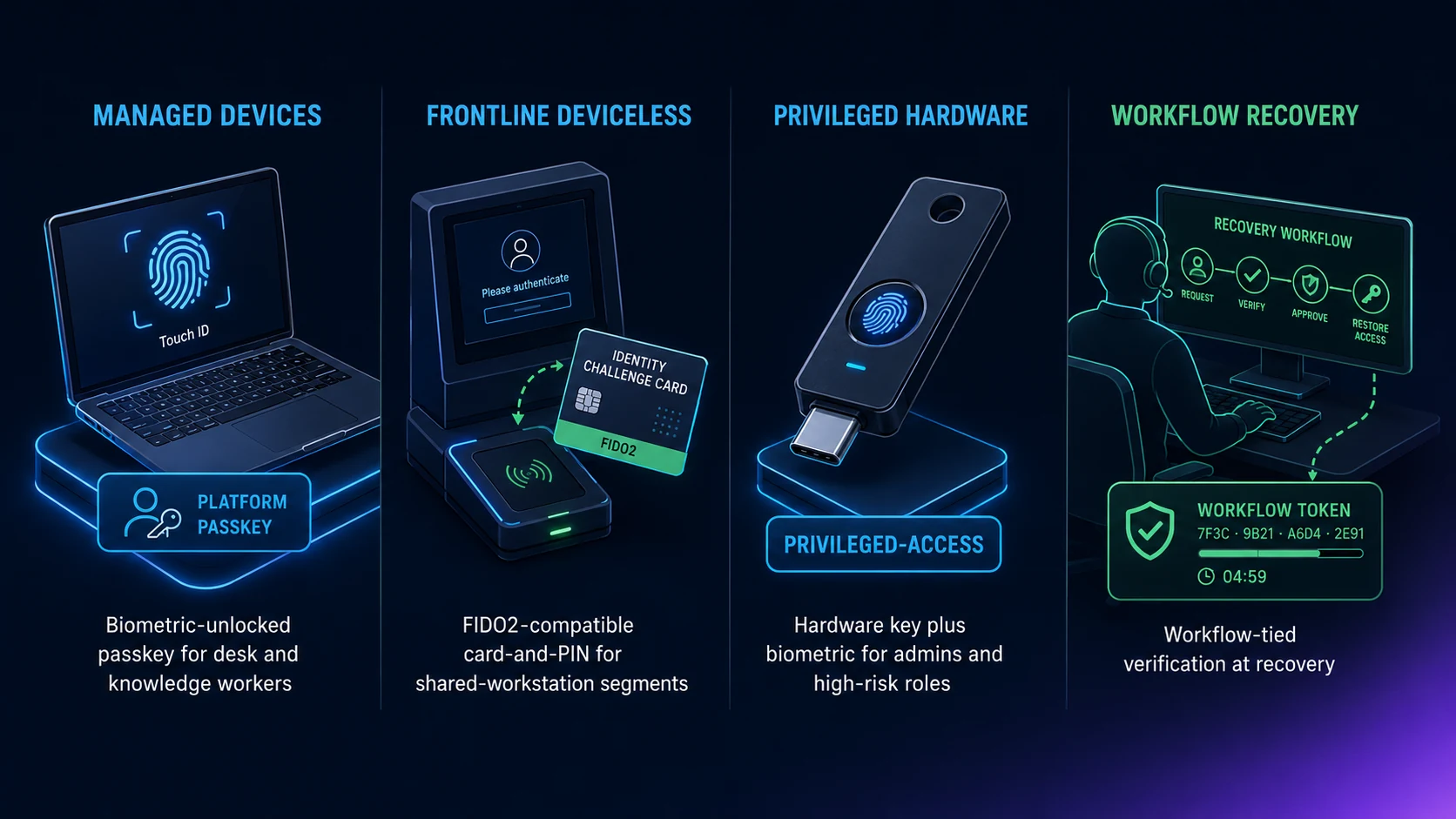 Four pillars, four workforce segments. Managed devices get platform passkeys with biometric unlock; frontline gets deviceless cards; privileged accounts get hardware keys; recovery is workflow-verified across all four. The architecture composes — no segment falls through the gap.
The deployment pattern that survives enterprise reality
The deployment pattern that survives contact with mixed-workforce enterprise reality is segmented, paired with a deviceless fallback, and tied to a workflow-verified recovery channel. Four pillars.
Pillar 1: Managed-device segments get biometric-unlocked passkeys. Desk workers, knowledge workers, executives — anyone with a managed laptop and a personal phone or tablet — get the platform passkey pattern. The IdP prompts enrollment on first login; the user enrolls a passkey on the device; the biometric (Touch ID, Face ID, Windows Hello) unlocks the passkey at each authentication. The deployment timeline is fast (3-6 months for the managed segment) and the operational overhead is bounded once the device fleet has biometric hardware support.
Pillar 2: Frontline and shared-device segments get deviceless authentication. Manufacturing workers, clinical workers at shared workstations, contractor populations without managed devices, defense facilities where phones aren't viable — these segments need a non-biometric pattern. The Avatier Identity Challenge Card provides FIDO2-compatible deviceless authentication via a physical card and a reader at the workstation. The card does the cryptographic ceremony; the user doesn't need a phone or password. The deployment timeline is longer than platform passkeys (6-9 months including card distribution and reader installation) but the security improvement for this segment is substantial.
Pillar 3: Privileged accounts get hardware-key biometric pairing. Domain admins, financial-system operators, security tools — the small but high-impact population — get hardware FIDO2 security keys (YubiKey, Feitian, Google Titan) with biometric unlock where the key model supports it (YubiKey Bio, etc.). The hardware key is the credential; the biometric is the unlock. The deployment is fast (4-6 weeks for the privileged segment) and the security posture is the strongest available.
Pillar 4: Recovery flows are workflow-verified, not biometric-only. When a user loses access to their biometric device, the recovery flow does not rely on biometric re-enrollment alone or on knowledge-based help-desk questions. The pattern is workflow-tied verification — the help-desk agent verifies the caller against the lifecycle-managed identity using a workflow-generated code, then issues a new credential on the new device. Avatier Password Station ships this pattern natively. The architectural point is that the recovery channel is the load-bearing piece — biometric authentication is necessary, recovery-channel hardening is what closes the gap that Storm-2949 exploits.
What Avatier ships toward this pattern
Avatier Identity Anywhere supports biometric-unlocked passkey enrollment, authentication, and recovery across the full enterprise device fleet — Apple Touch ID and Face ID, Windows Hello fingerprint and face, Android biometric unlock, Chrome OS biometric unlock. The platform integrates with the FIDO2/WebAuthn standard so the biometric template never leaves the device's secure enclave; the corporate IdP only ever sees the cryptographic challenge response, never the biometric data. The compliance posture supports global deployment with the regional privacy carve-outs (GDPR special-category, CCPA sensitive, Illinois BIPA).
For workforce segments where personal biometric devices don't fit — frontline shared workstations, contractor populations without managed devices, defense facilities where phones aren't viable — the Avatier Identity Challenge Card provides the deviceless alternative running on the same FIDO2 cryptographic ceremony. The card-and-reader pattern is what makes biometric MFA strategy work for the segments where biometrics structurally don't apply.
Recovery flows tie through Password Station for workflow-verified resets — the architecture that closes the Storm-2949 gap. Lifecycle integration with the Avatier Identity Anywhere Lifecycle Management platform handles biometric credential provisioning at joiner, re-enrollment at mover events, and credential revocation at leaver events. The Avatier Trust Center publishes our compliance posture (SOC 2 Type II zero exceptions, ISO/IEC 27001:2022, PCI DSS v4.0.1, CSA STAR Level 1, NIST 800-53 Rev. 5 aligned, CISA Secure-by-Design Pledge signatory).
The architectural pattern works regardless of vendor — the point is not that you have to buy Avatier — but the integrated pattern of biometric-unlocked passkey + deviceless fallback + workflow-tied recovery + lifecycle integration is what separates a biometric MFA deployment that actually upgrades the security posture from one that just adds Touch ID to the login flow.
The honest closing
Biometric authentication in 2026 is real, deployable, and the dominant unlock pattern for the workforce segments it fits. The Hollywood version — the retinal scanner, the dramatic face zoom — is no longer the frame. The production version is the daily reality of Touch ID unlocking a passkey, Face ID approving a federated session, Windows Hello signing into a Microsoft Entra ID-protected workload. The deployment is non-trivial — the architecture decisions about workforce segmentation, deviceless coverage, recovery channels, and privacy compliance matter substantially. The enterprises that deploy biometrics well will have a meaningfully improved security posture and a meaningfully improved user experience. The enterprises that deploy biometrics as a marketing-driven check-the-box exercise without the segmentation, deviceless fallback, or recovery-channel hardening will end up with most of the cost and little of the benefit.
About the author

More from MFA & Authentication
How Cybercriminals Exploit Weak OTP: The Attacker Playbook (2026)
Weak OTP fails at four specific points — SIM swap, real-time phishing relay, SS7 interception, and MFA fatigue — and every one of them is a known, repeatable attacker technique in 2026.

Advanced MFA in 2026: What Actually Counts as a Factor
Multi-factor authentication only works when the factors are genuinely different — this 2026 reference clears up what counts as a real factor and what advanced MFA actually means.
Does OTP Prevent Breaches? The Attacks It Actually Stops in 2026
OTP does not stop every attack, but it reliably defeats credential stuffing, password-spray, basic brute force, and stolen-password reuse from unrelated breaches. The 2026 breach-prevention case for OTP — the attack chains it breaks, the ones it doesn't, and how to deploy it so the prevention benefit actually lands.