Push Notification MFA: How It Works and Where It Fits in 2026
Push-notification MFA replaced the six-digit code with a tap — and closed SIM-swap and SS7 interception in the process. It did not close phishing. The 2026 reference on the delivery mechanism itself: how the approve/deny ceremony works, why number matching addresses prompt-bombing but not adversary-in-the-middle relay, and where push honestly sits between SMS OTP and FIDO2 passkeys.
Push-notification MFA replaced the six-digit code with a tap — and closed SIM-swap and SS7 interception in the process. It did not close phishing. The 2026 reference on the delivery mechanism itself: how the approve/deny ceremony works, why number matching addresses prompt-bombing but not adversary-in-the-middle relay, and where push honestly sits between SMS OTP and FIDO2 passkeys.
- Push-notification MFA sends a signed approve/deny (or number-matching) prompt to a registered device instead of a code the user types back in — removing the shared-secret transmission that makes SMS and TOTP relayable through a phishing page.
- Push structurally closes SIM-swap and SS7 interception because delivery is bound to an enrolled app instance, not a phone number — a real, measurable upgrade over SMS OTP.
- Number matching (typing a code shown on the login screen into the authenticator app) closes blind one-tap approval and defangs volumetric prompt-bombing, but it is a ceremony fix, not a cryptographic one — full attack-stage detail lives in the companion MFA-fatigue piece.
- Push is not phishing-resistant in the CISA/NIST 800-63B sense: it lacks WebAuthn's origin binding, so an adversary-in-the-middle proxy that has the password can still trigger a completely legitimate push request for the user to approve.
- The honest 2026 position is push-with-mandatory-number-matching as the default for the migration window, not the destination — privileged and phishing-targeted accounts should move to passkeys or hardware FIDO2 keys, and workforce segments without a personal device need a deviceless FIDO2 path instead.
Push-notification MFA sends a real-time approve/deny (or number-matching) prompt to a user's registered mobile device the moment they attempt to sign in, instead of making them read a six-digit code off a text message or authenticator app and type it back into a form. The user taps to respond, the identity provider receives a cryptographically signed confirmation from the push vendor, and the session opens — typically in two or three seconds, with no code to transcribe and no SMS delivery to wait on. It's one of the most widely deployed second factors in the enterprise stack today, and it's also more nuanced than "better than SMS": it structurally closes some of SMS's specific weaknesses, leaves others in place, and falls well short of the phishing resistance the newer FIDO2 and passkey standards deliver.
This is the 2026 update of a piece Avatier first published in July 2025 as Push Notifications for Authentication. The underlying mechanics haven't changed much, but the threat landscape around them has moved substantially. MFA fatigue attacks — prompt-bombing an approve/deny push until an exhausted user taps yes — went from a theoretical concern to the documented initial-access vector behind Uber, Cisco, and a long list of subsequent enterprise breaches. Number matching went from an emerging feature to a default configuration at most major identity providers. This update reflects both, and it stays deliberately narrow: this piece is about the push-notification delivery mechanism itself — how it works, how it compares to SMS OTP, and where it honestly sits in the 2026 authentication stack — not a general MFA buying guide.
How push-notification MFA works, mechanically
The flow starts the same way most authentication does: a user enters a username and password (or completes a federated SSO redirect) at the identity provider's login screen. Where push diverges from OTP-based factors is what happens next. Instead of prompting the user to enter a code, the identity provider calls out to a push-delivery service tied to that user's enrolled device — typically the vendor's own push infrastructure, riding on top of the underlying platform transport (Apple Push Notification service for iOS, Firebase Cloud Messaging for Android). The authenticator app on the registered device wakes up and displays a prompt carrying context: which application is requesting access, an approximate location derived from the requesting IP, the device type, and a timestamp. The user reviews that context and taps Approve or Deny — or, under the number-matching configuration most identity providers now default to, is shown a short code on the original login screen and has to type the matching code into the authenticator app before the approval registers.
Five components have to work together for this to function: the identity provider itself, an enrolled mobile app bound to a specific user and device, the push-delivery transport, a device-registration record that ties a specific app installation to a specific identity, and a policy engine that decides when a push challenge fires versus when something stronger is required (a new device, an anomalous location, a privileged action). None of that is exotic — it's the same architecture most enterprise identity platforms already run for federated SSO — but the registration step matters more than it looks. A push prompt is only as trustworthy as the enrollment ceremony that bound the app to the device in the first place; a weak enrollment process (self-service with no verification) undermines everything downstream of it.
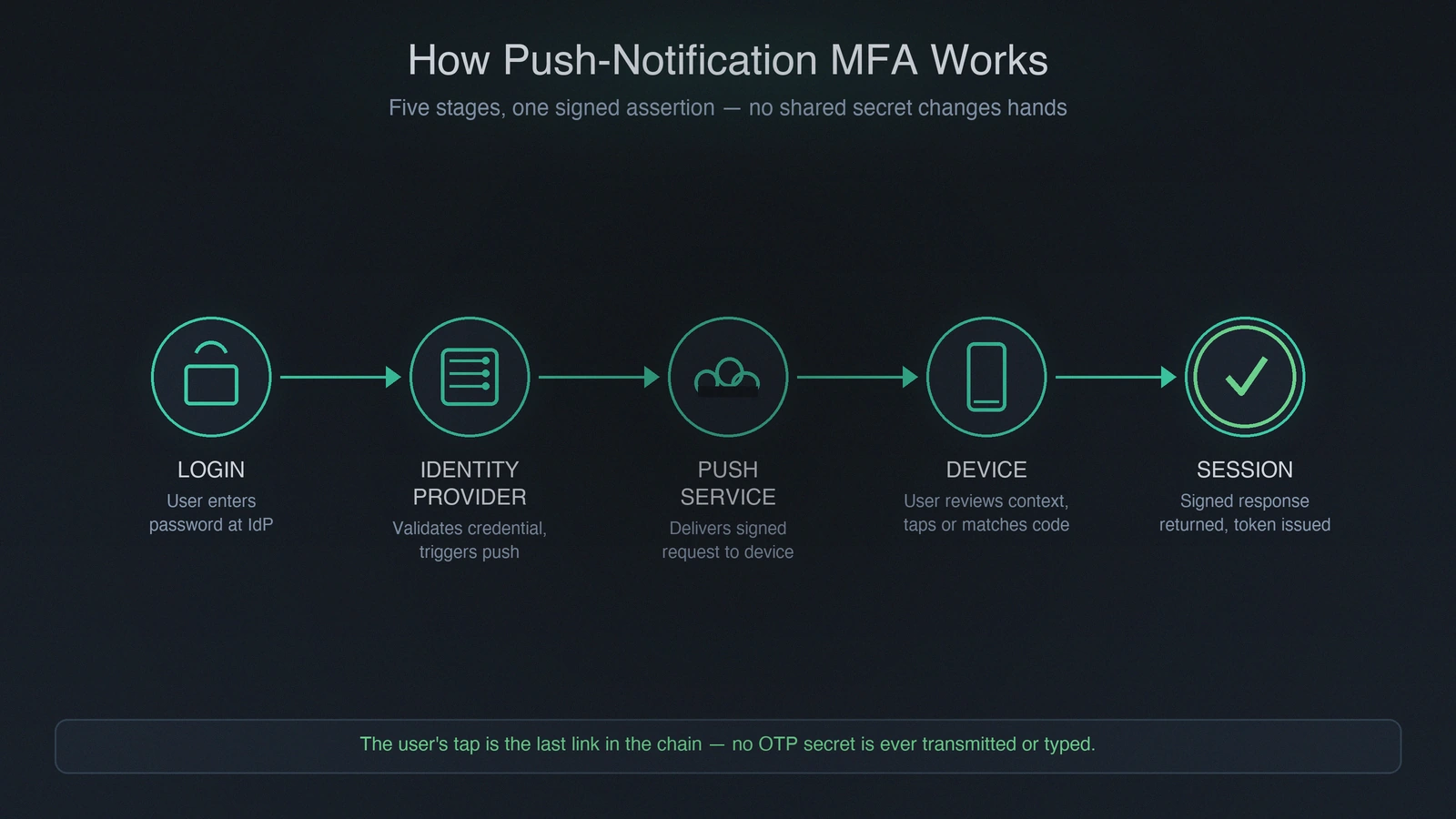 The request travels from login screen to identity provider to push service to device and back — the user's tap is the last link in a chain that never transmits a shared secret.
The structural property that matters most is what's absent from this flow: there is no six-digit or eight-digit secret changing hands. TOTP and SMS OTP both depend on a code that exists independently of the user's decision — it's generated, transmitted, and the user's only job is to copy it correctly. Push has no equivalent artifact. The "secret" being verified is a signed assertion from a device the identity provider already trusts, produced at the moment of approval, not a static or time-boxed value sitting in a text message waiting to be read, copied, or intercepted. That's the foundation of push's advantage over OTP-based factors — and, as the next two sections cover, also the source of its remaining weakness, because the assertion confirms a request happened, not that the request came from a legitimate site.
Push vs. SMS OTP: what actually gets better
A meaningful share of enterprises in 2026 are still running SMS as their MFA delivery channel, usually because it requires no app installation and works on any phone. NIST 800-63B has deprecated SMS for higher assurance levels for years now, and the reasons are specific enough to be worth naming plainly rather than waving at with a vague "SMS is insecure" claim.
SIM-swap attacks. SMS delivery depends on the carrier routing messages to whichever SIM is currently associated with a phone number. An attacker who social-engineers (or bribes) a carrier employee into porting that number to an attacker-controlled SIM silently intercepts every subsequent SMS to that number, OTP included, with no action required from the victim. Push delivery is bound to an enrolled app instance on a specific device, not a phone number — porting the number does nothing to a push prompt, because the push service is targeting a registered app installation that the SIM swap never touches.
SS7 signaling weaknesses. The legacy telecom signaling protocol SMS relies on for cross-carrier routing has documented interception vulnerabilities that predate mobile security as a discipline entirely. Push notifications never touch SS7 — they transit the vendor's own encrypted application channel end to end.
OTP relay phishing. A phishing page captures a victim's password and the OTP code they type in, then forwards both to the real site in real time before the code expires. This is the single most common way SMS and TOTP MFA gets defeated in practice, because it doesn't require breaking anything cryptographically — it just requires a convincing fake login page and a user who doesn't check the URL. Push's approve/deny form removes this specific relay vector, because there's no code for the user to type into the fake page at all.
Contextual signal. A push prompt can show the requesting application, approximate location, and device type; a bare SMS code carries none of that. A user who sees "sign-in request from Lagos, Nigeria" on a service they've never accessed outside their home city has a chance to catch the anomaly that a six-digit code gives them no way to notice.
None of this makes push flawless, and the honest caveat belongs right here rather than three sections later: push is dependent on network connectivity and on the push vendor's own infrastructure staying available, in ways SMS delivery (riding the near-ubiquitous cellular network) sometimes isn't. And critically, removing the OTP-relay vector is not the same as removing every phishing vector — it only removes the version where the user has to type a code. The version where the attacker triggers a real request and the user approves it blind is still very much alive, which is the subject of the next section.
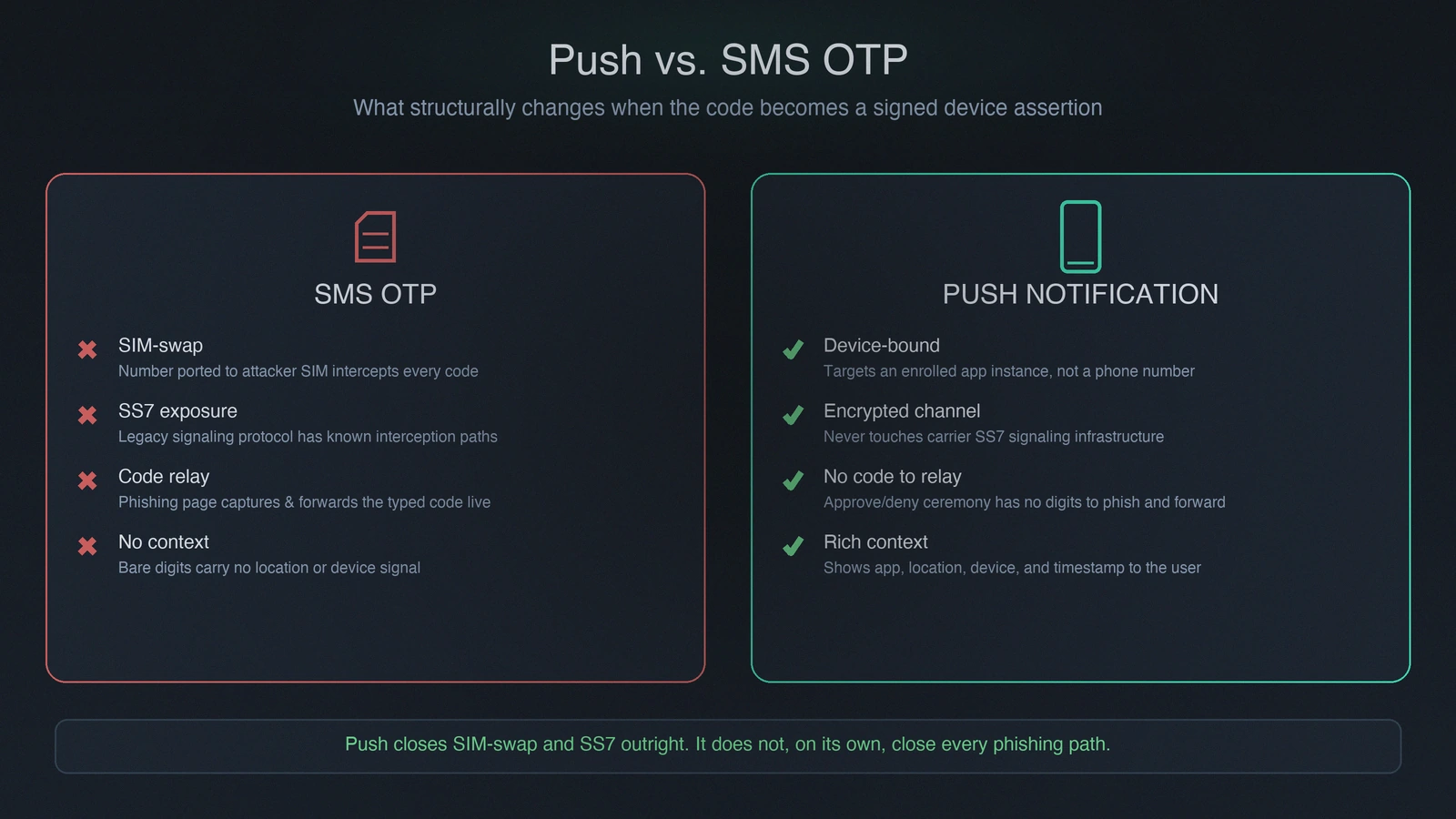 SMS OTP travels through carrier infrastructure an attacker can intercept without touching the user's device. Push travels through an encrypted app channel bound to the device itself — a structural difference, not just a UX one.
The prompt-bombing risk, and what number matching actually fixes
The same simplicity that makes push convenient — one tap, no code to transcribe — is what created MFA fatigue attacks, also called prompt-bombing or push-bombing. An attacker who already has a valid password can trigger the push challenge repeatedly, dozens or hundreds of times, betting that the legitimate user eventually taps Approve out of exhaustion, confusion, or a plausible pretext call from someone claiming to be IT. This pattern was the documented initial-access vector in the 2022 Uber breach and has recurred across a long list of enterprise incidents since.
Number matching is the delivery-mechanism-level answer. Instead of a bare Approve/Deny choice, the login screen displays a short code, and the user has to read it and type it into the authenticator app before the approval completes. That single change converts a reflexive one-tap action into an active step that requires looking at the actual device initiating the request — an attacker sitting at their own machine sees their own code, and a user who isn't looking at the attacker's screen has nothing to transcribe. Blind approval, mechanically, stops working. Major identity providers have made this the default authenticator behavior rather than an optional setting, which matters: a number-matching feature that's available but not enforced doesn't close the gap, because users (or attackers exploiting legacy fallback configurations) can still land on the old approve/deny flow.
What number matching does not fix is the social-engineering layer stacked on top of it — an attacker who calls the user, claims to be IT resolving a "system issue," and reads them the code to transcribe. That gap, along with push throttling, rate-limiting configuration, and the full attack-stage breakdown, is the subject of the MFA Fatigue Attacks defense playbook — this piece stays focused on the delivery mechanism itself rather than re-deriving the attack economics that companion piece already covers in depth.
Deployment considerations
Standing up push-notification MFA well is less about the cryptography, which the identity provider handles, and more about a handful of operational decisions that determine whether the deployment actually holds up.
Enrollment. Users complete a one-time registration ceremony — typically scanning a QR code or entering an activation code — that binds a specific app installation on a specific device to their identity. This step deserves more scrutiny than it usually gets: a self-service enrollment with no identity verification is a soft spot an attacker can exploit to enroll their own device against a compromised account.
Fallback. Push fails closed when the phone is dead, offline, out of signal range, or simply not with the user. Every deployment needs a documented fallback — a secondary TOTP method, a backup hardware key, or a workflow-verified recovery process — rather than defaulting to an open help-desk reset, which quietly reintroduces the social-engineering weakness the MFA deployment exists to close.
BYOD vs. managed devices. Some enterprises require the phone itself to be MDM-enrolled before the authenticator app is permitted to register; others accept the app on an otherwise unmanaged personal device. This is a policy decision with real trade-offs — MDM enrollment gives visibility into device posture but raises adoption friction and privacy concerns on personal devices.
Mandatory, not optional, number matching. Configure it as the only available ceremony, not a toggle the user (or a legacy client) can fall back away from. An optional setting that some users never adopt reopens exactly the gap number matching is supposed to close.
Rate limiting. Cap how many push challenges can fire against a single account within a given window at the identity-provider level. This doesn't prevent a patient, low-and-slow attacker, but it materially raises the cost and reduces the volume a rushed one can throw at a target.
Vendor dependency. Push authentication depends on the identity vendor's own delivery infrastructure remaining available; outages of that infrastructure — which have happened at major identity providers — block sign-in broadly unless a fallback factor is already configured and known to users.
Cost. Push-capable authenticator apps are typically bundled into the core identity-provider license, which is part of why push has become the default second factor for so many workforces; hardware key procurement, by contrast, is a separate line item that scales with headcount.
Where push fits relative to FIDO2 and passkeys — the honest positioning
This is the section where overselling push does readers a disservice. Push notification MFA, even with mandatory number matching, is not phishing-resistant in the sense CISA and NIST 800-63B Rev. 4 use the term — see the Phishing-Resistant MFA reference for the full category boundary and the Hardware FIDO2 Keys vs Passkeys comparison for what the origin-bound tier actually requires operationally. The reason is architectural, not a matter of degree: FIDO2/WebAuthn credentials cryptographically bind the authentication ceremony to the requesting origin domain, so a passkey or hardware key simply will not produce a valid signature for a challenge coming from the wrong domain. A phishing site can present a perfect visual clone of a login page, but it cannot get a FIDO2 credential to sign for it.
Push has no equivalent binding. A push prompt confirms that someone, somewhere, is attempting to authenticate to this account right now — it does not confirm that the site making the request is the legitimate one. An adversary-in-the-middle proxy that has already captured a victim's password on a convincing fake login page can use that password to trigger authentication against the real identity provider, which then sends the real user a completely legitimate push prompt. If that user approves it — blindly, or because a caller posing as IT talked them through transcribing the number-matching code — the attacker is authenticated with a fully valid session. Number matching raises the bar considerably by eliminating the blind-tap version of that attack, but it does not structurally close the adversary-in-the-middle path the way origin binding does.
None of that makes push a bad choice — it makes it a transitional one, and a genuinely worthwhile upgrade over SMS OTP and legacy TOTP for the accounts and time period where it's deployed. The honest 2026 position is push-with-mandatory-number-matching as the default configuration during a migration window, with privileged accounts, finance and payroll access, and any account that's a plausible phishing target moved to passkeys or hardware FIDO2 keys first. For broader context on how push sits among the full menu of authentication factors, see the Single-Factor vs Multi-Factor Authentication reference and the Best Multi-Factor Authentication Solutions guide.
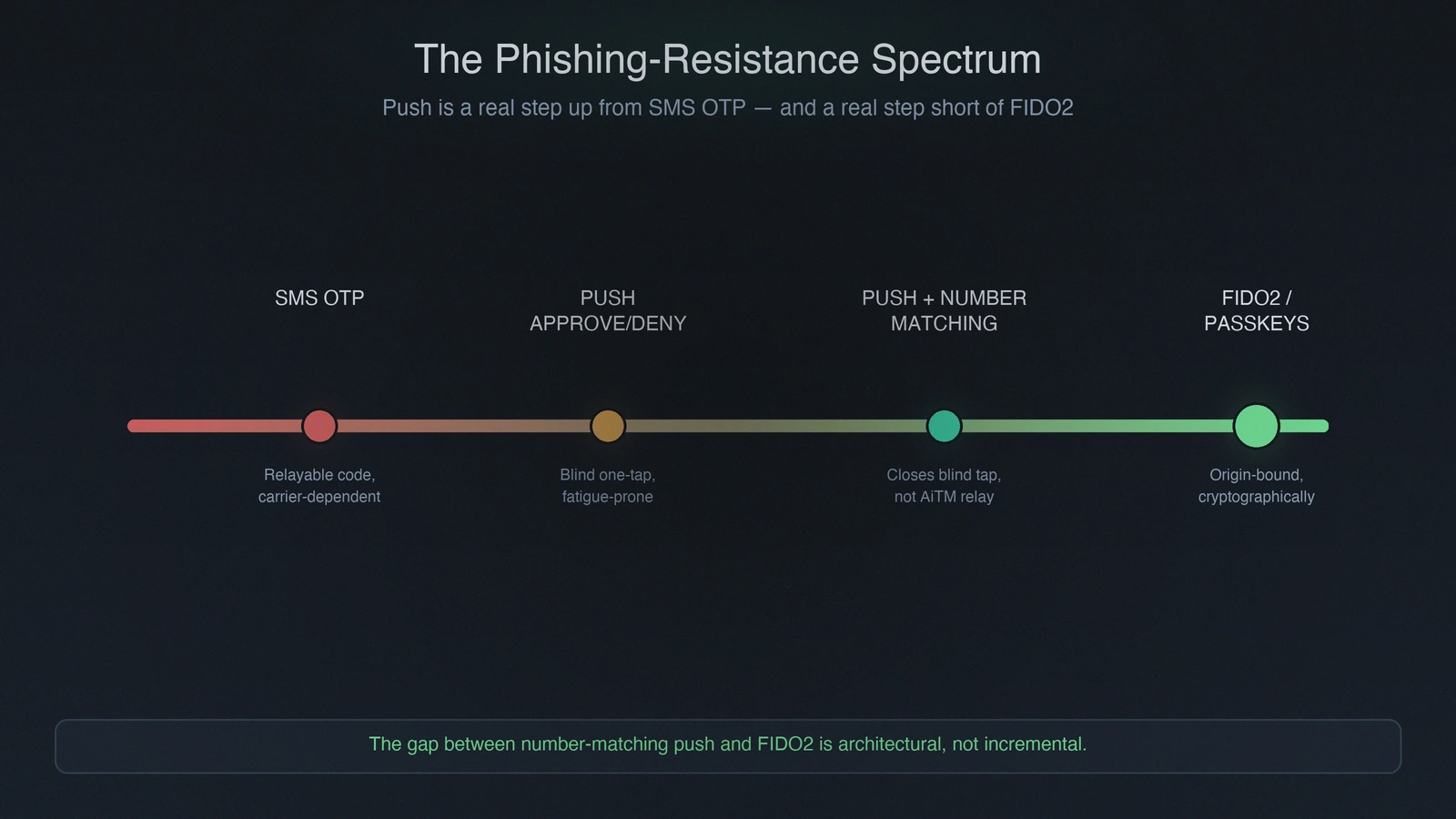 Push with number matching is a real step up from SMS OTP and bare approve/deny — but it sits short of FIDO2 and passkeys on phishing resistance, not adjacent to them. The gap is architectural, not incremental.
What Avatier ships toward this pattern
Avatier Identity Anywhere ships push-based authentication with mandatory number matching as a default behavior, not a toggle users can opt out of, paired with rate limiting and throttling on repeated authentication attempts from the same originating IP or user agent. That combination catches both the volumetric prompt-bombing attempt and the social-engineering-augmented one that survives simple throttling.
The platform treats push as a migration-window factor rather than a destination. It integrates with the FIDO2/WebAuthn standard for passkey enrollment and authentication across platform passkey providers (Windows Hello, macOS Touch ID, Android, Chrome OS), syncable passkey providers (Apple iCloud Keychain, Google Password Manager, 1Password, Dashlane, Bitwarden), and hardware FIDO2 keys (YubiKey, Feitian, Token2, Google Titan) — so accounts that need origin-bound phishing resistance can move to it directly rather than staying on push indefinitely. For workforce segments where push doesn't fit at all — frontline workers on shared workstations, contractor populations without a managed personal device, facilities where phones aren't permitted — the Avatier Identity Challenge Card provides FIDO2-compatible deviceless authentication via a physical card and reader, with no push notification involved at any point.
Recovery flows tie through Password Station for workflow-verified resets, closing the social-engineering pretext that complements both prompt-bombing and account-recovery attacks. Lifecycle integration with Avatier Identity Anywhere Lifecycle Management handles device and credential provisioning at joiner, re-enrollment at mover events, and revocation at leaver events, so a stale device registration doesn't sit around as an authentication path after someone's left. The Avatier Trust Center publishes our compliance posture (SOC 2 Type II zero exceptions, ISO/IEC 27001:2022, PCI DSS v4.0.1, CSA STAR Level 1, NIST 800-53 Rev. 5 aligned, CISA Secure-by-Design Pledge signatory).
The honest closing: what push notification MFA does not solve
Push notification MFA is a real, structural improvement over SMS OTP — it closes SIM-swap and SS7 interception outright, and it removes the specific relay vector where a phishing page captures and forwards a typed code. It is not, on its own, a complete answer, and pretending otherwise sets up exactly the false confidence that MFA fatigue and adversary-in-the-middle attacks exploit.
It does not structurally stop phishing. An adversary-in-the-middle proxy with a captured password can still trigger a legitimate push request and get it approved, blindly or through a pretext call — only origin-bound credentials close that path. It requires phone possession and connectivity, which means it fails closed for lost, dead, or offline devices, and it simply doesn't fit workforce segments without a managed personal device at all. It remains socially engineerable even with number matching in place, because the transcription step still depends on a human choosing correctly under pressure. And in most deployments it doesn't remove the password as the first factor, which means the password remains the initial attack surface regardless of how strong the second factor is.
The enterprises getting this right in 2026 treat push-with-number-matching as what it is: a meaningful, deployable-today upgrade for the accounts still mid-migration, not the finish line. The finish line is origin-bound authentication — passkeys and hardware FIDO2 keys for the segments that can adopt them, deviceless FIDO2 credentials for the segments that can't — with push carrying the accounts that haven't gotten there yet. Enterprises that treat push as a permanent, sufficient answer are the ones still showing up in the prompt-bombing breach disclosures.
About the author

More from MFA & Authentication
The Hidden Challenges of OTP Authentication in 2026
OTP fails less on cryptography than on deliverability, SIM-swap and phishing exposure, UX friction, and compliance. The real challenges of one-time passwords in 2026 — and how to implement OTP well.
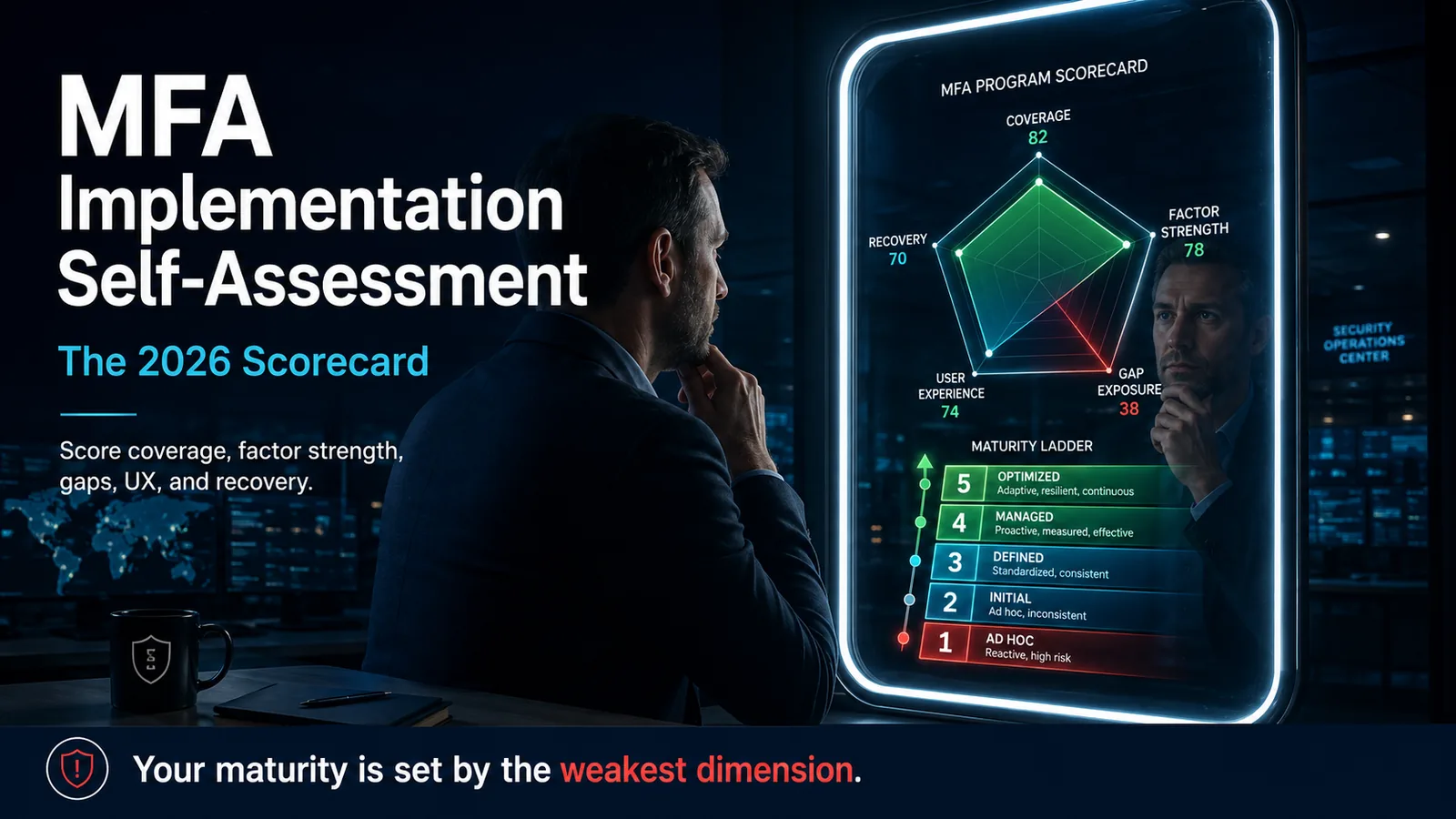
MFA Implementation Self-Assessment: The 2026 Scorecard
How to assess your own enterprise MFA implementation in 2026 — a scored self-assessment across coverage, factor strength, gaps, user experience, and recovery on a five-level maturity ladder.
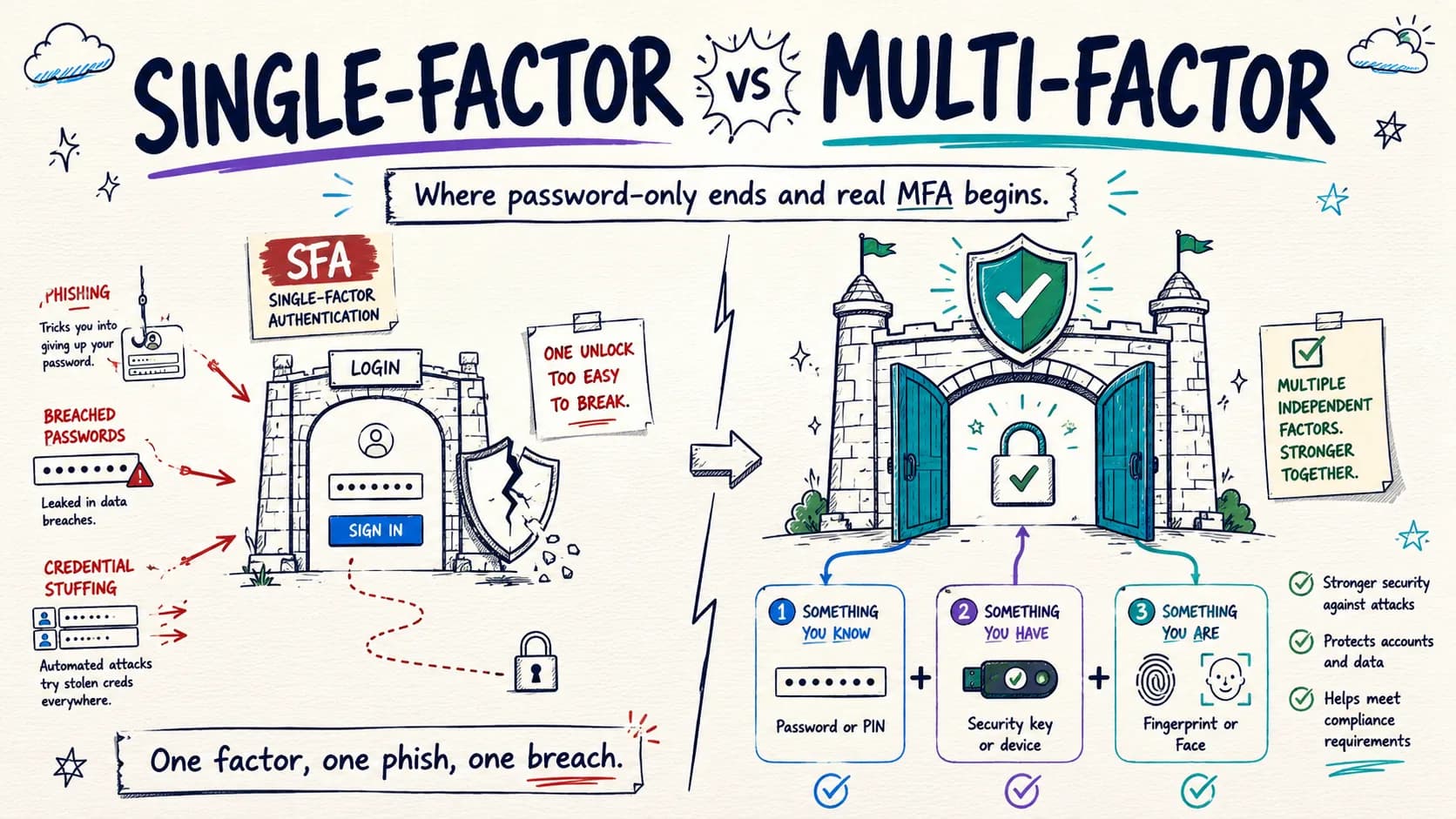
Single-Factor vs Multi-Factor Authentication: The 2026 Reference
Single-factor authentication still runs most login events on earth, and most of the advice about it is a strawman. The 2026 reference on what SFA actually is, where it remains defensible, why factor independence decides whether you really have MFA, and the failure ladder from password-only to phishing-resistant FIDO2.