Passwords to Biometrics: The Enterprise Shift 2026 — Migration Architecture for the Workforce Authentication Rewrite
The enterprise shift from passwords to biometrics isn't a technology purchase — it's a multi-year architectural migration with distinct phases, risk-tiered rollout, federation-parallel-run patterns, and fallback design that determines whether the shift succeeds or produces a support-burden crisis. The 2026 organizational reference on how the migration actually runs at workforce scale, distinct from the mobile-biometric-specific architecture that dominates operator-level attention.
The enterprise shift from passwords to biometrics isn't a technology purchase — it's a multi-year architectural migration with distinct phases, risk-tiered rollout, federation-parallel-run patterns, and fallback design that determines whether the shift succeeds or produces a support-burden crisis. The 2026 organizational reference on how the migration actually runs at workforce scale, distinct from the mobile-biometric-specific architecture that dominates operator-level attention.
- The enterprise shift from passwords to biometrics isn't a technology purchase — it's a multi-year architectural migration with distinct phases and risk-tiered rollout. Most 2026 enterprises are somewhere in the middle of the migration. The organizational architecture matters as much as the technical architecture; the change management determines whether the migration succeeds at workforce scale.
- Six migration phases define the enterprise pattern: (1) opt-in enablement where power users adopt biometric authentication while password remains available, (2) privileged-account hardening where high-privilege accounts require biometric-plus-hardware authentication, (3) default biometric preference where applications use biometric authentication when the user has enrolled, (4) onboarding-first biometric where new hires enroll biometric authentication as part of onboarding, (5) workforce-wide enrollment campaigns for existing employees, (6) application-class deprecation of password authentication for applications with sufficient adoption.
- The federation-parallel-run architectural pattern lets password and biometric authentication coexist during the multi-year transition without forcing a big-bang cutover. The identity provider issues session tokens that don't distinguish which authentication method was used; the applications trust the session; the risk scoring layer differentiates authentication strengths for adaptive-authentication decisions. The pattern is architecturally similar to the parallel-running pattern in [legacy IAM modernization](https://credentialgovernance.avatier.com/en/blog/playbook-legacy-systems-modern-iam-2026/).
- Fallback design determines whether the migration succeeds or produces exclusion of specific workforce segments. Scenarios that need fallback: workforce segments without smartphones (frontline retail, manufacturing floor, healthcare clinicians who can't bring smartphones bedside, defense workforces in classified environments), biometric enrollment failures (users whose fingerprint or face doesn't reliably enroll for specific medical or physical reasons), temporary access needs (contractors on short engagements, guest access, break-glass scenarios), and sensor damage or degradation. The [Identity Challenge Card](https://identitychallengecard.avatier.com) covers the deviceless-fallback pattern.
- The metrics that show whether the migration is actually converting the workforce or accumulating opt-in adoption without displacing password reliance: percentage of authentications completed via biometric versus password, percentage of workforce with active biometric enrollment, application-class coverage of biometric-supported authentication paths, help-desk password-reset volume trending downward, credential-compromise incidents involving password-only accounts trending downward. The wrong metric — enrollment count without authentication conversion — produces stalled migrations that look good on paper.
The enterprise shift from passwords to biometrics is not a technology purchase. The buying decision that unlocks the technical capability — the identity provider that accepts biometric authenticators, the hardware FIDO2 keys distributed to privileged accounts, the WebAuthn integration in enterprise applications — is a small component of a multi-year architectural migration. Most 2026 enterprises are somewhere in the middle of that migration, which means most 2026 enterprises are still running substantial residual password authentication alongside the biometric authentication that reached mainstream deployment through 2025.
The technical architecture for biometric authentication is well-covered — the Biometric Authentication Mobile piece covers the platform-specific technical patterns for iPhone Touch ID and Face ID, Android Biometric Strong, Windows Hello, and third-party credential managers; the Hardware FIDO2 Keys vs Passkeys piece covers the credential-class selection between synced and device-bound authenticators; the Phishing-Resistant MFA piece covers the WebAuthn credential architecture that makes biometrics cryptographically meaningful. The organizational architecture — the migration sequence, the change management, the federation-parallel-run pattern, the fallback design, the metrics that distinguish real conversion from opt-in accumulation — is where enterprises spend the majority of their multi-year migration effort and produce the majority of the operational risk.
This piece is the 2026 organizational reference on the enterprise passwords-to-biometrics shift. The six-phase migration sequence and how the sequence follows risk prioritization and adoption trajectory. The federation-parallel-run architectural pattern that lets password and biometric authentication coexist during the transition. The fallback design for scenarios where biometrics aren't operationally available. The change management discipline that determines whether the migration succeeds at workforce scale. The metrics that show whether the migration is actually converting the workforce or accumulating opt-in adoption without displacing password reliance.
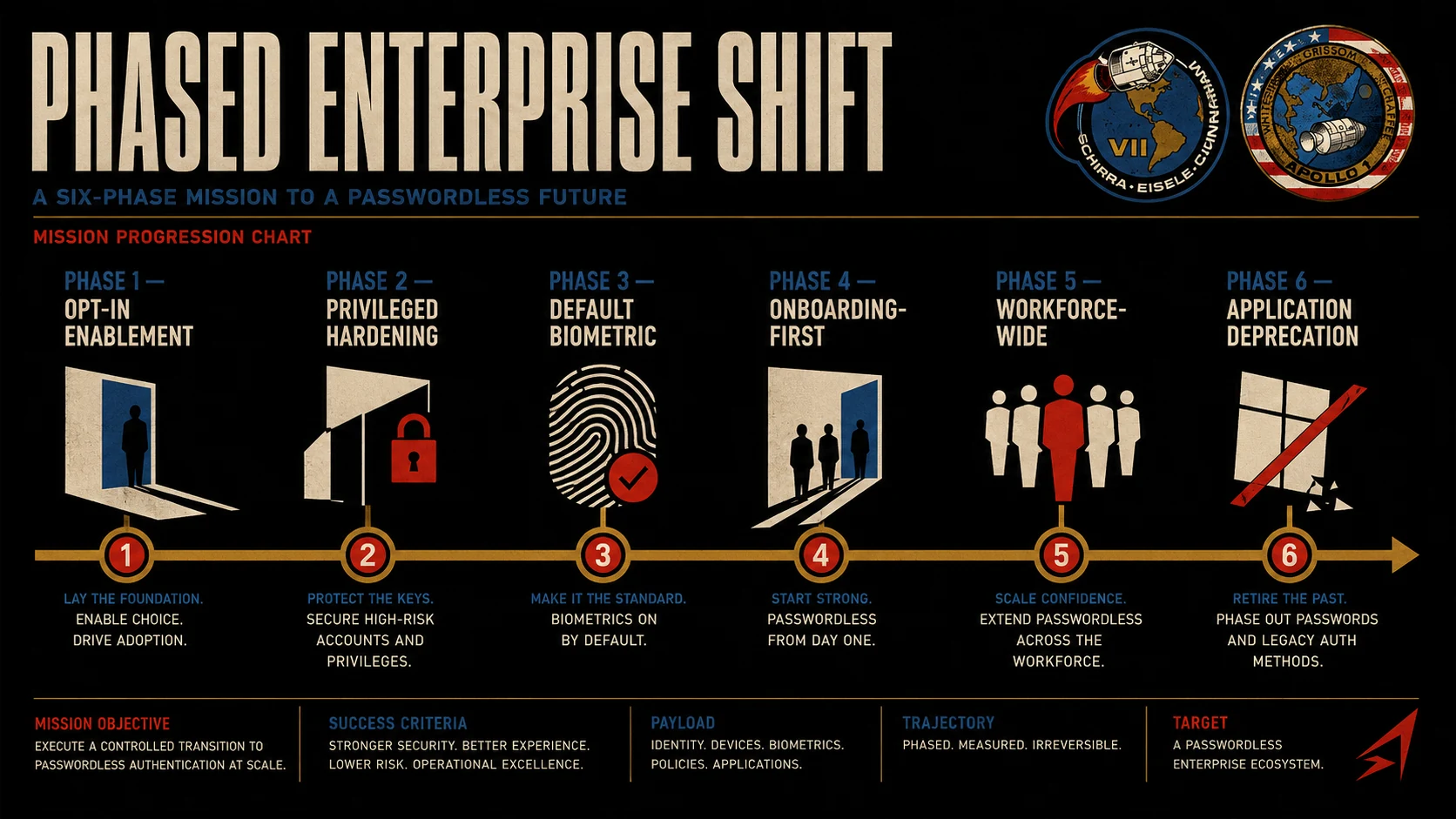 Six phases, one composed migration. The sequence follows risk prioritization (highest-privilege first) and adoption trajectory (voluntary before mandatory).
Why this is a migration, not a purchase
The technical capability to authenticate workforce members via biometrics has been available for years. What makes the shift a multi-year enterprise migration rather than a straightforward technology deployment is the organizational complexity of switching the authentication method for a large workforce across a diverse application portfolio while maintaining operational continuity.
The identity provider needs configuration changes to accept biometric authenticators, issue session tokens for biometric-backed authentication, and integrate with the adaptive authentication risk-scoring layer that differentiates authentication strengths. The application portfolio needs assessment — which applications support WebAuthn cleanly, which have partial support, which don't support it at all. Applications that don't support WebAuthn stay on password-and-MFA authentication for the foreseeable future. Applications with partial support need engineering work to complete the integration.
The workforce needs enrollment across their devices. Each workforce member has to complete an enrollment ceremony for the platforms they'll use. The enrollment requires either self-service capability that works reliably across ecosystems or facilitated enrollment sessions. At workforce scale, "reliably across ecosystems" is a real engineering constraint — enrollment success rates that look fine at 90% become substantial support burden when a 10-thousand-employee workforce translates to 1,000 users needing enrollment support.
The help desk needs retraining. The support scenarios shift from "reset my password" to a broader set including "my biometric isn't recognizing me," "I got a new phone and my passkeys aren't showing up," "my hardware FIDO2 key stopped working," and "I'm on a trip and left my authenticator at home." The scripts and troubleshooting patterns are different from password reset; the support staff need to develop new muscle memory.
The compliance documentation needs updates. The enterprise's regulatory attestations, security questionnaire responses, penetration testing scope, and audit narratives all include references to the authentication architecture. The migration produces updates across all of these documents, coordinated with the compliance function to ensure the updates land at the appropriate points in the enterprise's certification cycles.
The change management needs communication that explains the shift to workforce members. Some workforce members are uncomfortable with biometric authentication for privacy reasons, personal reasons, or medical reasons; the communication has to address the concerns without dismissing them. The technical reality — the biometric data doesn't leave the local device, the cryptographic ceremony authenticates without transmitting biometric material, the enterprise doesn't build a biometric database — needs to be communicated in accessible terms.
The recovery-account architecture needs design. The migration doesn't just replace passwords with biometrics; it replaces password-reset flows with a different recovery architecture that has to handle scenarios like lost devices, damaged sensors, and biometric enrollment failures. The passwordless recovery-account architecture covers the composition of synced-passkey recovery, hardware-key backup, and administrator-mediated recovery.
The metrics infrastructure needs updates. The dashboards that showed password-reset volume, credential-compromise incidents, and MFA-challenge outcomes need extension to measure biometric authentication method mix, biometric enrollment progress, biometric authentication success rates, and the metrics that distinguish real migration progress from opt-in accumulation.
Every one of these workstreams takes months to years at workforce scale. They interact in ways that make sequential planning necessary — the compliance documentation update needs the technical architecture to stabilize; the workforce communication needs the recovery-account architecture designed; the help-desk retraining needs the operational scenarios understood. The buying decision that unlocks the technical capability is a small part of the overall shift. The organizational work is where the migration lives.
The six-phase migration sequence
The migration sequence that most enterprises follow (or should follow) consists of six phases, executed sequentially with substantial overlap between adjacent phases.
Phase one: opt-in enablement. Biometric authentication is enabled as an option for all users on all applications that support WebAuthn. Power users, security teams, and technology enthusiasts adopt biometric authentication and start using it in their daily flow. The password remains available for anyone who hasn't enrolled a biometric authenticator. This phase produces the operational learning that shapes subsequent phases — which applications support WebAuthn cleanly, where the enrollment friction concentrates, what the help-desk scenarios actually look like, which workforce segments respond well to opt-in messaging. Timeline: 2-4 months.
Phase two: privileged-account hardening. Hardware FIDO2 keys are distributed to privileged accounts — administrators, SREs, security responders, executives with access to sensitive systems. High-privilege actions require biometric-plus-hardware authentication regardless of the account's default authenticator. This phase closes the highest-risk credential compromise vector first and establishes the operational patterns for hardware-key logistics (distribution, backup keys, lifecycle management, replacement flows). Timeline: 3-6 months, typically overlapping with phase one.
Phase three: default biometric preference. Application-specific policies configure biometric authentication as the preferred path when the user has enrolled. The user's session automatically uses biometric authentication where available; password becomes a fallback path. The application-level configuration is where the actual authentication method mix starts shifting substantially — until this phase, users who enrolled biometric authenticators often continued using passwords by preference. Timeline: 6-12 months.
Phase four: onboarding-first biometric. New hires enroll biometric authentication as part of onboarding and never routinely use passwords. The onboarding process becomes the primary enrollment engine, and the new-hire cohort demonstrates that biometric-first workflow is feasible. Over years, this shifts the workforce demographic toward biometric users through natural attrition and hiring. Timeline: continuous once initiated.
Phase five: workforce-wide enrollment campaigns. Structured enrollment for the workforce segments that haven't opted in. The sequencing prioritizes segments that can absorb friction — engineering, security, and other technical teams first (they can figure out enrollment problems on their own); general workforce through manager-facilitated enrollment or all-hands training; hard-to-reach segments (frontline workers, remote employees with intermittent connectivity, contractors) through targeted programs with dedicated enrollment support. Timeline: 6-18 months.
Phase six: application-class deprecation. High-value applications where biometric adoption is above a threshold (typically 85-95%) can deprecate password authentication for the remaining stragglers, forcing enrollment through the recovery-account architecture. The threshold varies by application — highly-adopted internal applications can deprecate faster than externally-facing applications with less adoption discipline. This phase produces the final push to compress the residual password population. Timeline: 12-24 months for the first application classes to reach deprecation.
The multi-year timeline is normal. Most 2026 enterprises are somewhere in phases 3-5 of this migration. The goal is reducing password reliance over time rather than eliminating passwords immediately. A permanent 5-15% residual password population is realistic — some applications never get WebAuthn support, some workforce segments never get the primary authenticators to work reliably, some recovery scenarios require password-fallback availability. The residual is addressed through the modern password policy discipline rather than through migration effort.
The federation-parallel-run pattern
The federation-parallel-run pattern is the architectural approach that lets password and biometric authentication coexist during the multi-year transition without forcing a big-bang cutover. The pattern is architecturally similar to the parallel-running pattern in legacy IAM modernization where legacy and modern identity systems coexist during the modernization migration.
The identity provider (Azure AD, Okta, Ping Identity, or equivalent) is configured to accept multiple authenticator types simultaneously — password-plus-MFA using the modern password policy, biometric-with-cryptographic-binding via WebAuthn, hardware-FIDO2-with-PIN for AAL3 use cases, Identity Challenge Card for deviceless workforce segments. When the user authenticates through any accepted method, the identity provider issues a session token that represents the authenticated session.
Applications integrated with the identity provider trust the session token regardless of which specific authentication method produced it. The session token contains claims about the authentication event, including the authentication method reference (AMR) claim that identifies which authenticator was used and the authentication context class reference (ACR) claim that identifies the assurance level achieved. Applications can inspect these claims for authorization decisions when the specific authenticator matters, but for most application access, the presence of a valid session token is sufficient.
The differentiation between authentication strengths happens in the adaptive authentication risk-scoring layer at runtime. When the user attempts an action, the risk-scoring layer evaluates the specific action's sensitivity, the user's current context (device, location, session freshness), and the authenticator that produced the current session. If the risk-scoring layer determines that additional verification is warranted for the specific action, it can trigger a step-up challenge — the user is asked to complete a stronger authentication ceremony (biometric-plus-hardware) even if the initial session was password-based. The step-up ceremony completes and the user's session is upgraded with the stronger authentication context.
The pattern works for the passwords-to-biometrics migration because it decouples the user's authentication method from the application's session trust. The user can migrate to biometric authentication at their own pace — enrolling biometric authenticators when convenient, using them when preferable, falling back to password when necessary — without breaking application access. Applications don't need per-user awareness of which authentication method the user prefers; they trust the identity provider's session tokens.
The pattern has three operational properties that make it robust. First, users can complete authentication through whichever method is available in their current context — biometric on their phone, password-and-MFA on a shared workstation where biometric isn't available, hardware key when they're at their desk. The authentication method is contextual rather than static. Second, the enterprise can advance the migration by changing the identity provider's policy over time — starting with all methods equally weighted, then preferring biometric when available, then requiring biometric for specific applications, then deprecating password for specific applications. Each policy change happens at the identity provider without requiring application-level rewrites. Third, the fallback path remains available when the primary path fails — users whose biometric enrollment failed, whose phone battery died, whose hardware key is at home can still authenticate through the residual password path with the modern policy discipline.
Fallback design for scenarios biometrics don't cover
Fallback design determines whether the migration succeeds or produces exclusion of specific workforce segments. Four scenario types typically need fallback architecture.
The first scenario type is workforce segments without smartphones or with restricted smartphone access. Frontline retail workers who don't carry personal phones on the sales floor. Manufacturing floor operators whose environment excludes personal electronics for safety or contamination reasons. Healthcare clinicians who can't bring smartphones bedside for hygiene reasons or hospital policy. Defense workforces in classified environments where personal devices are prohibited by regulation. These segments can't participate in the mobile-biometric authentication path that dominates the general workforce migration. The fallback for these segments is a deviceless authentication path such as the Identity Challenge Card — a physical card that provides FIDO2-equivalent authentication without requiring the workforce member to carry a smartphone. The card is presented to a reader at the workstation, the user completes local user verification (PIN, or biometric if the card supports it), and the cryptographic ceremony completes.
The second scenario type is biometric enrollment failures. Users whose fingerprints don't reliably enroll due to worn ridges from manual labor. Users whose face doesn't reliably enroll due to specific medical or physical characteristics. Users who have specific cultural, personal, or religious reasons for declining biometric enrollment. The fallback for these users is typically a hardware FIDO2 authenticator with PIN, providing equivalent security through a different modality. The user carries the hardware key on their person and uses PIN entry as the local user verification factor. The user's authentication assurance level is comparable to the biometric-plus-cryptographic-binding pattern used by the general workforce.
The third scenario type is temporary access needs. Contractors on short engagements who won't be with the enterprise long enough to justify hardware-key issuance and enrollment. Guest access for auditors, vendors, or partners who need short-term access to specific applications. Break-glass scenarios where the primary authenticator is unavailable and the user needs immediate access to a specific system. The fallback for these scenarios is typically time-bounded credentials provisioned through a controlled workflow with additional verification — a password issued through the Temporary Password architecture with strict expiration, or a temporary hardware key from a pool of enterprise-owned devices, or a time-bounded credential-manager access grant.
The fourth scenario type is sensor damage or degradation. Users whose smartphone biometric sensor fails and the phone needs weeks to repair or replace. Users whose hardware key firmware failed and needs replacement. Users whose face changed enough (facial surgery, significant weight change, aging) that the enrolled biometric no longer matches reliably. The fallback for these situations is administrator-mediated recovery combined with backup authenticators — the user completes an identity-verification workflow with strict verification (video call with government ID, manager attestation, additional shared secret) and gets access to their account through the backup authenticator, then re-enrolls the primary authenticator when the replacement device is available.
The composition of fallback patterns is what covers the complete workforce. Single-pattern deployments produce segments that get excluded from the migration and end up as accumulating support burden or as compliance gaps. The Identity Challenge Card provides the deviceless-fallback pattern; hardware FIDO2 keys with PIN provide the biometric-alternative pattern; time-bounded credential provisioning provides the temporary-access pattern; administrator-mediated recovery provides the sensor-failure pattern. Together they cover the operational range that any large-workforce migration encounters.
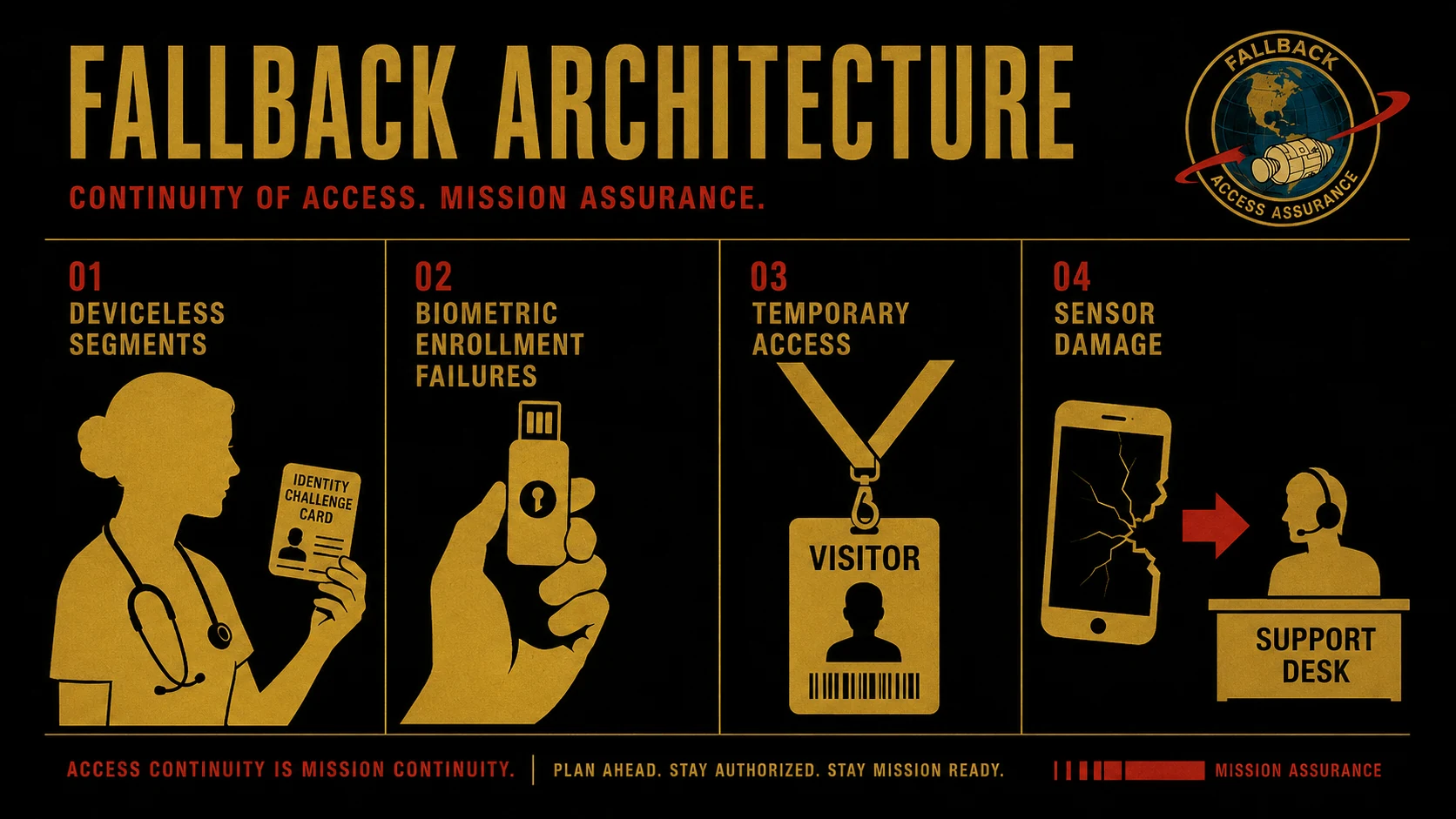 Four fallback scenarios, one composed architecture. Each scenario has a dedicated pattern; the composition covers the operational range without excluding workforce segments.
Change management as a first-class workstream
Change management shapes whether the migration succeeds because workforce members interact with the authentication system dozens of times per day. Their operational experience determines whether they perceive the migration as improvement or as impediment. The change-management workstream is not a separate track from the technical rollout; it's tightly coupled with each phase and needs its own timeline, resourcing, and metrics.
The communication workstream explains why the shift is happening in terms the workforce can connect to. The reasons include compliance mandates (specific regulations that increasingly require phishing-resistant MFA), security posture improvement (the credential-compromise incidents the shift prevents), reducing help-desk friction (the password-reset burden that biometric authentication removes), and alignment with the modern password policy discipline. The communication addresses concerns proactively rather than reactively — the biometric data doesn't leave the local device, the cryptographic ceremony authenticates without transmitting biometric material, the enterprise doesn't build a biometric database. Concerns about privacy or personal reasons for declining biometric enrollment are acknowledged with the fallback path explained.
The enrollment support workstream helps users complete the initial enrollment ceremony in a low-stress environment. Enrollment is a moment where things can go wrong — the phone doesn't pair properly with the identity provider, the hardware key doesn't get recognized, the biometric doesn't enroll on the first attempt. In-person enrollment sessions with dedicated support (IT staff who can walk the user through the flow, troubleshoot immediately, and complete the enrollment before the user leaves the session) produce substantially higher enrollment success rates than self-service enrollment. The trade-off is cost — dedicated enrollment sessions require staff time — but the alternative is enrollment failures that produce accumulated support tickets and stalled adoption.
The ongoing support workstream handles the scenarios that come up during transition. Sensor problems. Sync issues between devices. Cross-device UX questions ("how do I use my phone to authenticate on my laptop?"). Recovery scenarios when the primary authenticator is unavailable. The help desk needs both the retraining to handle these scenarios and the tooling to resolve them efficiently.
The recognition workstream identifies workforce members who complete the transition early and enlists them as ambassadors who can help peers. Peer-to-peer support is often more effective than centralized IT support for the "how do I actually use this?" questions. Formal recognition — leadership acknowledgment, small perks, visibility in internal communications — produces incentive for the early-adopter behavior that drives phase two through phase four adoption.
Enterprises that treat change management as an afterthought produce migrations that stall in phase three or four. Voluntary adoption plateaus because the workforce members who were going to adopt on their own already did, and the remaining workforce needs organizational buy-in to complete the transition. Phase five's workforce-wide enrollment campaigns require change-management infrastructure that has to have been built during phases one through four. Enterprises that get the change management right complete the migration in the multi-year timeline; enterprises that don't produce migrations that never actually finish, accumulating opt-in enrollment without displacing password reliance.
The metrics that distinguish real progress from opt-in accumulation
Enrollment count alone doesn't measure real migration progress. A workforce that has enrolled biometric authenticators but continues using passwords by preference hasn't actually migrated — the enrollment is a checkbox that doesn't correspond to authentication behavior.
The primary success indicator is percentage of authentications completed via biometric versus password, measured at the identity provider level. This metric captures the actual authentication method mix in production traffic. It goes up when workforce members shift from opt-in enrollment to routine biometric use. It stalls when workforce members enroll but keep authenticating with passwords out of habit or preference. It responds to the phase-three transition (default biometric preference) more strongly than to phase-one opt-in enablement.
The secondary indicators include percentage of workforce with active biometric enrollment (necessary but not sufficient — high enrollment can coexist with high password use if defaults don't shift), application-class coverage of biometric-supported authentication paths (measures whether the application portfolio can support the target authentication method), help-desk password-reset volume trending downward (measures whether actual password use is declining, corroborating the primary indicator), and credential-compromise incidents involving password-only accounts trending downward (measures whether the security posture improvement is materializing in outcomes).
The workforce satisfaction indicators come from surveys and focus groups. Does the workforce perceive the migration as improvement? Are the enrollment support and ongoing support experiences producing satisfaction or frustration? Are specific workforce segments experiencing exclusion (segments without smartphones, segments with biometric enrollment challenges)? The satisfaction indicators are lagging — they show whether the change management is working, but they take time to reflect changes in the technical rollout.
The wrong metric to lead with is enrollment count in isolation. Enterprises that measure enrollment count as their primary progress indicator often reach 80-90% enrollment while password authentication remains at 60-70% of actual production traffic. The gap between enrollment and conversion reveals that the migration hasn't actually happened in the way the enrollment number suggests. The password reliance that the migration was supposed to displace is still there.
Composition with the broader authentication architecture
The passwords-to-biometrics migration composes with the broader authentication architecture in specific ways. Understanding the composition is what determines whether the migration integrates cleanly with existing security controls or produces unexpected gaps.
The migration composes with adaptive authentication risk scoring — the risk-scoring layer differentiates authentication strengths at runtime, enabling the federation-parallel-run pattern. Without the adaptive layer, the enterprise has to make binary decisions per application about which authenticators are acceptable; with the adaptive layer, the decisions become contextual and per-action.
The migration composes with continuous authentication for high-risk workforces — high-privilege sessions that continue after the initial authentication need ongoing verification through the session's lifetime, and the biometric-plus-hardware authentication that phase two established provides the strong initial authentication that continuous verification builds on.
The migration composes with the mobile biometric authentication architecture — the mobile-biometric-specific technical architecture (Touch ID and Face ID, Android Biometric Strong, Windows Hello) is what actually delivers the biometric capability for the general workforce. The organizational migration described in this piece and the mobile-biometric technical architecture in the companion piece are two views of the same shift — the technical view focuses on what the authentication is; the organizational view focuses on how the workforce moves to it.
The migration composes with the hardware FIDO2 credential-class architecture — the hardware-key path serves the AAL3 use cases and the biometric-fallback use cases. The hardware-key credential class is a specific tool in the migration's kit; the migration decides where to use it based on the risk-tier prioritization.
The migration composes with the phishing-resistant MFA credential-class architecture — the WebAuthn foundation that makes biometric authentication cryptographically meaningful is the same foundation that makes the phishing-resistance property emerge. The migration is implicitly moving the workforce toward phishing-resistant authentication as it moves toward biometric authentication.
Closing
The enterprise shift from passwords to biometrics is a multi-year architectural migration, not a technology purchase. The technical capability was ready before 2025; the multi-year migration is what makes the capability actually reach the workforce. Most 2026 enterprises are somewhere in phases 3-5 of the migration — default biometric preference established, onboarding-first biometric shipping, workforce-wide enrollment campaigns in various states of execution.
The six-phase migration sequence covers the range from opt-in enablement to application-class deprecation. The federation-parallel-run pattern lets password and biometric authentication coexist during the transition. The fallback design covers the scenarios biometrics don't reach — deviceless workforce segments through the Identity Challenge Card, biometric enrollment failures through hardware FIDO2 with PIN, temporary access needs through time-bounded credentials, sensor damage through administrator-mediated recovery. The change management determines whether the migration succeeds at workforce scale. The metrics distinguish real conversion from opt-in accumulation.
The organizational architecture matters as much as the technical architecture. Enterprises that treat the migration as primarily a technology deployment produce stalled migrations that reach 80-90% enrollment while password authentication remains at 60-70% of production traffic. Enterprises that treat the migration as an organizational shift with tightly coupled technical and change-management workstreams complete the migration in the multi-year timeline and produce workforces that actually authenticate via biometrics. The shift is here; the shift is running; the shift is finishable — with the right architecture.
About the author

More from Passwordless
Passwordless Authentication in Healthcare: The HIPAA Case (2026)
Passwordless authentication doesn't earn HIPAA certification — HIPAA doesn't certify vendors — but it directly strengthens the §164.312 access-control safeguards clinical IT teams are graded on.
Windows Hello Limitations 2026: Where It Works and Where It Stops
Windows Hello does one thing extremely well — it produces a strong, TPM-bound, biometric or PIN sign-in on the specific Windows device a user enrolled on. The limitations show up the moment authentication needs to leave that device: shared and kiosk workstations, roaming across machines, cross-platform access, and the per-device enrollment burden. The 2026 practitioner reference on how Windows Hello actually works, exactly where its device-bound model falls short, and the FIDO2 and passkey patterns that extend it to the endpoints Hello was never designed to cover.
Passwordless Implementation Step-by-Step: The 2026 Enterprise Deployment Playbook
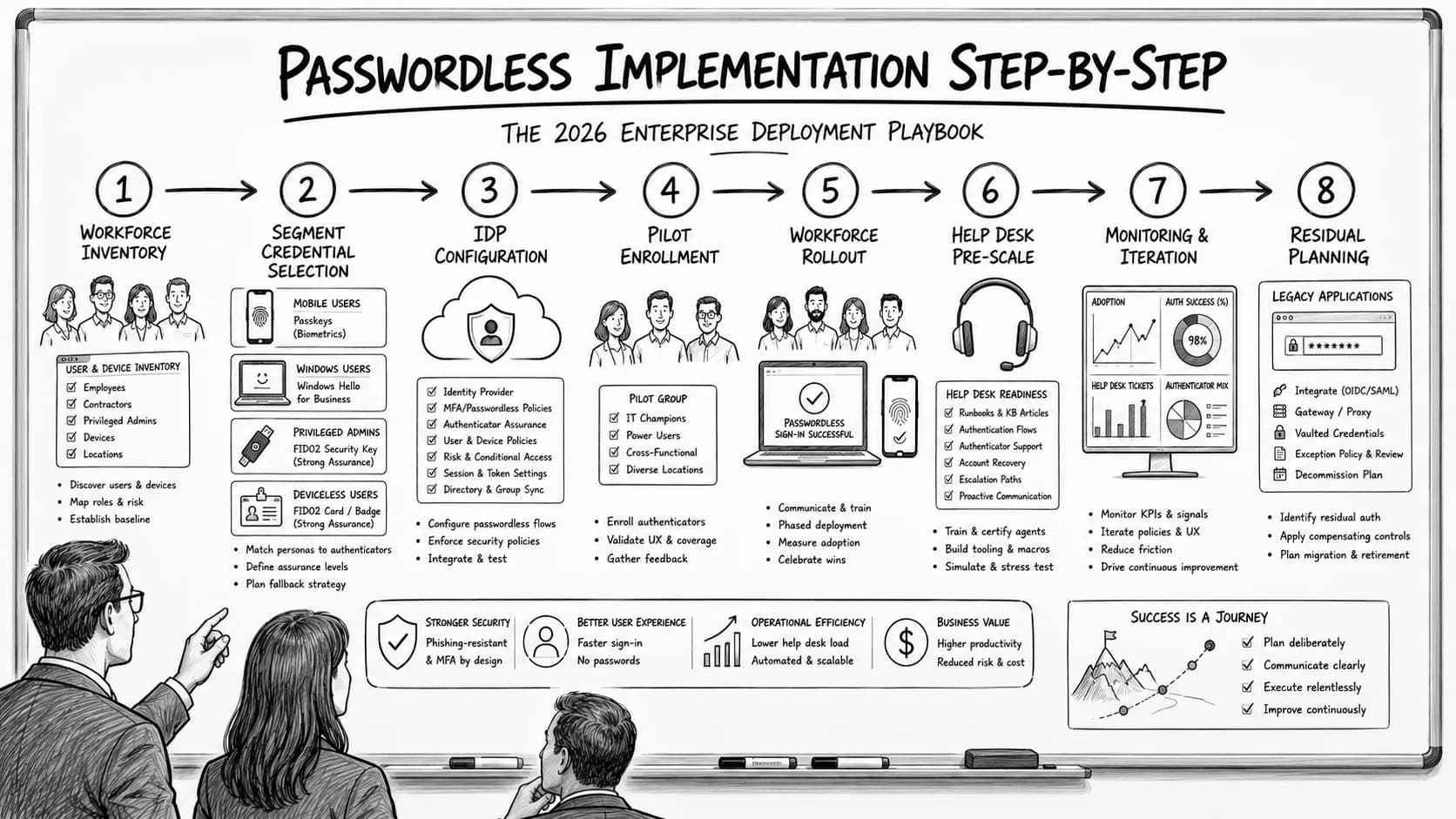
Enterprise passwordless implementation runs on a specific eight-step deployment sequence — workforce inventory, credential-class selection per segment, IdP configuration, pilot enrollment, workforce rollout with change management, help desk pre-scaling, monitoring and iteration, and passwordless-fallback residual planning. The 2026 enterprise reference on the step-by-step deployment playbook, the go/no-go criteria at each phase gate, and the discipline that produces successful passwordless rollout at workforce scale.