The phone is the workforce authenticator. The 2026 operational reality is that for most enterprise users, the dominant authentication path is "tap your finger on your phone" or "look at your phone." Behind that simple user experience sits substantial cryptographic infrastructure — Secure Enclaves, TPMs, WebAuthn protocol exchanges, attestation chains — but from the user's perspective, the act of authentication has compressed from "type a password, type an MFA code" to "touch the sensor."
What changed isn't the biometric capabilities themselves. Touch ID has been around since 2013, Face ID since 2017, Windows Hello since 2015. What changed is the architectural integration with the WebAuthn standard, the maturation of the platform-native passkey systems, and the operational readiness of mobile-biometric authentication at enterprise scale. The 2026 enterprise deployment can credibly run phishing-resistant MFA for the entire workforce on the devices the workforce already carries.
This piece is the 2026 enterprise reference on mobile biometric authentication. The platforms that dominate the workforce deployment, the cryptographic binding that makes mobile biometrics meaningful, the NIST 800-63B assurance level mapping, the four enterprise deployment patterns mature in 2026, and the operational pitfalls that distinguish mature deployments from naive ones. Companion pieces cover adjacent layers: the Hardware FIDO2 Keys vs Passkeys piece covers the broader credential-class comparison; the Phishing-Resistant MFA piece covers the WebAuthn cryptographic foundation; the Biometric Authentication Workforce MFA piece covers the architectural composition for workforce-wide rollouts; the Adaptive Authentication piece covers the risk-evaluation layer that composes with mobile biometrics; the Continuous Authentication piece covers the high-risk segment treatment.
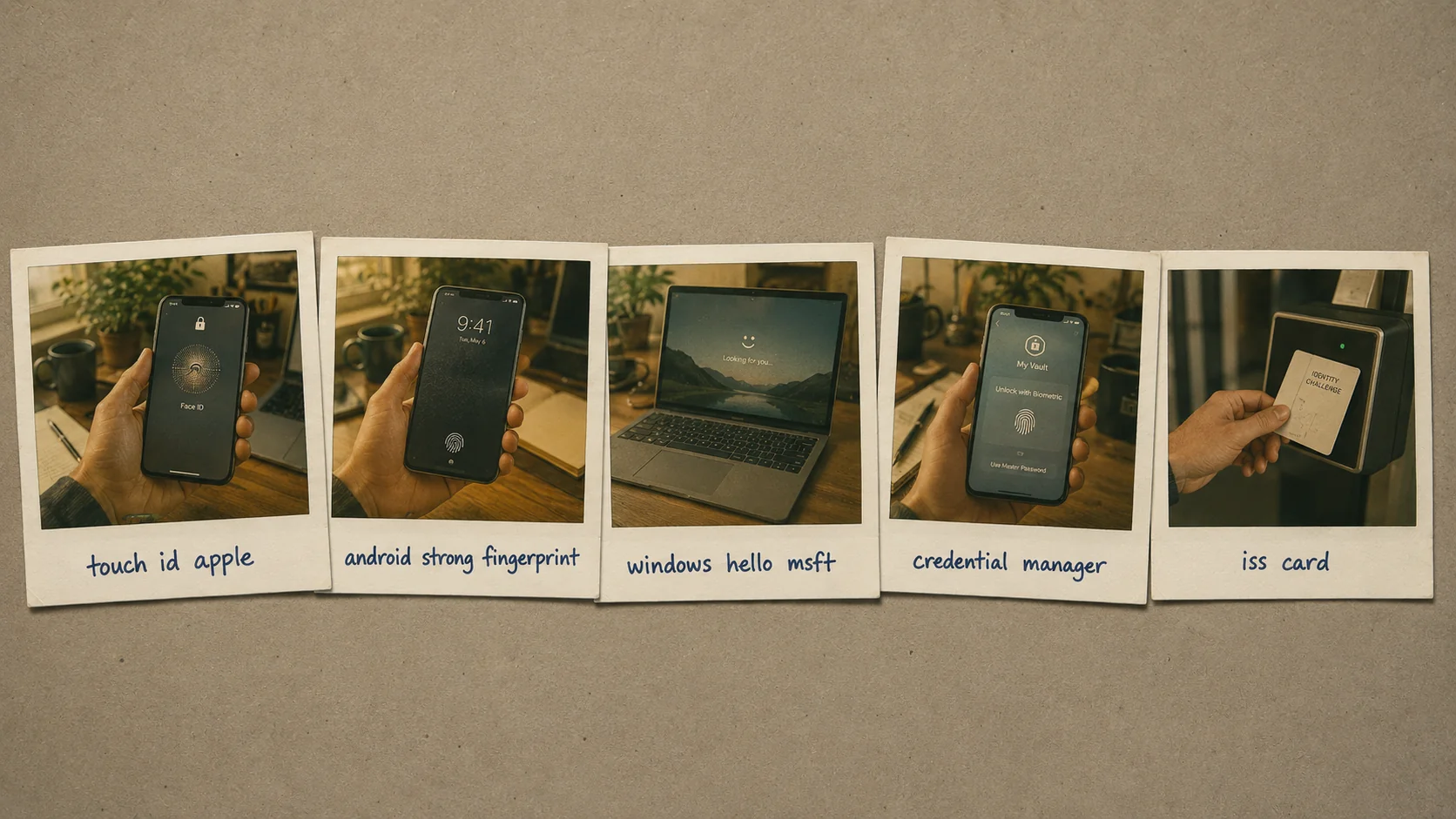 Five platforms, one architectural foundation. Each platform stores cryptographic keys in hardware-isolated secure elements; the biometric verification unlocks the key locally; the WebAuthn cryptographic ceremony authenticates to the relying party.
What makes mobile biometric authentication cryptographically meaningful
The most-misunderstood aspect of mobile biometric authentication is what the biometric actually does. Treating biometric verification on its own as "the authentication" misses the architectural point — and misses why mobile biometrics are phishing-resistant when they're done correctly.
The biometric is the local user verification factor. When the user touches the Touch ID sensor or looks at Face ID, the device verifies that the presented biometric matches the enrolled biometric for the device's user. The biometric data never leaves the device — Apple, Google, and Microsoft all design their biometric systems so the actual fingerprint or facial template lives in the device's secure element and is never transmitted to the relying party or even to the platform vendor.
The WebAuthn cryptographic ceremony is what actually authenticates. When the biometric verification succeeds, the device unlocks a private key stored in its hardware-isolated cryptographic store (Apple Secure Enclave, Android StrongBox or Trusted Execution Environment, Microsoft TPM 2.0). That unlocked private key signs an authentication challenge issued by the relying party. The relying party validates the signature against the user's enrolled public key. The user is authenticated.
Why this matters for phishing-resistance. An attacker who obtains the user's biometric data (a high-quality face photo, a fingerprint mold, a voice recording) still doesn't have the private key in the device's Secure Enclave. The cryptographic ceremony can't complete without the actual device. Phishing pages can't trick the user into entering credentials because the user doesn't enter anything — the touch happens on the user's own device. The credential class is structurally different from password-class authentication where a leaked credential is the entire attack surface.
The architectural pattern is "two factors at the device, one factor on the wire." The user's possession (the device) and inherence (the biometric) combine locally; the wire only sees a cryptographic signature.
Assurance level mapping under NIST 800-63B Rev. 4
NIST 800-63B Revision 4 (finalized 2025, operationally normative through 2026) defines authentication assurance levels AAL1, AAL2, and AAL3. Mobile biometric platforms map to these levels in specific ways.
| Platform | Assurance level when properly deployed | Notes |
|---|
| Apple Touch ID + Secure Enclave + WebAuthn | AAL2-equivalent | Secure Enclave attestation chains to Apple's root; biometric Class assertion is implicit in iOS device-class identity |
| Apple Face ID + Secure Enclave + WebAuthn | AAL2-equivalent | Same architectural pattern as Touch ID; TrueDepth depth-sensing adds spoof resistance |
| Microsoft Windows Hello for Business + TPM 2.0 + WebAuthn | AAL2-equivalent | TPM attestation chains to Microsoft Hello attestation infrastructure |
| Android Biometric Strong (Class 3) + StrongBox + WebAuthn | AAL2-equivalent | Class 3 designation means the biometric has a False Acceptance Rate (FAR) below 1 in 50,000 and a Presentation Attack Detection (PAD) capability |
| Android Biometric Class 2 | Lower than AAL2 | "Convenience biometric" tier; not appropriate as sole factor for high-impact authentication |
| Consumer Windows Hello (unattested) | Lower than AAL2 | Personal Windows devices without TPM attestation infrastructure |
| Hardware FIDO2 key + PIN | AAL3-equivalent | The hardware-bound + secret-validator pattern; covered in our Hardware FIDO2 vs Passkeys piece |
| Identity Challenge Card + PIN | AAL3-equivalent | Deviceless equivalent of hardware FIDO2 + PIN; covered in our Identity Challenge Card materials |
The implication for enterprise deployments: most workforce authentication at AAL2 can run on mobile biometrics with WebAuthn. AAL3 requirements (typically privileged operators, defense workforces, financial back-office above a transaction threshold) typically need hardware FIDO2 keys or the Identity Challenge Card. The mature enterprise pattern composes both — mobile biometrics for the broad workforce, hardware keys / Identity Challenge Card for the higher-assurance segments.
The four enterprise deployment patterns mature in 2026
Four operational patterns dominate 2026 enterprise mobile-biometric deployments. Most large enterprises compose multiple patterns rather than choosing one.
Pattern 1: Platform-native biometric + WebAuthn passkey on managed corporate devices. The employee receives a corporate-issued iPhone, Android device, or Surface laptop. Apple Business Manager, Samsung Knox, or Microsoft Intune handles MDM enrollment. Biometric enrollment policies are MDM-managed (enrollment required during onboarding, re-enrollment required on policy events). Platform-native passkeys store in the device's secure element. The authentication ceremony is "user touches the device's biometric sensor" → device cryptographically authenticates via WebAuthn → user is in.
Best fit: large enterprises with corporate-device-issued workforces. The pattern is fully under enterprise control, the assurance level is consistent, the operational discipline is straightforward.
Pattern 2: Biometric-unlocked credential-manager passkeys synced across user device ecosystem. The user's passkeys live in a cloud-synced credential manager — iCloud Keychain on Apple, Google Password Manager on Android/Chrome, Microsoft Entra ID on Windows, or third-party managers like 1Password, Bitwarden, Dashlane that bridge across ecosystems. Biometric verification on each device unlocks the synced passkey for that device. The user authenticates with biometric on whichever device they're using; the credential follows them.
Best fit: distributed workforces with multiple devices per user, BYOD-friendly environments, ecosystem-diverse workforces. The portability is the user-experience benefit; the dependency on the credential manager's security model is the architectural cost.
Pattern 3: MDM-enrolled BYOD with conditional access tied to device posture. Users enroll their personal devices through Microsoft Intune, Jamf, Workspace ONE, or equivalent MDM. The enterprise enforces device posture (recent OS patches, screen lock active, biometric enrolled, device not jailbroken, EDR agent running). Conditional access policies in the IdP evaluate the posture combined with the biometric authentication outcome.
Best fit: mid-market enterprises with workforce expectations of using personal devices, organizations that can't or won't issue corporate hardware to every employee, contractor-heavy workforces. The conditional access layer is what makes BYOD operationally safe; without it, the biometric-on-personal-device authentication is only as trustworthy as the personal device's posture, which can vary widely.
Pattern 4: Deviceless fallback through the Identity Challenge Card. Users whose role context excludes carrying mobile devices — frontline retail (no personal phones during shift), manufacturing floor (devices not allowed on the line for safety reasons), healthcare clinicians who can't bring smartphones bedside (sterile-field considerations), defense workforces in classified environments (no personal electronics allowed) — need an authentication path that doesn't depend on mobile biometric.
The Identity Challenge Card provides FIDO2-compatible authentication in a card form factor. The user taps the card to a reader, optionally provides a PIN, the cryptographic ceremony completes, the user is authenticated. The card carries the WebAuthn credentials; the reader provides the user-verification factor for environments where biometric sensors aren't available.
Best fit: any enterprise workforce segment that doesn't fit the mobile-biometric pattern for legitimate operational reasons.
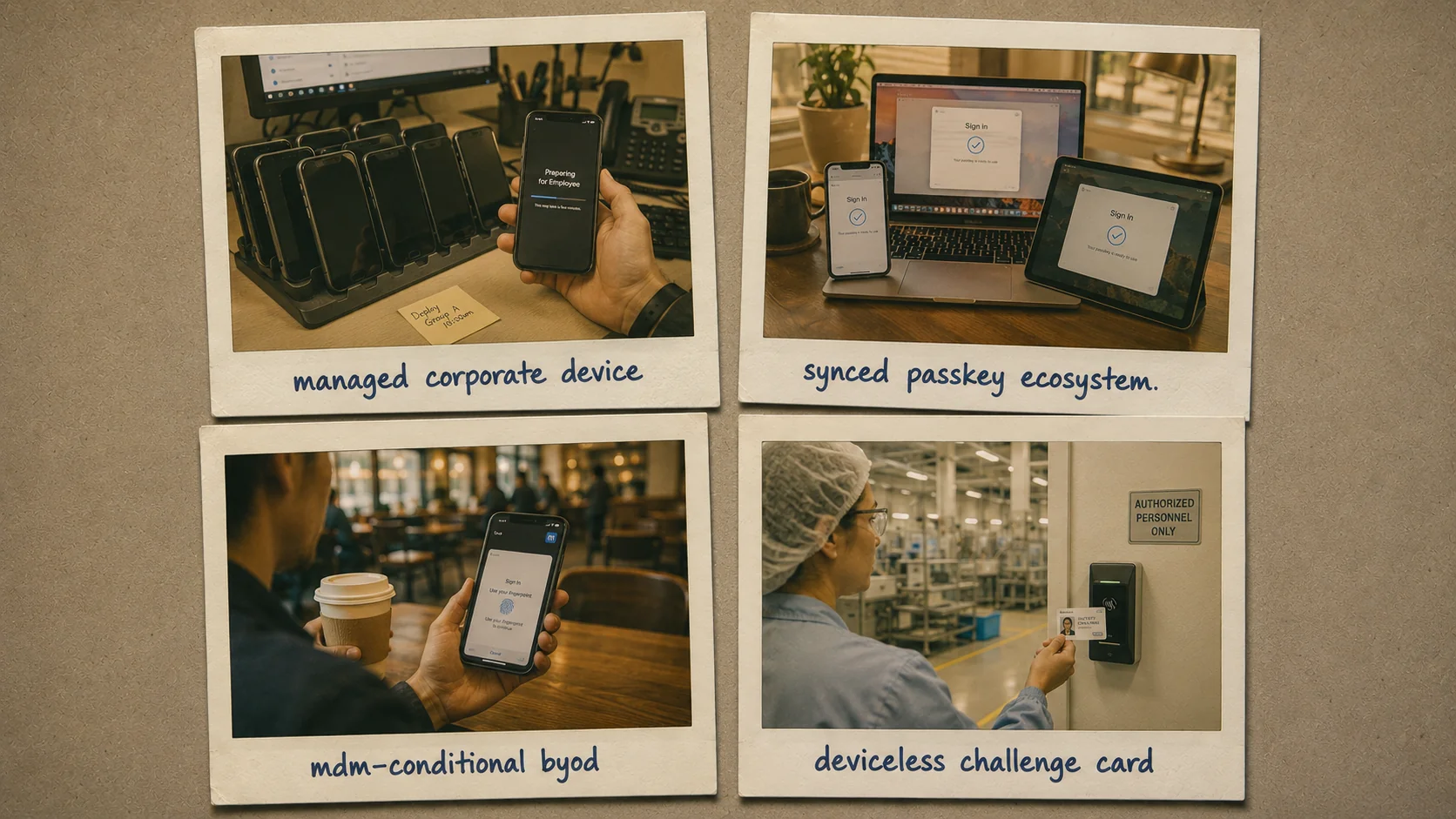 Four operational patterns. Each fits a specific workforce-segment profile; mature enterprises compose multiple patterns to cover the full workforce envelope. Pure single-pattern deployments are rare at scale.
Where mobile biometric authentication breaks operationally
Four operational pitfalls recur in 2026 enterprise deployments. Each is operationally addressable; each is also common when teams deploy biometrics as a technology without the surrounding operational discipline.
False rejection rate at scale. Mobile biometric sensors have specified false rejection rates (FRR) — the rate at which the legitimate user's biometric fails to verify even though it should succeed. For Apple Touch ID and Face ID, published FRR is approximately 1 in 50 (2%) under typical conditions. For Android Biometric Strong (Class 3), FRR varies by device but typically 1-3%. The pattern multiplies at scale — a 5,000-employee enterprise with mobile-biometric authentication produces roughly 100-150 daily false rejection events that cascade into authentication retries, help desk tickets, and operational friction. The mitigation is workflow design that handles false rejection gracefully (allow a few retries before escalating to fallback authentication, route fallback through a defined path rather than an ad-hoc bypass).
Sensor failure and biometric drift. Mobile biometric sensors can degrade or fail. Touch ID sensors get worn on devices that see heavy use. Face ID can fail if the TrueDepth camera or sensor array is damaged. Cracked screens can interfere with under-display fingerprint sensors. Biometric templates can drift over time (especially fingerprint, less so face). The mitigation is fallback infrastructure: every mobile-biometric user has a backup authentication path enrolled (a hardware FIDO2 key kept in a desk drawer, the Identity Challenge Card kept in a wallet, a workflow-verified recovery procedure documented in our Temporary Password Best Practices piece).
Enrollment governance. The biometric is only as trustworthy as the initial enrollment ceremony. If an attacker can enroll their biometric on a device that subsequently authenticates as the legitimate user, the entire architecture is compromised. The mitigation is enrollment-ceremony integrity — biometric enrollment happens through MDM-controlled flows on managed devices, through documented in-person identity-verification ceremonies on BYOD, and never through an unattended self-service path that could be exploited by an attacker with momentary physical access. The CGov Identity Maturity Model piece covers the broader operational discipline this fits within.
Cross-platform interop gaps. Apple-ecosystem passkeys don't propagate to Android or Windows cleanly without third-party credential managers. Android passkeys don't propagate to iPhone cleanly without third-party credential managers. Workforce users with mixed-ecosystem devices (an iPhone, a Windows laptop, an Android tablet) sometimes hit friction when the passkey they expected to be available on one device is actually only on another. The mitigation is either ecosystem-standardization at the enterprise level (everyone gets Apple, or everyone gets Microsoft, or everyone gets Google) or deployment of third-party credential managers (1Password Business, Bitwarden Enterprise) that bridge cross-ecosystem.
The four pitfalls compound. False rejection rate produces help desk tickets that look like authentication problems but are actually expected biometric-system behavior. Sensor failure produces user lockouts that need fallback paths that need to be set up in advance. Enrollment governance gaps produce attack surface that's invisible until exploited. Cross-platform interop gaps produce user-experience friction that drives workforce frustration. The mitigations have to layer — fixing one pattern without the others leaves cumulative operational drag.
The 2026 reference path
Deploy mobile-biometric authentication as the primary workforce authentication path for the segments where it fits. Apple Business Manager + Touch/Face ID for Apple-ecosystem workforces. Microsoft Intune + Windows Hello for Business for Microsoft-ecosystem workforces. Samsung Knox + Android Biometric Strong for Android-ecosystem workforces. Third-party credential managers (1Password, Bitwarden) for cross-ecosystem environments.
Configure the WebAuthn cryptographic layer correctly. The biometric on its own is pattern-matching; the WebAuthn ceremony with hardware-attested device binding is what produces phishing-resistance. Verify your IdP supports WebAuthn attestation chains for the device classes your workforce uses.
Map workforce segments to assurance levels explicitly. AAL2 for routine workforce authentication via mobile biometric + WebAuthn. AAL3 via hardware FIDO2 key + PIN (per our Hardware FIDO2 vs Passkeys piece) or Identity Challenge Card + PIN for privileged operators, defense workforces, high-transaction financial back-office.
Deploy fallback infrastructure for the 1-3% of authentication attempts that fail at the biometric layer for legitimate reasons. Hardware FIDO2 key + PIN as primary backup. Identity Challenge Card for users whose context excludes mobile devices. Workflow-verified recovery (per Temporary Password Best Practices) as the catastrophic-failure path.
Compose with the broader authentication layer. Adaptive authentication (per our Adaptive Authentication piece) feeds risk signals into the authentication decision. Continuous authentication (per our Continuous Authentication piece) re-evaluates assurance throughout the session for high-risk segments. The credential layer (mobile biometric + WebAuthn) is the foundation; the risk-evaluation layers compose on top.
Mobile biometric authentication is the workforce authentication of 2026. The platforms are mature, the cryptographic foundation is sound, the deployment patterns are well-understood. The operational discipline that distinguishes mature deployments from naive ones is in the four pitfall categories — false rejection handling, sensor failure fallback, enrollment governance, cross-platform interop. Address all four deliberately and the architecture produces phishing-resistant workforce authentication at scale. That's a meaningful improvement over the password-and-SMS-MFA pattern that dominated the prior decade.