QR Code Phishing (Quishing): How It Works and How to Defend in 2026
Quishing hides a malicious URL inside a QR code, slips past email link scanners, and moves the victim onto a personal phone where the fake login is hard to inspect. The 2026 reference on how the attack runs and the phishing-resistant defenses that actually stop it.
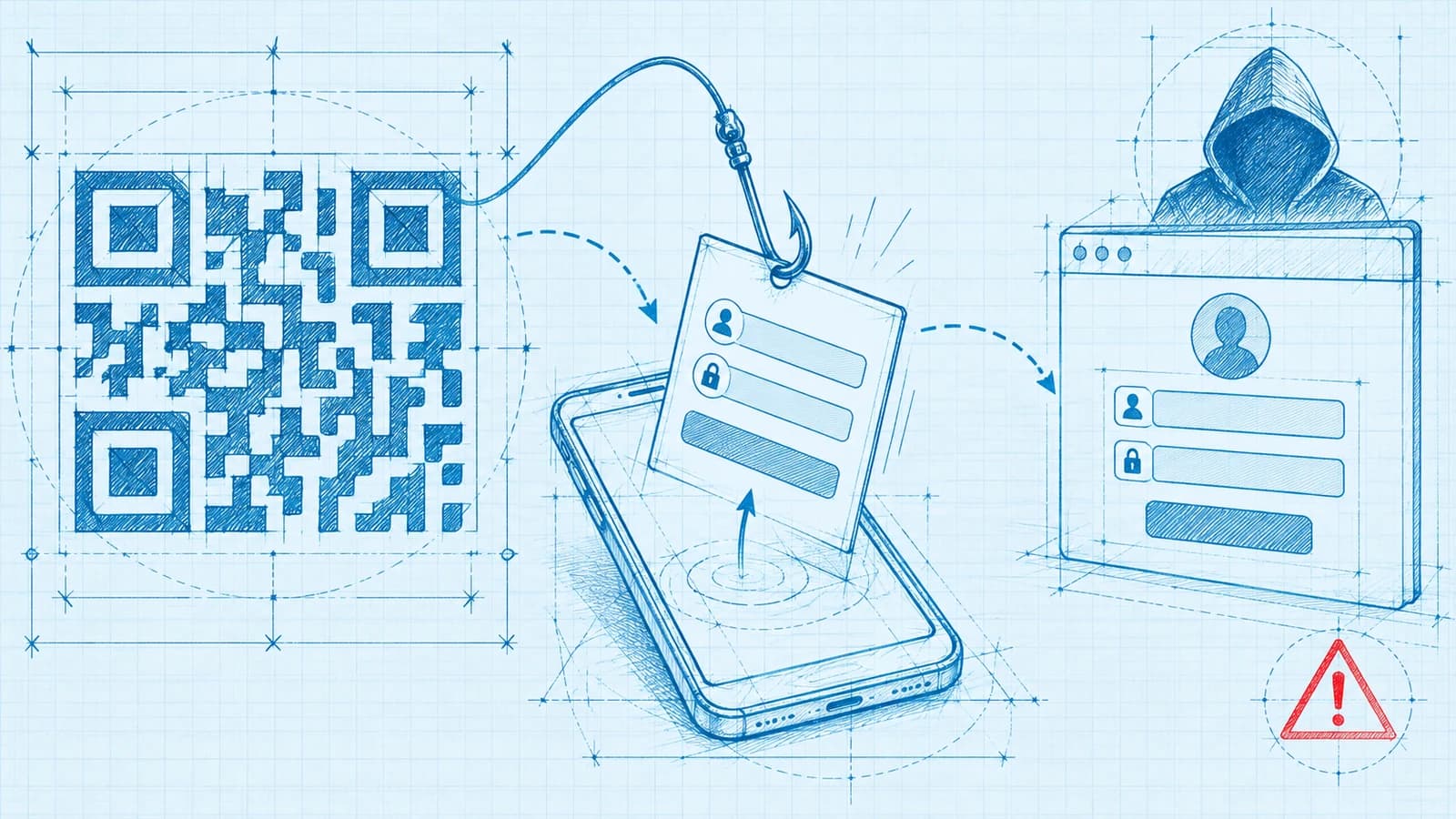
Quishing hides a malicious URL inside a QR code, slips past email link scanners, and moves the victim onto a personal phone where the fake login is hard to inspect. The 2026 reference on how the attack runs and the phishing-resistant defenses that actually stop it.
- Quishing is phishing that uses a QR code as the delivery vehicle — the code carries the victim to a malicious destination rather than a clickable text link, so the attack is a familiar credential-theft play wearing a new wrapper.
- Attackers favor QR codes because the image hides the real URL from the human eye, bypasses email scanners that only parse text and hyperlinks, and moves the victim onto a personal phone where the fake page is far harder to inspect.
- A typical run plants a code in an email, a printed notice, signage, or a document, lands the victim on a fake login or OAuth consent page, and harvests the credential or session token — which increasingly means stealing a live session past MFA, not just a password.
- The defenses that actually work are phishing-resistant MFA and passkeys, which cannot be handed to a look-alike page, backed by verifying the destination URL before signing in and by mobile and URL filtering on the device that does the scanning.
- QR-specific user awareness matters because scanning feels casual and a printed code looks trustworthy — but awareness alone is a mitigation, not the control; the credential class is what removes the payoff for the attacker.
Quishing is phishing that uses a QR code as its delivery vehicle. Instead of a clickable link, the attacker presents an image — a QR code — that the victim scans with a phone camera. The code resolves to a URL, the phone opens a page the attacker controls, and the rest is the credential theft enterprises already know: a fake login or OAuth consent screen that harvests a password, a multi-factor response, or a live session token. The name blends "QR" and "phishing," but the point to grasp is that quishing is not a new class of attack. It is an old attack in a new wrapper, and the wrapper is chosen precisely because it defeats the defenses built for the old one.
That distinction shapes the response. Treat quishing as an exotic threat and you over-invest in QR-specific detection while under-investing in the credential architecture that removes the attacker's payoff. Treat it as ordinary phishing with a better delivery mechanism and you focus on the two things that matter: making the delivery harder to land and making the harvested credential worthless. This piece is the 2026 enterprise reference on how a quishing attack runs, why attackers reach for QR codes, how it connects to session theft and consent phishing, and which defenses genuinely close the gap versus which merely feel reassuring.
What quishing is, precisely
A QR code is a two-dimensional barcode that encodes data — most often a URL — in a pattern of squares. A phone camera decodes the pattern, extracts the URL, and offers to open it. Its usefulness to an attacker comes from one property: a human cannot read a QR code. When you look at a hyperlink, you can in principle inspect where it points before clicking; when you look at a QR code, you see an abstract pattern, and the destination stays invisible until you have already scanned it — often until the page has already loaded.
Quishing exploits that invisibility. The attacker encodes a malicious URL into a code, places it where the target will encounter it with a plausible reason to scan, and the page that opens does what phishing pages have always done: it impersonates a trusted service and asks the victim to sign in or grant access. The credential flows to the attacker. The mechanics of that destination page are identical to any other phishing attack. What quishing changes is the path to it — a scan for a click, an image for a link, a personal phone for a managed laptop — and each substitution has security consequences that together make quishing a persistent enterprise problem rather than a curiosity.
How a quishing attack runs
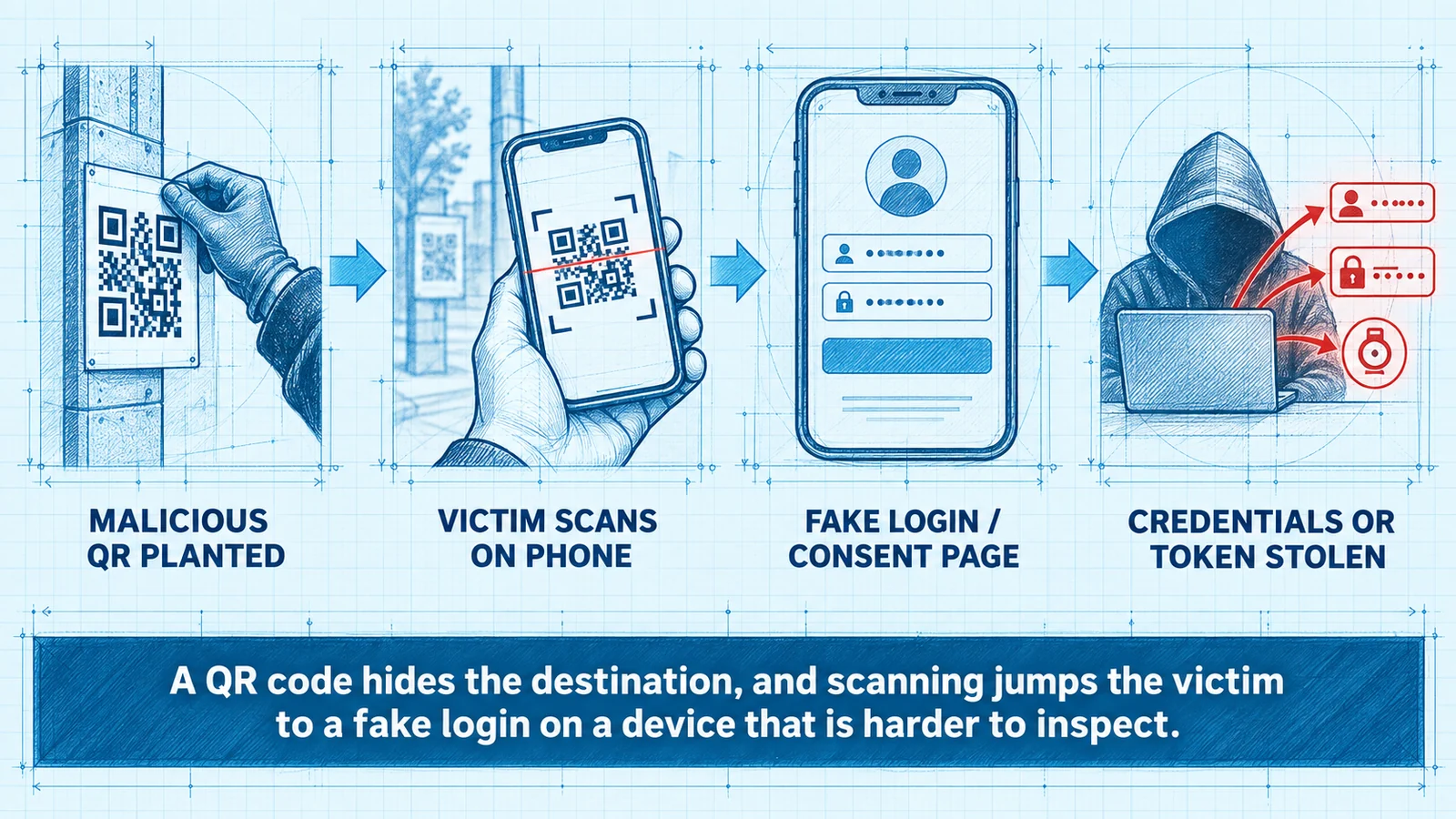
A quishing campaign moves through the same stages as any phishing operation — lure, delivery, capture, exploitation — each adapted to the QR vehicle.
The malicious code is planted. The attacker places the code where the target will find and trust it. In email it frequently appears as an inline image or, more evasively, inside an attached PDF, because attachments are inspected differently from message bodies. Beyond email, quishing reaches into the physical world in a way ordinary phishing cannot: a code printed on a notice, stuck over a legitimate one on a payment terminal, added to a fake invoice, or dropped onto official-looking signage. That physical vector is difficult for any digital control to address, because the code never touches the corporate network until it is scanned.
The lure gives a reason to scan. The pretext mirrors familiar phishing themes calibrated to prompt action: a secure message to view, a payment or invoice to confirm, an account that must be re-verified, a shared document, a voicemail, a delivery to reschedule. The framing is either urgent or routine — "act now or lose access" or "this is normal" — because both suppress scrutiny.
The victim scans on a personal phone. This is the pivot that makes quishing effective. Scanning a code from a work email or a printed notice almost always happens on the phone with the camera in hand, and in many enterprises that phone is personal and unmanaged — outside the reach of corporate URL filtering, endpoint detection, and browser policy.
The victim lands on a fake page. The destination is a look-alike login or an OAuth consent screen impersonating a trusted service. On a phone the deception is easier to sustain: the screen is small, the address bar is truncated after load, and a subtly wrong domain is far harder to notice than on a desktop browser.
The credential or token is captured. The victim enters a username and password, provides a one-time code, or approves a push — or grants OAuth consent — and the attacker captures it. In the most capable campaigns the fake page is a real-time proxy that immediately relays those inputs to the genuine service and steals the authenticated session the service issues in return.
Why attackers favor QR codes
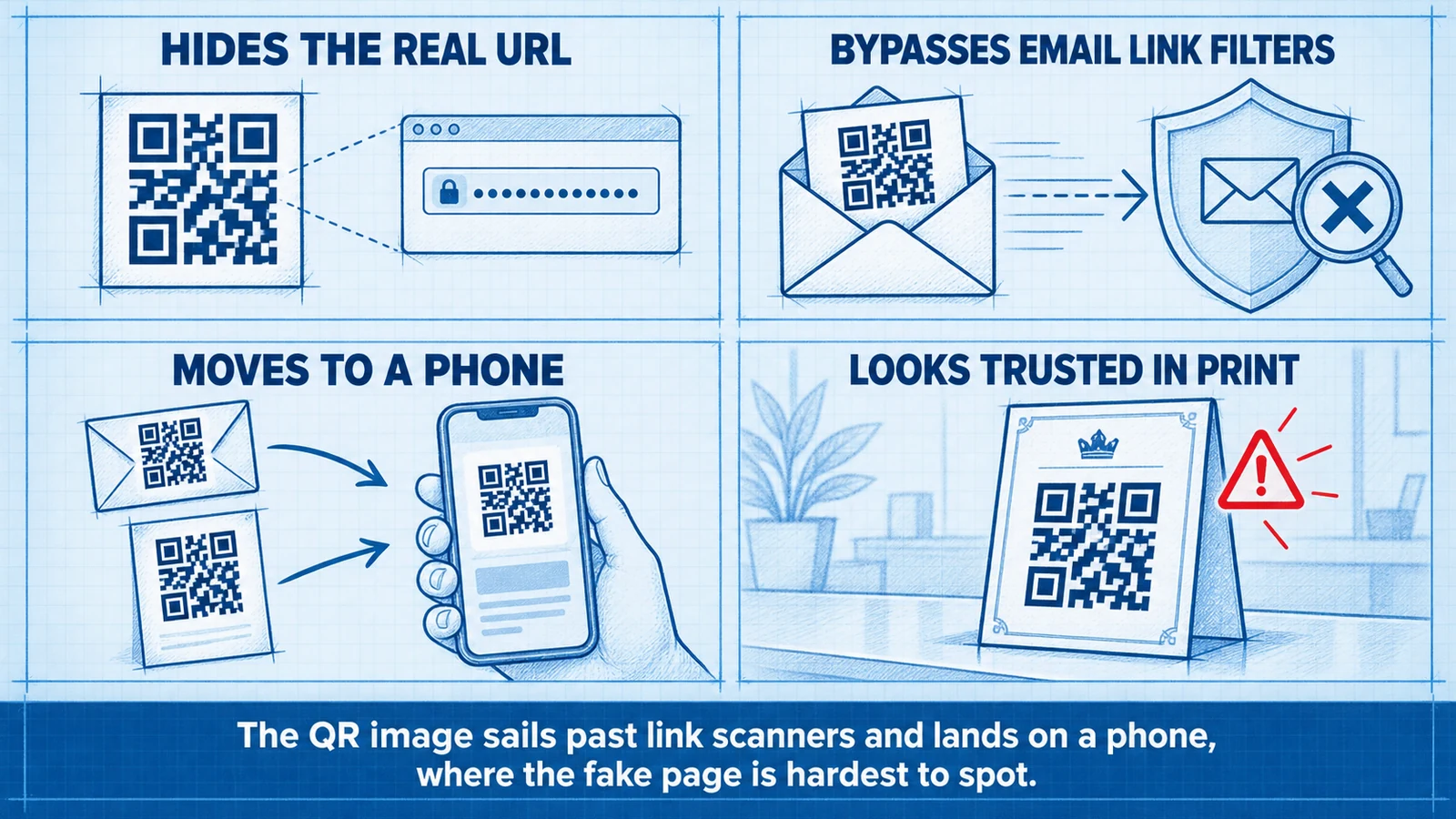
Understanding the specific advantages of the QR vehicle explains why the same defenses that blunt link-based phishing often miss quishing entirely.
The image hides the real URL. The most repeated anti-phishing advice — inspect the link before you click — is inapplicable to a QR code, because there is no readable link to inspect. The destination is encoded in a pattern the eye cannot parse, so the victim commits to it by scanning, often before any warning appears and the page may already be loading.
QR codes bypass email link scanners. Most email security that flags malicious links works by parsing message text and hyperlinks and checking them against reputation and detonation systems. A QR code is an image, and the malicious URL lives inside that image — or inside an attached document — where a text-and-link parser never looks. This is precisely why attackers moved to QR delivery: it routes around the control that catches ordinary phishing links. Defending against it requires email systems that actually decode QR codes in images and attachments, a capability many deployments still lack or leave disabled.
Scanning moves the victim to a phone. A QR code all but guarantees the next step happens on a mobile device, and that shift is a security downgrade. The phone is often personal and unmanaged, outside corporate URL filtering, endpoint protection, and browser hardening; its small screen and truncated address bar make a look-alike domain harder to detect; and phone use is casual rather than deliberate. The attacker has effectively chosen the battlefield — moving the victim off the defended laptop onto a device where fewer controls apply and inspection is harder.
A printed code looks trustworthy. People scan QR codes constantly for menus, payments, and check-ins. The act is mundane and carries little suspicion, and a code on a physical notice or signage inherits the perceived legitimacy of its surroundings. An attacker who prints a convincing notice, or stickers a malicious code over a real one, exploits that trust with no need to compromise any digital system at all.
Taken together these properties describe an attack engineered to slip between the controls enterprises already run. Quishing succeeds not because it is technically sophisticated, but because it sidesteps text-based scanning, human link inspection, and device-level filtering all at once.
The connection to session theft and MFA
The most important thing to understand about quishing in 2026 is that the goal is usually not to steal a password but to steal an authenticated session — which is why simply having MFA turned on does not make an organization safe.
Modern phishing pages, including those delivered by QR codes, are increasingly adversary-in-the-middle proxies. Rather than statically collecting a username and password, the proxy sits between the victim and the real service. When the victim enters credentials on the fake page, the proxy forwards them to the genuine service in real time; when the service demands a second factor, the proxy relays that prompt, collects the one-time code or push approval, and forwards it too. The real service, satisfied, issues a session token — and the proxy captures it. The attacker now holds a live, already-authenticated session and can act as the user without reproducing the login.
This is the mechanism that renders one-time codes and push approvals ineffective against a well-built quishing attack. The QR code's only job is to deliver the victim to the proxy; the proxy launders the MFA challenge straight through. The dynamics of that relay, and the broader family of techniques that defeat MFA in transit, are covered in MFA bypass techniques and defenses — quishing is best understood as one delivery route into those bypass patterns.
A parallel path does not steal a session at all. In consent phishing, the QR code carries the victim to a legitimate OAuth authorization screen rather than a fake login, asking the user to grant an application permission to access their mailbox, files, or calendar. If they approve, the attacker's application receives a token and retains access even after a later password change — because no password was ever involved. This variant is particularly insidious because the flow runs on the genuine provider's infrastructure, so the page is authentic and the URL is correct. The defense is not stronger authentication but governance over which applications users may authorize.
Both paths lead to the same conclusion: the harvested artifact is access, not a secret. Any defense premised on making the secret stronger — longer passwords, more one-time codes — misunderstands the attack.
Defenses that actually work
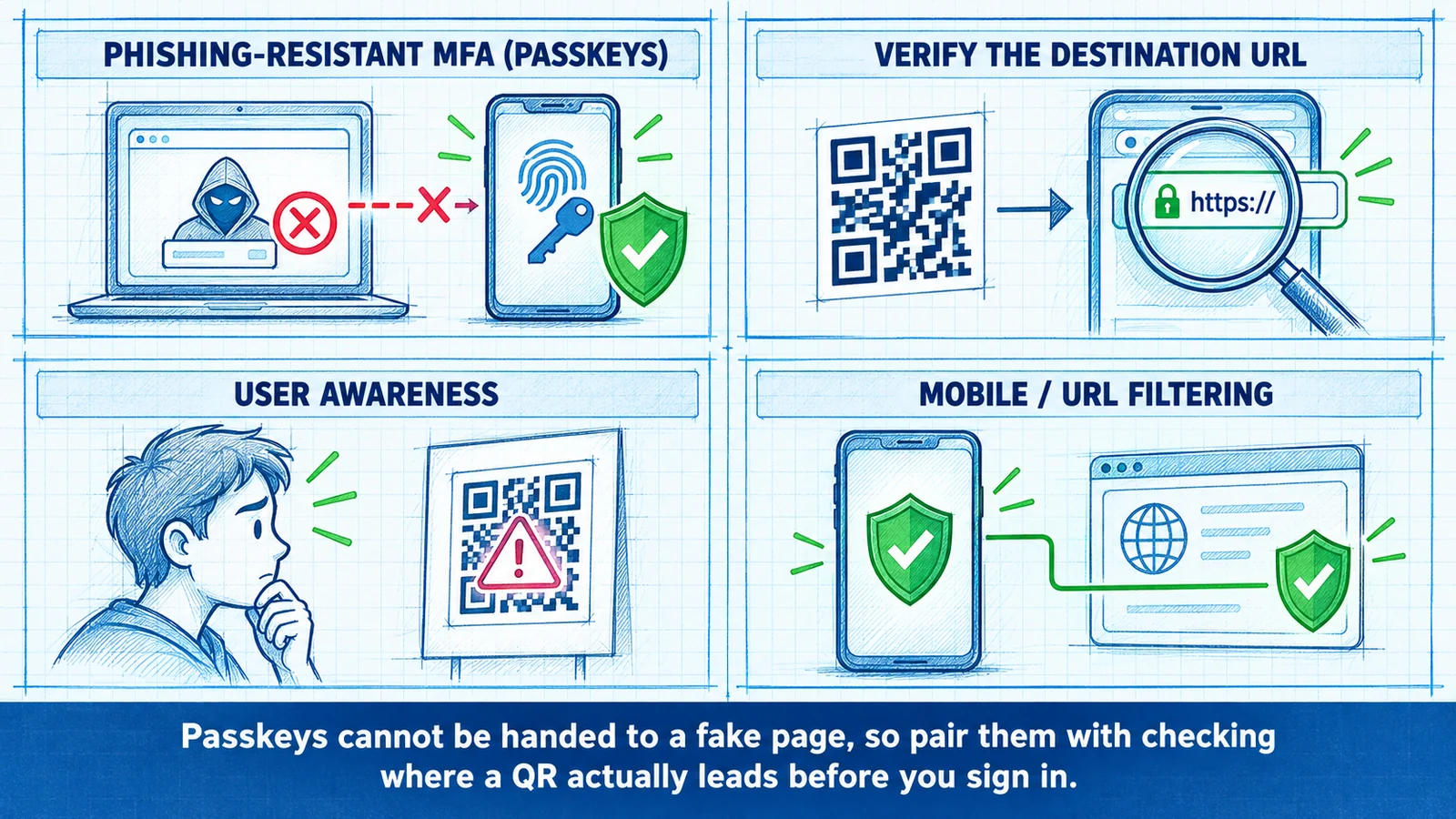
The defenses that materially reduce quishing risk fall into two groups: those that make the malicious page harder to reach, and those that make a reached page worthless. The second is where the leverage is.
Phishing-resistant MFA and passkeys
The single most effective control against quishing is phishing-resistant authentication, because it removes the payoff even when every other layer fails and the victim lands on the fake page. Passkeys and hardware FIDO2 keys, built on WebAuthn, bind authentication cryptographically to the real service's origin, and the browser enforces that check: a passkey created for the genuine service will not complete against a look-alike domain, however convincing the page. There is no code to read, no secret to type, no push to approve — nothing the user can be induced to hand to the attacker's page, and therefore nothing the real-time proxy can relay.
This is a structural defeat of the attack, not a probabilistic one: a passkey ceremony fails silently against the wrong origin, so the quishing proxy has nothing to forward, where a one-time code or push is a value the user can be induced to hand over. The reasoning and enterprise rollout considerations are developed in phishing-resistant MFA for the enterprise, and the deployment mechanics — enrollment, recovery, and fleet coverage — in the passkey deployment playbook. The through-line is that the credential class, not the warning label, is what neutralizes quishing.
Moving toward passwordless authentication compounds the benefit, because it removes the shared secret that quishing pages are built to capture; the options and trade-offs are surveyed in passwordless authentication solutions.
Verify the destination before signing in
Where phishing-resistant credentials are not yet universal, the behavioral control that matters most is verifying the destination URL before entering anything. After scanning, the user should look at the address bar — is this the real domain, or a look-alike with an extra word, a swapped character, or an unfamiliar suffix? This is harder on a phone than a laptop — exactly why attackers push the victim to a phone — and why the control is a mitigation rather than a guarantee: it reduces the success rate of unsophisticated campaigns and buys nothing against a perfect look-alike, but it is worth teaching as the last human checkpoint before a credential is surrendered.
QR-specific user awareness
General phishing training does not automatically cover QR risk, because scanning does not feel like clicking. Effective awareness names the QR vehicle explicitly: be skeptical of unexpected codes in emails and attachments; treat printed codes on notices, invoices, and signage with the same caution as an unsolicited link; be alert to codes stickered over legitimate ones; and never enter credentials on a page reached by scanning an unexpected code. The goal is to attach to a casual-feeling act the same reflexive caution people apply to suspicious links. Awareness is a genuine risk reducer, but a layer, not the control — it lowers the odds of delivery landing without removing the consequence if it does.
Mobile and URL filtering
Because quishing deliberately relocates the attack to phones, the defensive controls have to reach phones. Mobile threat defense and DNS or URL filtering on the scanning device can block a malicious destination at resolution, before the fake page ever renders — one of the strongest arguments for extending device management and network filtering to the mobile fleet rather than treating phones as out of scope. On the email side, security systems that decode QR codes embedded in images and attachments — rather than only parsing text and hyperlinks — close the specific gap that made QR delivery attractive. Where those capabilities exist, enable them; a scanner that cannot see the URL inside the image is not defending against this attack.
Where quishing defenses break down
Even a thoughtful program has predictable weak points.
Personal, unmanaged phones. The scanning device is frequently outside enterprise control, so mobile threat defense and URL filtering never apply. An organization that has not extended protection to personal devices used for work has no technical layer between the scan and the fake page — leaving only the credential class and user judgment.
Physical-world codes. A code on a printed notice, or a sticker placed over a legitimate one, bypasses every digital email and network control, because nothing is transmitted until the victim scans. This vector can only be addressed by awareness and by phishing-resistant credentials that make the eventual page worthless.
Consent phishing on genuine infrastructure. Because the OAuth consent variant runs on the real provider's domain, URL inspection and look-alike detection offer no help — the URL is correct. Only app-consent governance and restriction of authorizable applications close this path.
Awareness treated as the primary control. Leaning on training as the main defense places the entire burden on a human reading a truncated address bar under time pressure. Awareness lowers the probability of a successful lure; it does nothing to reduce the impact if one succeeds. Programs that stop at training have chosen the weakest available lever as their strongest.
Recovery-channel exposure. An attacker who captures a credential may pivot to account recovery — social-engineering a help desk, or exploiting a weak self-service reset. A defense is only as strong as the easiest way to reset the credential behind it, so recovery hardening belongs inside the quishing threat model, not beside it.
What Avatier ships toward this problem
Avatier's posture on quishing follows from the analysis above: the durable control is the credential class, and everything else is a layer that reduces the odds of delivery landing. Avatier Identity Anywhere supports phishing-resistant authentication at the credential layer — FIDO2/WebAuthn passkeys and hardware FIDO2 keys — so a user who scans a malicious code and reaches a look-alike page has no secret to surrender and no prompt a real-time proxy can relay. The origin binding does the work the warning label cannot.
For the segments where a personal smartphone or registered mobile authenticator is not a safe assumption — frontline shared workstations, contractors without managed devices, facilities where phones are restricted — the Avatier Identity Challenge Card provides a deviceless phishing-resistant factor, so the standard does not quietly exclude the users most likely to encounter a physical-world QR lure. Recovery flows route through Password Station for workflow-verified resets rather than help-desk social engineering — closing the recovery-channel bypass a quishing threat model has to account for. The Avatier Trust Center publishes the compliance posture this operates within.
The architecture is vendor-neutral in its logic: any enterprise that makes phishing-resistant credentials the default, extends filtering to the scanning devices, governs OAuth consent, decodes QR codes in email, and hardens recovery will substantially reduce its quishing exposure regardless of which products deliver those capabilities. The point is not the badge on the tools; it is the ordering — credential class first, delivery-side layers second, awareness as reinforcement rather than foundation.
The bottom line
Quishing is not a novel threat; it is a delivery innovation on a very old one. The QR code hides the URL from the human, slips past scanners that only read text and links, and lands the victim on a phone where the fake page is hardest to inspect and easiest to trust. But the destination is the same fake login or consent screen phishing has always used, and the endgame is increasingly a stolen, already-authenticated session rather than a password. That is why turning on MFA and running awareness training, while worthwhile, does not settle the matter: a real-time proxy relays one-time codes and push approvals straight through, and a printed code on a wall reaches no email or network control at all.
The defense that changes the economics is phishing-resistant authentication. When the credential cannot be handed to a look-alike origin, the entire quishing chain — the hidden URL, the bypassed scanner, the convincing fake page — leads nowhere, because there is nothing at the end for the victim to give away. Layer verification of the destination, QR-specific awareness, mobile and URL filtering, email QR decoding, consent governance, and recovery hardening around that core, and each closes a specific gap. But lead with the credential class. An enterprise that ships passkeys and hardware keys, extends protection to the phones that scan, and hardens recovery behind it has removed the payoff attackers moved to QR codes to reach; one that stops at a warning about scanning unfamiliar codes has named the problem without disarming it.
About the author
More from MFA & Authentication

New-Hire MFA on Day One: Closing the Enrollment Gap with Avatier
A new hire needs MFA before a phone, authenticator or device is enrolled. How Avatier's Identity Challenge Card closes the first-day enrollment gap through one IGA workflow.

MFA for Contractors Without Company Phones, with Avatier
Contractors and field staff may have no company phone and no wish to put an authenticator on a personal one. How Avatier's Identity Challenge Card gives them MFA without a device.

How to Verify Help Desk Callers with the Identity Challenge Card
Help desk caller verification confirms an employee is who they claim before a reset, unlock or MFA change. How to run it without relying on agent judgment, with Avatier's Identity Challenge Card.