How to Verify Help Desk Callers with the Identity Challenge Card
Help desk caller verification confirms an employee is who they claim before a reset, unlock or MFA change. How to run it without relying on agent judgment, with Avatier's Identity Challenge Card.

Help desk caller verification confirms an employee is who they claim before a reset, unlock or MFA change. How to run it without relying on agent judgment, with Avatier's Identity Challenge Card.
- Help desk caller verification confirms an existing employee is who they claim before an agent resets a password, unlocks an account or changes MFA.
- Questions an attacker can research, and codes texted to a phone the attacker may control, leave the decision to the agent's judgment.
- In Avatier's Identity Attack Ledger, 12 of the 53 California incidents that name a vector (1 Jan 2023 to 30 Sep 2026) name social engineering of a person.
- Avatier Assisted Reset sends the challenge to the user's own enrolled device, and the agent sees only pass or fail.
- When the phone is the problem, the agent names a coordinate on the Identity Challenge Card, the caller reads the word, and that value is spent.
Help desk caller verification is the check a service desk agent runs to confirm that a caller is the existing employee they claim to be before resetting a password, unlocking an account or changing MFA. The version that holds up sends a challenge to something only the real employee holds and lets the result decide, so the agent never has to judge a voice.
That is the idea behind Avatier's Identity Challenge Card™. In Avatier's words: "One card covers three moments. At the service desk, the agent verifies the caller, not the caller's phone." The procedure below is for people who already have accounts. Proofing someone's identity at onboarding is a different job; for that, see Identity Verification and Proofing: The 2026 IDV Guide.
Why the verify step is where attackers push
Resets, unlocks and MFA changes at the desk all hand back access, and that is where callers apply pressure. NIST SP 800-63B-4, the US federal guideline on authentication, says it plainly: "To the extent that authenticator recovery is human-assisted, social engineering attacks also pose risks."
Avatier's own breach research points the same way. The Identity Attack Ledger reads 2,242 California breach-notification filings from 1 Jan 2023 to 30 Sep 2026. Of the 53 incidents that name a vector, 12 (22.6%) name social engineering of a person, a category the ledger says "Includes vishing and help-desk pretexting." In 2026 filings alone (1 Jan to 30 Sep 2026), the ledger notes that "deception of a person outnumbers credential theft (10 to 6)." Keep the ledger's own caveat in view: this is "the distribution of the named subset, not of all breaches."
The weak point is the question the agent is left to answer. Avatier's service-desk explainer describes an agent "deciding whether to trust a voice on the phone," and adds: "Instinct shouldn't be the deciding factor." For the full pretexting playbook, see Help Desk Social Engineering Defense. This post stays on the verify step itself.
What each verification method actually proves
Here are four methods a desk might use. The test for each is simple: could an attacker who has researched the employee, or taken over their phone, pass it?
| Method | What the caller proves | What to watch |
|---|---|---|
| Knowledge questions | They know, or found, the answers | Avatier calls it "a list of questions an attacker can research" |
| Code texted to a phone | They can read that phone | It "assumes the phone is theirs" |
| MFA prompt to the user's enrolled device | They hold the enrolled device | The device has to be on hand and working |
| Identity Challenge Card coordinate | They hold the printed card | A lost card is revoked and re-issued |
The first two rows check something an attacker can gather or intercept. The last two check something the real employee holds, and that is the property worth building the desk around.
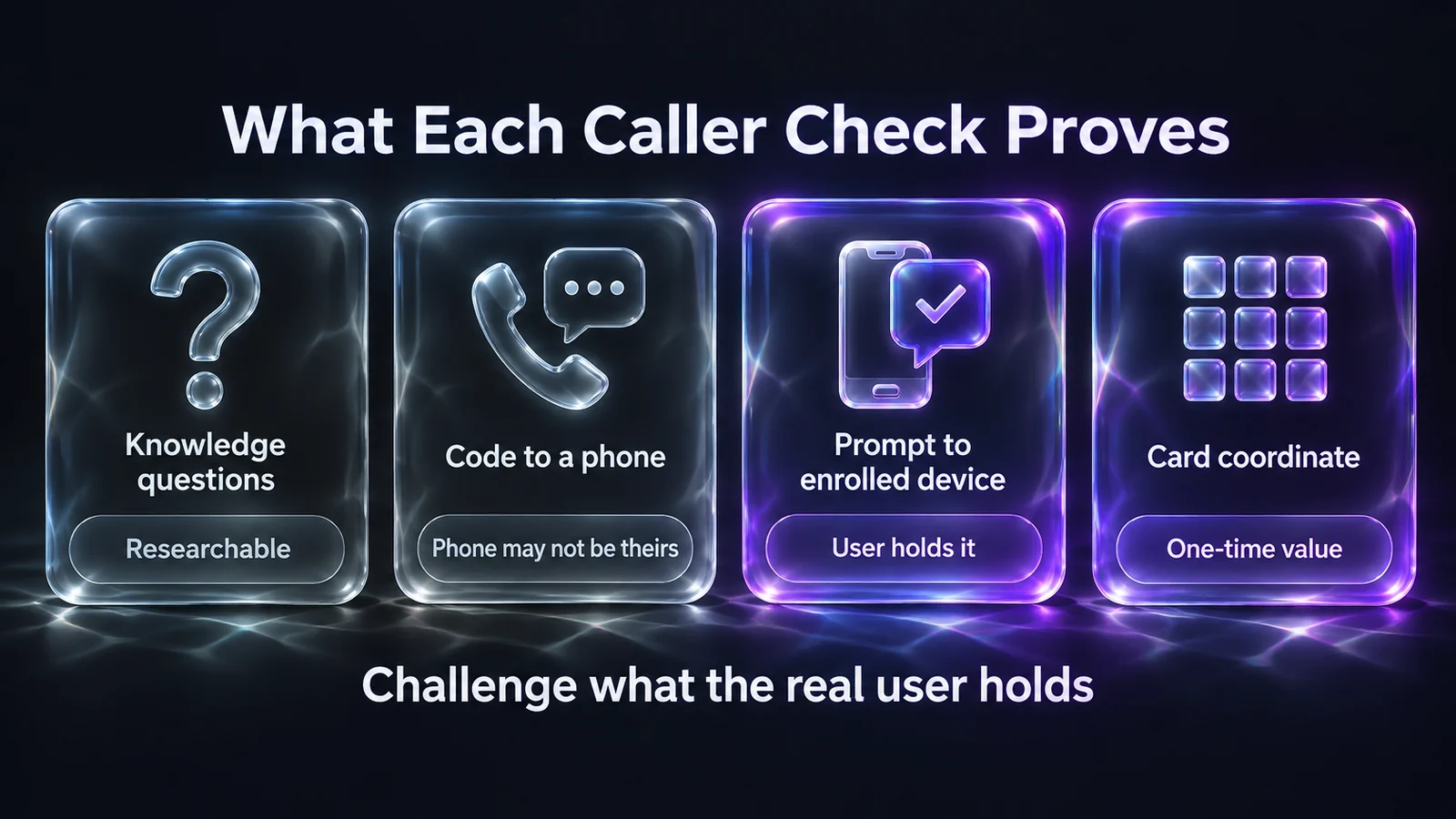 Four caller checks, sorted by whether an attacker could research or intercept the answer before the call.
A caller-verification procedure for the desk
The steps below are general guidance for any service desk, whatever tools it runs:
- Name the action first. Log what the caller wants (a password reset, an unlock or an MFA change) before verifying, so the check matches the change.
- Skip what the caller supplies. A callback number, email address or device offered during the call proves nothing. Verify against what is already on record for the account.
- Challenge something the real user holds. Send the prompt to the user's enrolled device, or ask for a one-time value from a printed card issued to them.
- Let the result decide. The agent acts on pass or fail. A failed check goes to an escalation path, not to a judgment call made under pressure.
- Record how the caller was verified. Avatier's Assisted Reset page names the gap: "Ticketing systems may record that work was completed, but not prove the user was verified before access was changed."
- Notify the user after the change. NIST SP 800-63B-4 states that "account recovery SHALL cause a notification to be sent to the subscriber or their designee," which gives the real employee a chance to flag a change they didn't ask for.
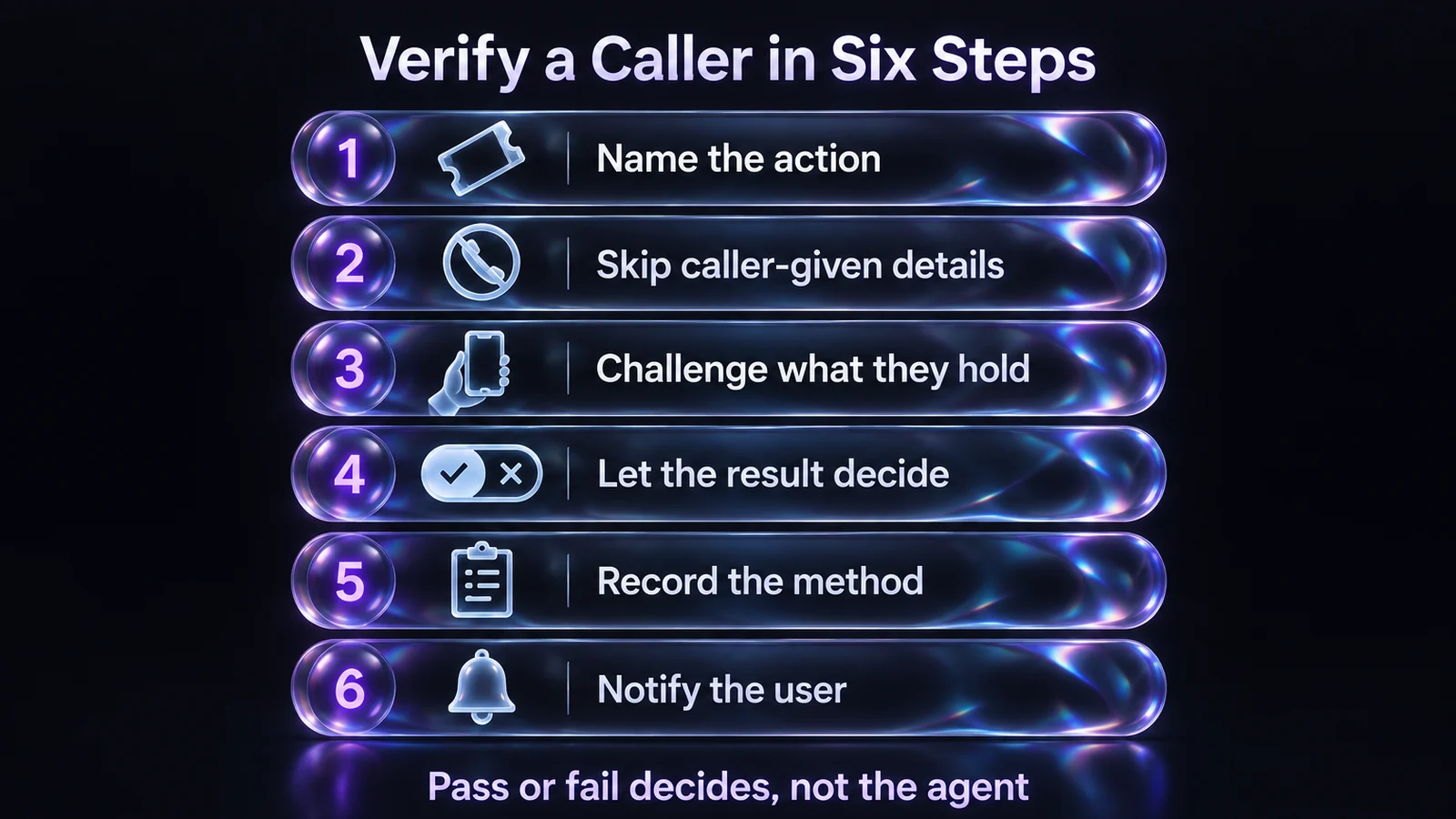 Six steps that move the trust decision from the agent's ear to a challenge only the real employee can answer.
Two ways to run the check with Avatier
Assisted Reset: the challenge goes to the user's own device. Assisted Reset is Pillar 3 of Avatier Credential Governance™, and its rule is "Every challenge goes to the user — the agent only sees pass or fail." It uses existing MFA methods (Microsoft Authenticator, Okta Verify, Duo and Google Authenticator) to verify users before agents complete resets, unlocks or enrollment support. Policy sets "how users are verified, which agents can assist which groups," and delegation "can follow OUs, regions, or support responsibilities." For the help desk console, see Avatier Assisted Reset.
Verify User is one of Assisted Reset's features, and it also appears among the Credential Governance actions on Avatier's Identity Actions page, where most actions can run from an AI assistant through Avatier MCP on the current (.NET 10) Avatier server. Avatier's rule there: "Avatier verifies the person before sensitive changes, with the methods your policy already allows."
The Identity Challenge Card: when the phone is the problem. Some calls are about the device itself. Avatier lists the cases: "Lost phone? Dead battery? No cell signal?" The card is a printed grid of word pairs. On a call, "The agent names a coordinate, the caller reads the answer off their printed card, and that value is spent." The desk resolves the answer against the grid locally, with "no IdP call, no network dependency," and "Each coordinate value is one-time," so a word overheard on one call can't be replayed. The card's private PIN is something the worker enters at login; as a general rule, no agent should ask a caller to read a PIN aloud. For the full card mechanics, see MFA for Frontline Workers Without Phones.
The two fit together. Assisted Reset lists the Identity Challenge Card for "deviceless verification for air-gapped and restricted environments," so a desk can keep the enrolled-device prompt as the default and use the card where the device can't answer.
A lost card must not become the next pretext. Avatier lists "Identity-verified re-issuance closes the social-engineering path," and says a lost card "is revoked in seconds and replaced the same day." For that workflow, see Issuing, Revoking and Replacing Avatier's Identity Challenge Card.
What Avatier ships toward this pattern
- Assisted Reset. A delegated help desk console with Verify User, Assisted Unlock Account and Assisted Password Reset. Its records cover "who requested help, how verification was handled, what changed, and what was logged." It works with ServiceNow, Zendesk, Jira and Freshservice, and runs in 34 languages.
- Identity Challenge Card. A printed factor for the service desk, login and password reset, with "no phone, no app, no network." Avatier says "Every challenge and re-issue is logged," and that "the whole workforce can be up and running in under an hour." For the product and its live demo, see the Identity Challenge Card.
- Security posture. Avatier is SOC 2 Type II audited with no exceptions noted and ISO/IEC 27001:2022 certified. For details, see the Avatier Trust Center.
Getting started
Avatier Identity Anywhere 2027™ is priced by Pay Per Identity Action™: customers pay only for completed, verified, policy-compliant outcomes, and attempts, failures and retries are never billed. Getting started is free, deployment services are included, and a 45-day money-back guarantee applies. Full terms are available to qualified organizations in the invitation-only preview. For the platform, see the Avatier Identity Anywhere 2027™ preview. For Avatier's full product line, see avatier.com.
About the author

More from MFA & Authentication

Retiring MFA Exceptions: Full-Workforce MFA with Avatier
An MFA exception register lists the workers device MFA can't reach. How Avatier's Identity Challenge Card lets policy route each of them to a method, so exceptions can be retired.

Multilingual MFA in 34 Languages: Avatier's Identity Challenge Card
Avatier's Identity Challenge Card ships in 34 languages, including right-to-left Arabic and CJK scripts. Same card, same three-factor flow, localized for every worker.

The Identity Challenge Card in Apple, Google and Samsung Wallet
Avatier's Identity Challenge Card can be added to Apple Wallet, Google Wallet or Samsung Wallet, alongside the printed card. When to reach for the wallet card, and when for the printed one.