Advanced MFA in 2026: What Actually Counts as a Factor
Multi-factor authentication only works when the factors are genuinely different — this 2026 reference clears up what counts as a real factor and what advanced MFA actually means.

Multi-factor authentication only works when the factors are genuinely different — this 2026 reference clears up what counts as a real factor and what advanced MFA actually means.
- There are three real authentication factor categories — something you know, something you have, something you are. Location and behavior are sometimes marketed as a 4th or 5th factor, but they're context signals, not independent proof of identity.
- Using two examples from the same category — a password plus a security question, or two OTP codes — is not multi-factor authentication, no matter how the vendor markets it. Real MFA requires factors from at least two different categories.
- Advanced MFA means adaptive, risk-based authentication layered on top of phishing-resistant credentials — not just "having MFA turned on." The 2026 baseline is FIDO2/passkey credentials with risk signals that adjust the requirement per session.
- Not all MFA is equally resistant to attack. SMS OTP and push-approval MFA are phishable; FIDO2 hardware keys and passkeys are structurally phishing-resistant because the cryptographic ceremony is bound to the origin.
- MFA does not fix over-provisioned access, does not replace identity governance, and does not help if account lifecycle and offboarding are broken — a phished-proof login into an account that should have been deprovisioned months ago is still a breach.
Multi-factor authentication (MFA) is the practice of requiring a user to prove their identity with two or more genuinely different types of evidence before granting access — typically something they know (a password), something they have (a device or key), or something they are (a fingerprint). The part that gets lost in vendor marketing and in a lot of enterprise deployments is the word "different." Two passwords are not two factors. A password and a security question are not two factors. Real MFA requires evidence drawn from at least two of the three actual factor categories, and understanding that distinction is the difference between MFA that meaningfully raises an attacker's cost and MFA that just adds a second box to fill in.
This is the 2026 update of Avatier's earlier MFA explainer, rewritten to reflect where authentication architecture actually stands three years on — phishing-resistant credentials as the enterprise baseline, adaptive and risk-based evaluation as the definition of "advanced," and a clearer answer to a question search traffic keeps surfacing: what actually counts as a factor, and how many of them do you really need?
What MFA actually is, and the three real factor categories
Authentication architecture recognizes three factor categories, and every credible framework — NIST, FIDO Alliance, the major identity platforms — describes MFA in terms of these three, not more.
Something you know is a knowledge factor: a password, a PIN, the answer to a security question. Knowledge factors are cheap to deploy and cheap to attack — they can be phished, guessed, keylogged, or found in a breach corpus, because the only thing standing between an attacker and success is information, and information is exactly what phishing pages are built to extract.
Something you have is a possession factor: a smartphone running an authenticator app, a hardware security key, a smart card, or a physical deviceless authentication card issued to a user without a personal device. Possession factors require the attacker to obtain a physical object or its cryptographic equivalent, which is a structurally different — and usually much harder — attack than phishing a password.
Something you are is an inherence factor: a fingerprint, a face scan, an iris pattern, or another biometric trait. Inherence factors can't be phished over email the way a password can, but they carry their own tradeoffs — they can't be rotated if compromised, and their enrollment and matching infrastructure becomes a high-value target in its own right.
Genuine MFA combines evidence from at least two of these three categories. A password plus a push notification to an enrolled phone is MFA — knowledge plus possession. A hardware key alone, if it requires a PIN or biometric unlock to activate, is arguably MFA on its own, because the key itself is possession and the unlock is knowledge or inherence. A password plus a second password, no matter how the login screen frames it, is not MFA — it's two examples of the same factor, and an attacker who can phish or guess one is well-positioned to get the other through the identical channel.
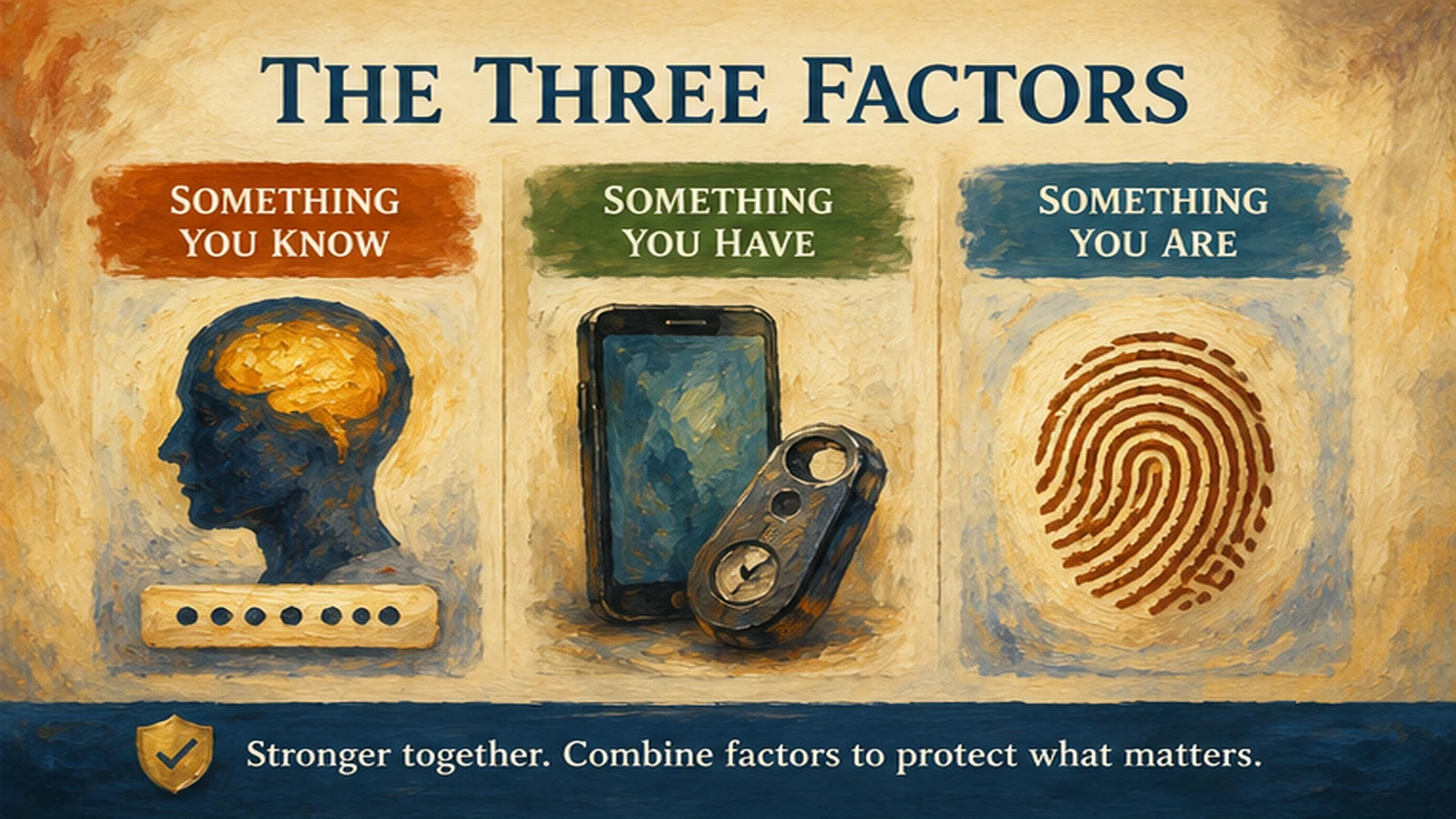 Three real factor categories, not four or five. Location and behavior modulate risk; they don't replace the need for evidence from a genuinely different category.
Why "3-factor" and "4-factor" marketing claims usually aren't what they sound like
Search demand around "3 factor authentication," "4 factor authentication," and "authentication factors" reflects a genuine and reasonable confusion, because vendor marketing has muddied a fairly precise concept. Here's the clean version.
Some products and analysts describe "somewhere you are" (geographic or network location) as a fourth factor, and "something you do" (behavioral biometrics — typing rhythm, mouse movement, navigation pattern) as a fifth. Both are real signals worth collecting, and both feed genuinely useful adaptive authentication decisions. But neither functions as independent proof of identity the way the three core factors do. Location can be spoofed with a VPN in seconds. Behavioral patterns drift naturally and can't reliably block access on their own without an unacceptable false-positive rate. That's why the mature architectural framing treats location and behavior as risk signals that adjust confidence, not as factors that stand on equal footing with knowledge, possession, and inherence — more on how those signals get used operationally in the next section.
The more common source of "3-factor" and "4-factor" marketing claims, though, is simpler: it's stacking. A login flow that asks for a password, then a security question, then a PIN is asking for three pieces of evidence — but all three are knowledge factors. An attacker who compromises the user's memory (through phishing, social engineering, or a breach-corpus match) is frequently positioned to compromise all three at once, because the attack surface is the same for each. The number of prompts went up. The number of factor categories did not. This distinction matters operationally, not just semantically: security value comes from forcing an attacker to defeat structurally different attack surfaces, and stacking same-category prompts doesn't do that — it just adds friction for the legitimate user while leaving the attacker's job largely unchanged. If a vendor's "3-factor" or "4-factor" claim can't name which of the three real categories each factor falls into, it's stacking, not multi-factor authentication in the sense that actually defends against credential compromise.
Why passwords alone fail
None of this is an argument that knowledge factors are useless — passwords remain part of most authentication ceremonies, often as the unlock mechanism for a possession or inherence factor. The argument is narrower: a password by itself, unpaired with a factor from a different category, fails against the attack patterns that dominate 2026 threat activity.
Passwords fail because they're reusable, memorable (which makes them guessable), and transferable — a user can be tricked into typing a password into a fake login page, and the password works identically whether the real user or an attacker typed it. Credential-stuffing attacks exploit password reuse across services at scale. Phishing pages exploit the fact that a password carries no information about who's presenting it. Breach corpora exploit the fact that a compromised password from one breach often still works elsewhere, because users reuse credentials across services more than security teams would like.
None of these attack patterns require defeating a possession or inherence factor — they only require defeating knowledge. That's precisely why pairing a password with a genuinely different factor category closes the gap: an attacker who successfully phishes a password still needs the user's phone, hardware key, or fingerprint to get further, and that's a different, harder problem. The security value of MFA comes entirely from that category difference — which is also why single sign-on layered under weak MFA, or MFA where the second factor is itself a knowledge factor, doesn't deliver the protection the name implies. Adoption patterns across sectors are consistent on this point: organizations that pair genuinely different factor categories see materially different outcomes than organizations that only add friction.
Basic MFA vs. advanced MFA: what "advanced" actually means
"Advanced MFA" is one of the more winnable and most misunderstood search terms in this space, and it deserves a direct answer: advanced MFA is not a stronger version of the same static challenge. It's MFA that evaluates context and adjusts.
Basic MFA challenges every session identically. The user logs in from their usual laptop at their usual desk at 9 a.m. and gets the same prompt as if they logged in from an unfamiliar device on an unfamiliar network at 3 a.m. — same friction, same requirement, no context taken into account. This is real MFA, and it's meaningfully better than a password alone, but it treats every session as equally risky, which wastes user goodwill on the low-risk majority of sessions and doesn't add extra scrutiny where it would actually matter.
Advanced MFA — also described as adaptive or risk-based MFA — evaluates signals at each session: device posture (is this a managed, compliant device), geographic and network context (is this location consistent with the user's normal pattern, is impossible travel detected), identity context (has this user recently changed roles, is their access under active certification), and threat intelligence (does this session match a known attack pattern). The system then adjusts the authentication requirement to match the assessed risk — a familiar, low-risk session proceeds with minimal friction, while an anomalous, high-risk session gets stepped up to a stronger credential requirement, or blocked outright pending verification.
The architectural point that gets missed in "advanced MFA" marketing is that adaptive logic is a layer that sits on top of a credential floor — it doesn't replace the need for that floor to be phishing-resistant. Adaptive evaluation applied to an SMS-OTP or push-approval baseline is still adaptive logic built on a phishable foundation; an attacker who can defeat the underlying credential class can often route around the risk evaluation too. The 2026 definition of advanced MFA that actually holds up under scrutiny is: phishing-resistant credentials as the floor, with adaptive, risk-based evaluation modulating the requirement above it. Enterprises evaluating vendors on "advanced MFA" claims should ask specifically what credential class the adaptive logic is layered on — our adaptive authentication reference breaks down the signal categories and architecture that answer that question in depth.
Phishing-resistant factors vs. phishable ones
Not all possession factors resist the same attacks, and this is where a lot of enterprise MFA deployments still carry more risk than the "MFA is deployed" checkbox suggests.
SMS one-time codes and voice-call codes are possession factors — the code arrives on a device the user has — but they route through the telecom network, which creates attack surface unrelated to the authentication ceremony itself: SIM-swap fraud, SS7 interception, and real-time phishing proxies that simply relay the code from a fake login page to the real one within its short validity window. Push-approval notifications (tap "approve" on your phone) remove the interception risk but introduce push-fatigue and MFA-bombing risk, where an attacker sends repeated prompts hoping the user approves one out of frustration or confusion. Authenticator apps generating time-based codes remove the telecom dependency but are still phishable through real-time relay attacks, because the code itself, once generated, is just another piece of information a phishing page can capture and forward.
FIDO2 and WebAuthn-based credentials — hardware security keys and passkeys — are structurally different. The cryptographic ceremony is bound to the origin (the actual domain) the user is authenticating to, which means a phishing page hosted on a different domain simply cannot complete the ceremony, no matter how convincingly it's designed. This is why FIDO2-compatible credentials are described as phishing-resistant rather than merely "another MFA option" — the resistance comes from the protocol's origin-binding property, not from user vigilance or training.
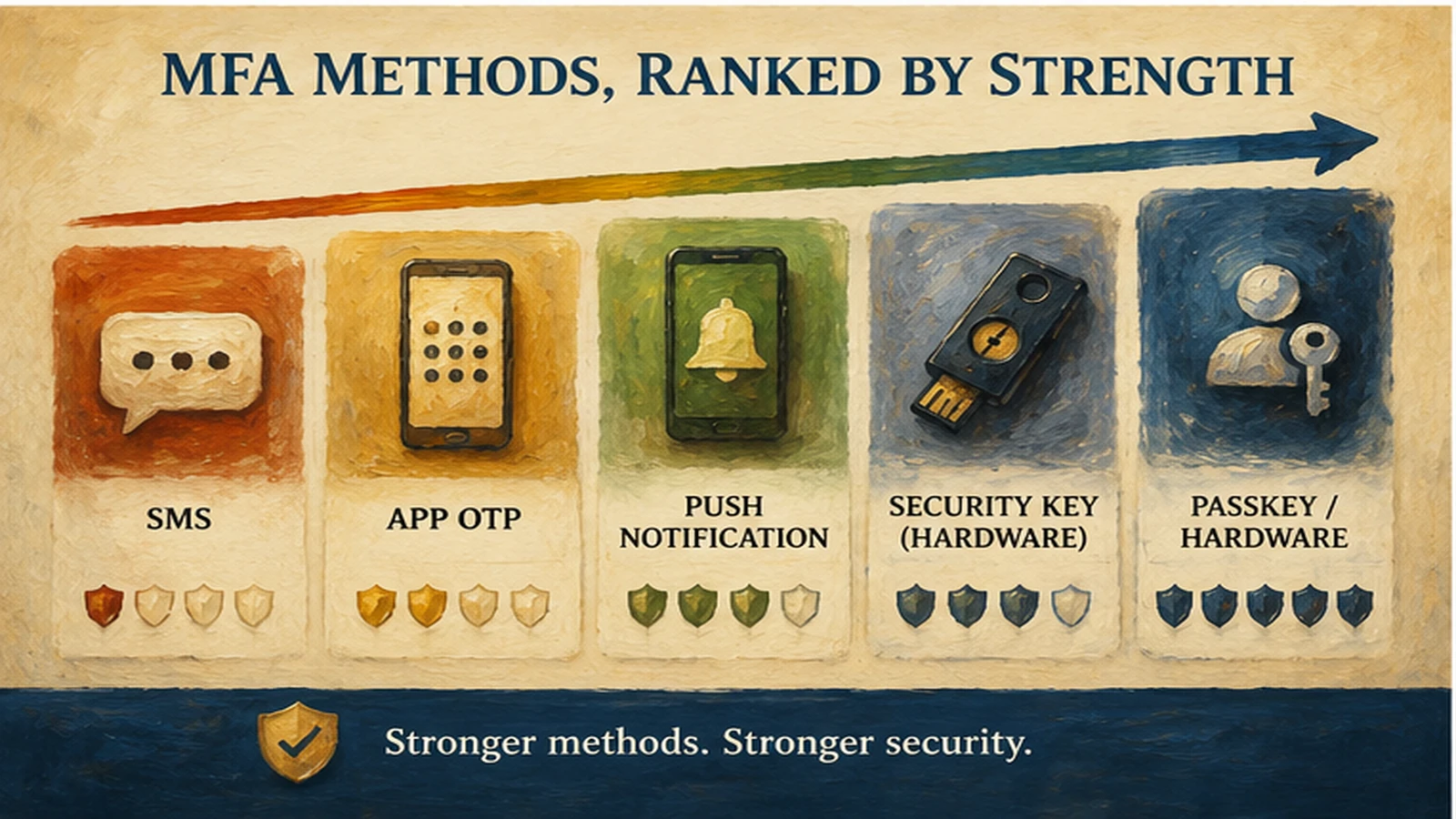 Not all MFA resists the same attacks. Phishing resistance comes from origin-bound cryptography, not from the presence of a second factor alone.
Our phishing-resistant MFA reference covers the regulatory and architectural case for standardizing on FIDO2 credential classes in more depth, and the hardware FIDO2 keys vs. passkeys comparison covers the tradeoffs between the two most common phishing-resistant deployment shapes for enterprise rollouts.
Enterprise rollout: what actually works
Deploying MFA broadly and deploying it well are different projects, and the gap between them is where most enterprise rollouts lose momentum or generate a spike in help-desk tickets that gets blamed on "MFA" rather than on rollout sequencing.
The rollout patterns that hold up start with segmentation rather than a single enterprise-wide push. Privileged accounts and high-risk roles go first, on the strongest available credential (hardware FIDO2 keys), because the blast radius of a privileged-account compromise justifies the friction of a hardware requirement immediately. The general workforce follows on a lower-friction phishing-resistant credential — platform passkeys are the practical default for most desk workers, since enrollment rides on hardware most users already carry. Workforce segments without personal smartphones or managed laptops — frontline staff, shared-device environments, contractor populations — need a deployment shape that doesn't assume a device the organization doesn't control, which is where deviceless printed authentication cards fill a gap that phone-based passkeys structurally can't.
Fallback and recovery paths deserve as much design attention as the primary credential. An MFA rollout that's airtight on the front door but allows a help-desk agent to reset a user's authentication over an unverified phone call has built a bypass into the architecture, and attackers have consistently targeted exactly that path. Recovery flows should require the same rigor as the credential they're recovering — workflow-verified identity confirmation, not just a name and a callback number.
Communication and sequencing reduce the help-desk load that otherwise accompanies any MFA rollout. Staged enrollment windows, in-context guidance during first use, and a clearly signposted fallback for edge cases (a lost hardware key, a locked-out contractor) all reduce the volume of confused tickets that land on the service desk in the first weeks. Our MFA implementation self-assessment walks through the specific coverage gaps — factor strength, recovery paths, workforce segmentation — that enterprise rollouts most often miss before they surface as incidents.
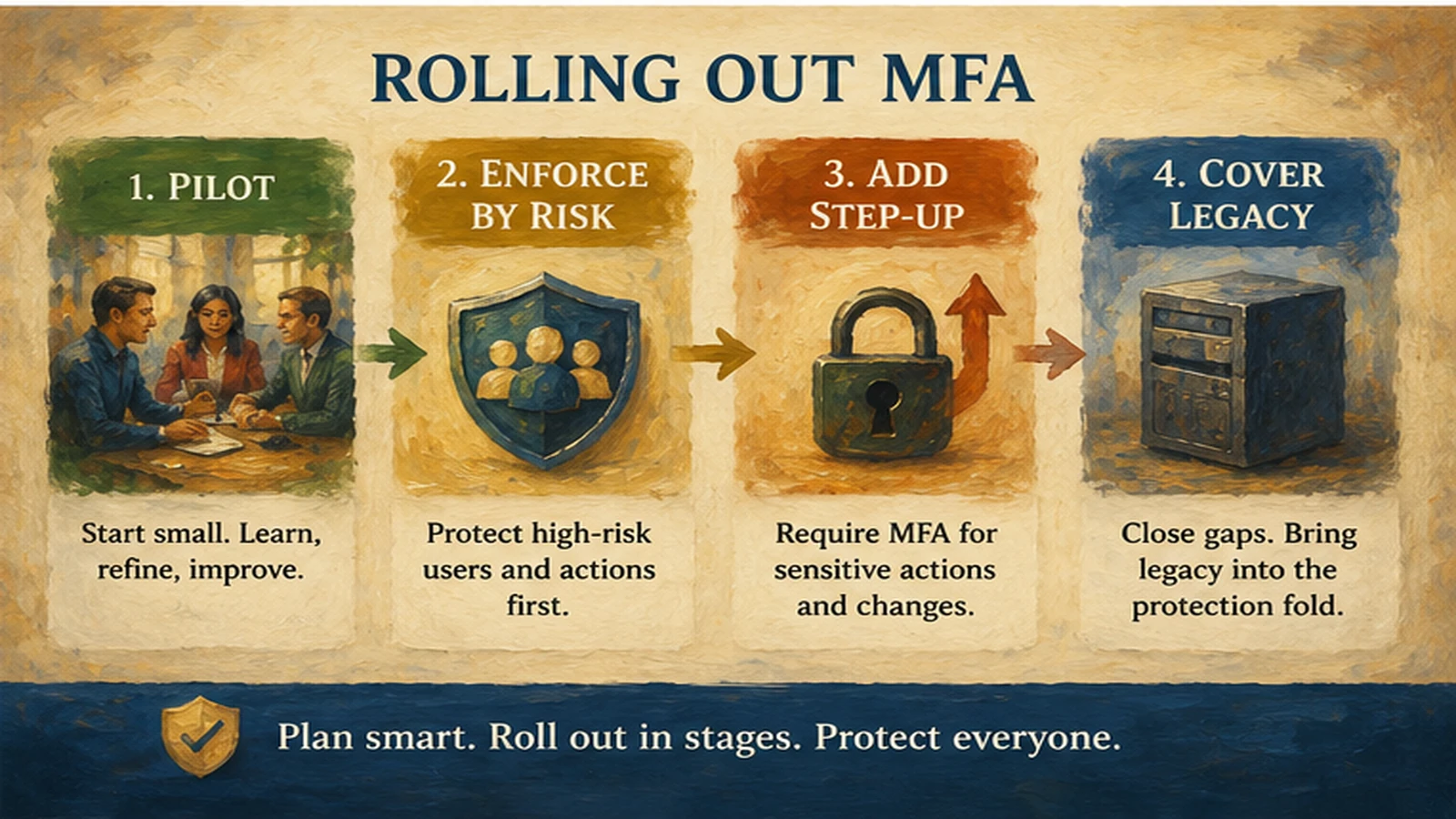 Rollout order matters as much as the credential choice. Privileged accounts first, general workforce on passkeys, deviceless segments last but deliberately covered — not left out.
What Avatier ships toward this pattern
Avatier Identity Anywhere is built around the credential-category distinctions and the adaptive layer this piece describes, not around a single flagship factor. Phishing-resistant FIDO2/WebAuthn passkeys cover desk workers whose enrollment can ride on hardware they already carry. Hardware FIDO2 security keys cover privileged accounts and high-risk roles where a device-bound credential that doesn't depend on a synced cloud account matters. The Avatier Identity Challenge Card covers workforce segments — frontline staff, shared-device environments, contractor populations without managed devices — where phone-based passkeys structurally don't fit, without falling back to a phishable credential class for that population.
Layered on top of the credential floor, Avatier's adaptive authentication evaluates device posture, geographic and network context, identity-lifecycle state, and threat-intelligence signals per session, adjusting the authentication requirement rather than applying uniform friction to every login. That lifecycle-context signal draws from Avatier Identity Anywhere Lifecycle Management, so risk evaluation reflects whether a user's role or entitlements recently changed rather than treating every session as static. Recovery flows route through workflow-verified identity confirmation rather than an unverified help-desk callback, closing the fallback gap that undermines an otherwise strong credential floor.
None of this is presented as a reason the architecture in this piece only applies if you buy Avatier — the factor-category distinctions, the phishing-resistance argument, and the rollout sequencing hold regardless of vendor. The Avatier Trust Center publishes the compliance posture behind the platform — SOC 2 Type II with zero exceptions, ISO/IEC 27001:2022 certified, PCI DSS v4.0.1 compliant, CSA STAR Level 1, NIST 800-53 Rev. 5 aligned, and a signatory to the CISA Secure-by-Design Pledge.
For governing the password behind every MFA prompt, see Credential Governance.
About the author
More from MFA & Authentication
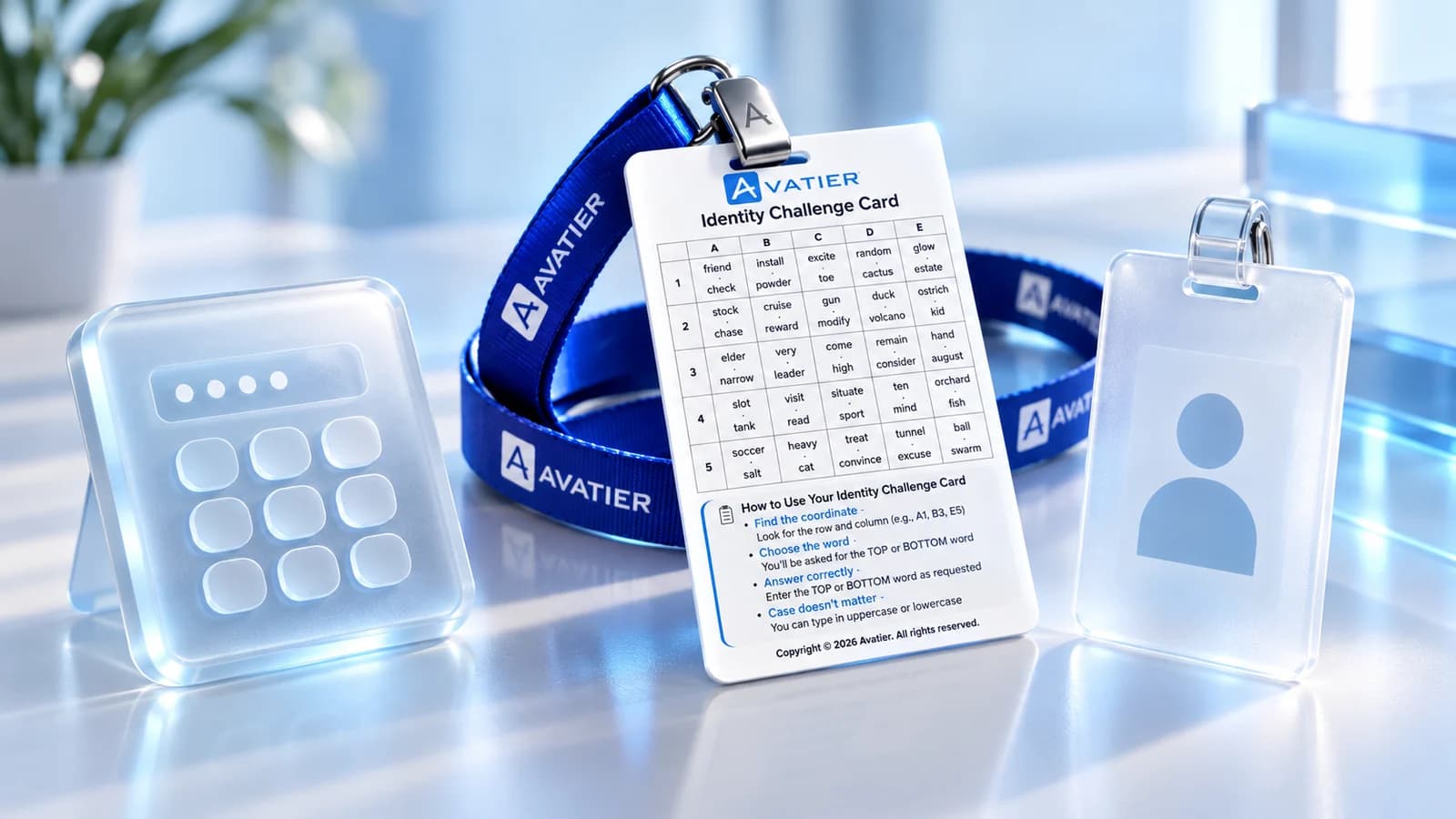
Three-Factor Authentication Explained: The Identity Challenge Card
What three-factor authentication is, how 3FA differs from 2FA, and how Avatier's Identity Challenge Card checks three factors: a printed grid card, a private PIN and a directory identity.

When Your IdP or MFA Goes Down: Avatier's Identity Challenge Card
When the identity provider, MFA service or devices go down, people still have to prove who they are. A runbook for verifying, restoring and recording access with Avatier's printed card.

Air-Gapped MFA for Phone-Free Sites: Avatier's Identity Challenge Card
Air-gapped MFA for sites where phones are banned or networks don't reach. How Avatier's printed Identity Challenge Card verifies a worker locally, with no phone, no app and no network.