Conversational Password Reset in Teams, Copilot and Chat, with Avatier
With Avatier, employees reset or unlock their password by asking in Teams, Outlook, Copilot, chat, or voice: MFA-verified, checked by Password Firewall, synchronized, and logged.

With Avatier, employees reset or unlock their password by asking in Teams, Outlook, Copilot, chat, or voice: MFA-verified, checked by Password Firewall, synchronized, and logged.
- Conversational password reset is self-service password reset completed by conversation: an employee asks in Microsoft Teams, Outlook, Copilot, a chat assistant, or on a voice call, and the reset runs through the same verification, policy, synchronization, and logging as the self-service portal.
- The governed flow has five steps: ask, verify identity with MFA, apply the password policy through Password Firewall (or simply unlock), synchronize the credential across connected systems, and record the evidence.
- A chatbot shortcut, one that treats the chat session as proof of identity or resets passwords through a privileged service account, reopens the same help-desk social-engineering path attackers already use; the fix is to verify the person, not the conversation.
- When the phone is lost, dead, or out of signal, the Identity Challenge Card provides deviceless verification, so a reset does not have to fall back to a help-desk exception.
- Avatier Actions exposes Password Management actions (unlock, forgot password, change password, enrollment) as MCP tools inside Claude, Microsoft Copilot, Avabot, and other MCP-compatible assistants, and Password Portal delivers MFA-verified resets across web, mobile, Teams, Outlook, and AI voice in 34 languages.
Conversational password reset is self-service password reset completed by conversation: an employee types "I forgot my password" or "my account is locked" in Microsoft Teams, Outlook, Copilot, or a chat assistant, or says it on a voice call, and the reset runs through the same MFA verification, password policy, synchronization, and audit logging as the self-service portal. With Avatier, the conversation is the interface. It is never the authority.
A quick note on intent, because "password reset in Teams" means two things. If you only need to reset your own Microsoft work account password, Microsoft Entra self-service password reset is Microsoft's own route when your IT team has enabled it. This article is about something broader: organization-wide self-service reset through Avatier, in the chat tools people already use, covering the directories and connected systems an enterprise manages.
This piece sits in the Conversational AI pillar of this blog. The conversational identity hub covers the wider shift to identity work done by conversation, and the companion how-to on requesting access in Microsoft Teams covers the access side. Here the focus is the request every service desk sees most: I can't get in.
What conversational self-service password reset is
Self-service password reset has existed for years as a web portal. The CGov guides on self-service password management and enterprise SSPR deployment cover that foundation: enrollment, verification methods, policy, and rollout. Conversational reset changes one thing, which is where the request starts.
Instead of finding a portal URL, the employee asks where they already are. A locked-out person's path of least resistance has always been to message or call the service desk; putting the reset in the conversation removes the reason to call.
What conversational reset covers is broader than one "forgot password" form. The routine self-service actions are:
- Forgot password: the person cannot remember it and needs a new one.
- Unlock account: the password is fine, but too many failed attempts locked the account.
- Change password: the person knows the current password and wants, or is required, to change it.
- Enrollment: registering recovery and verification methods before they are needed.
A useful conversational assistant also tells the person what is actually wrong. Avatier's Password Portal, for example, shows users their lockout, expiration, and password status before they contact IT, which can turn "reset my password" into "you're locked, not expired; unlock instead."
What conversational reset is not: a chatbot that files a ticket, which leaves the employee in the same queue, or a bot that decides for itself whether the person is genuine.
How to reset a password in Teams, Copilot, or chat: the five steps
Here is the governed flow in order. The employee sees steps 1 and 5. The organization's controls do the work in between.
-
Ask in the channel you already have open. The employee states the problem in ordinary language in Teams, Outlook, Copilot, a chat window, or on a voice call. The assistant's first job is to work out which action is needed. "I can't log in" might be a forgotten password, a lockout, or an expired password, and each resolves differently. A good assistant checks account status and confirms the action with the person before anything changes.
-
Verify identity with MFA. Before any credential changes, the person proves who they are with an approved MFA method, the one the organization already runs, such as Microsoft Authenticator, Duo, Okta Verify, RSA, or the Identity Challenge Card. The chat session is not proof of identity on its own: a session can be left open on a shared machine or hijacked. Where policy calls for it, Password Portal's adaptive authentication steps up verification by user, group, OU, or geo-location on top of the existing MFA; the ICC guide to adaptive authentication covers the wider risk-based pattern. Privileged accounts should always face the stronger challenge.
-
Apply the password policy, or unlock. For a reset or change, the person sets a new password and it is checked before it is accepted. With Avatier, that check is Password Firewall, which validates the new password against enterprise policy, NIST common passwords, and Have I Been Pwned, and blocks weak, breached, reused, or predictable passwords before they reach the directory. For a plain lockout, the account is unlocked and no password changes at all.
-
Synchronize. A new password that works in one directory and fails in the next application creates a second ticket. The change is synchronized across the systems that need it: Active Directory, Entra ID, and the connected on-premises and cloud systems the organization manages. The person should be told when it has landed.
-
Record the evidence. The outcome is logged: who asked, how they were verified, what changed, and where the credential was synchronized. The employee gets a confirmation. The auditor, later, gets a record that does not depend on anyone having typed up a ticket note.
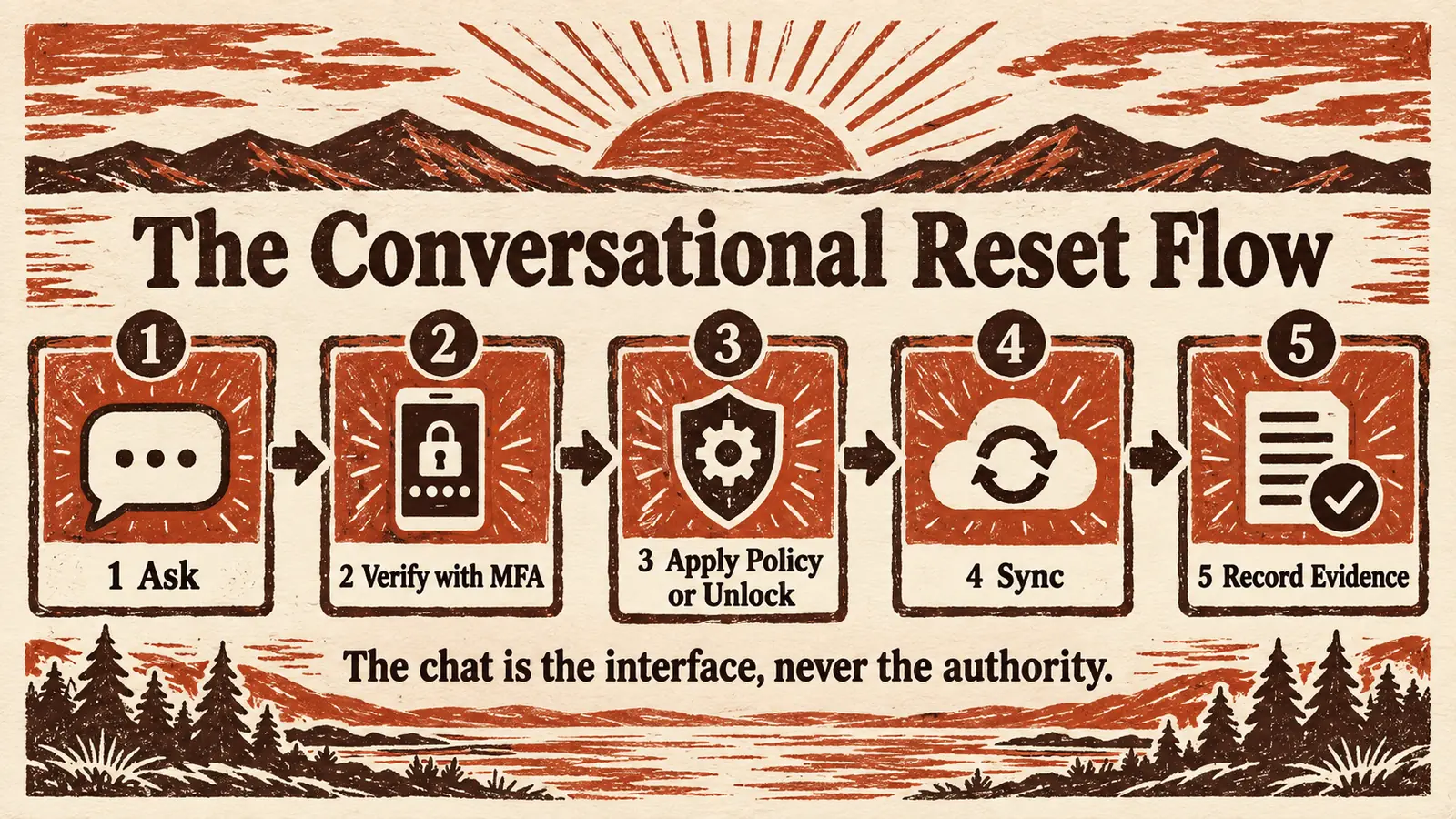 Five steps, one conversation: the employee sees the ask and the answer, while MFA, policy, sync, and evidence run in between.
An illustrative conversation
The exchange below is illustrative. It shows the shape of a governed reset, not a transcript of any product's interface, and the wording is invented for the example.
Employee: I can't sign in, I think I forgot my password.
Assistant: Your account is locked after several failed attempts, and your password also expires in two days. I can reset it now. First I need to verify you. Approve the prompt from your authenticator, or reply "card" to use your Identity Challenge Card.
Employee: Card. My phone is dead.
Assistant: Enter the top word at coordinate C2 on your card, then enter your PIN.
Employee: (enters the word, then the PIN)
Assistant: Verified. Enter a new password. It will be checked against your organization's password policy.
Assistant: That password appears in a known breach list, so it can't be used. Try another.
Assistant: Accepted. Your password has been updated and synchronized, and your account is unlocked.
Behind a conversation like that, an MCP-compatible assistant calls an approved capability rather than editing a directory itself. A simplified sketch of what such a call might carry is below. It is illustrative only and is not Avatier's published tool schema.
# Illustrative only: not a real API schema
tool: forgot_password
arguments:
  subject: requesting user (directory identity)
  verification: identity_challenge_card
result:
  verification: passed
  policy_check: passed
  sync: completed
  status: password_reset
Notice what the assistant did not do: decide the person was genuine, choose which passwords were acceptable, or write to the directory on its own authority. Each came from verification and policy the organization had already defined.
Verifying without a phone: the Identity Challenge Card
Step 2 has a weak point that almost every reset program runs into. Most MFA assumes a trusted device is available at the moment of verification, and a reset request is often the moment it is not. The phone is lost, the battery is dead, there is no signal, or the worker is on a floor where phones are not allowed. When the only verification method is on a device the person does not have, a self-service reset turns into a help-desk exception, and help-desk exceptions are where social engineering lands.
The Identity Challenge Card is Avatier's answer. It is a printed grid of word pairs: no phone, no app, no network. The person is shown a coordinate, reads back the matching word, adds a private PIN, and their directory identity, such as an employee ID, is matched automatically. Each coordinate value is one-time, so a spent value cannot be replayed. The card defines what Avatier calls the Identity Continuity Layer: authentication that persists when device-dependent systems fail. The ICC explainer on what an identity continuity layer is covers the category in full.
For conversational reset, the card does two jobs:
- Self-service reset with no device. The card proves who the person is before the password changes, so the reset needs no help-desk call, and it still works when the phone is dead, out of signal, or in a locker.
- Verification on service desk calls. When a call reaches the service desk, the agent names a coordinate and the caller reads the answer off the printed card, and that value is spent. What is printed on that card is not online and not on a device an attacker may already control.
The card sits alongside the MFA organizations already run rather than replacing it, keeping verification possible for the people and the days device MFA cannot reach.
Why a chatbot shortcut is dangerous
The fastest way to put password reset in chat is also the most dangerous: give a bot a privileged service account, let it ask a couple of questions, and let it reset the password. That design fails in three predictable ways.
It treats the conversation as proof of identity. A signed-in chat session proves that someone has the session, not that the person typing is the account owner. Sessions are left open on shared workstations and can be hijacked. A reset is precisely the action an attacker wants from a hijacked session, because it converts temporary access into a credential they control.
It verifies with things an attacker can research. Knowledge questions, the last four digits of an ID, a manager's name: much of this is findable. A bot that accepts it is automating the weakest part of the old help-desk script.
It rebuilds the vishing path in software. Help-desk social engineering is well documented. In its advisory on Scattered Spider, CISA described attackers posing as employees to convince IT or help desk staff to reset passwords and transfer the employee's MFA to a device the attacker controls. The CGov analysis of lessons from the MGM help-desk breach walks through why that path works. A chatbot that can be talked into a reset has the same weakness as an agent who can be talked into one, with less judgment and more speed. Voice assistants carry the sharpest version, because a caller can sound exactly like the employee.
A governed conversational reset closes those gaps by design.
| Question | Chatbot shortcut | Governed conversational reset |
|---|---|---|
| Who decides identity? | The bot, from the session or answers | An approved MFA challenge the person must pass |
| What if the phone is unavailable? | Falls back to questions or an agent | Deviceless verification with the Identity Challenge Card |
| Who checks the new password? | Often nothing beyond basic format | Password Firewall: policy, common passwords, breach data |
| What permissions does it hold? | A broad service account | Approved capabilities only, permissions inherited from the identity platforms already in place |
| Does it synchronize? | Sometimes one directory | Across the connected systems that need it |
| What evidence is left? | A chat log, at best | Who asked, how they were verified, what changed, where it synced |
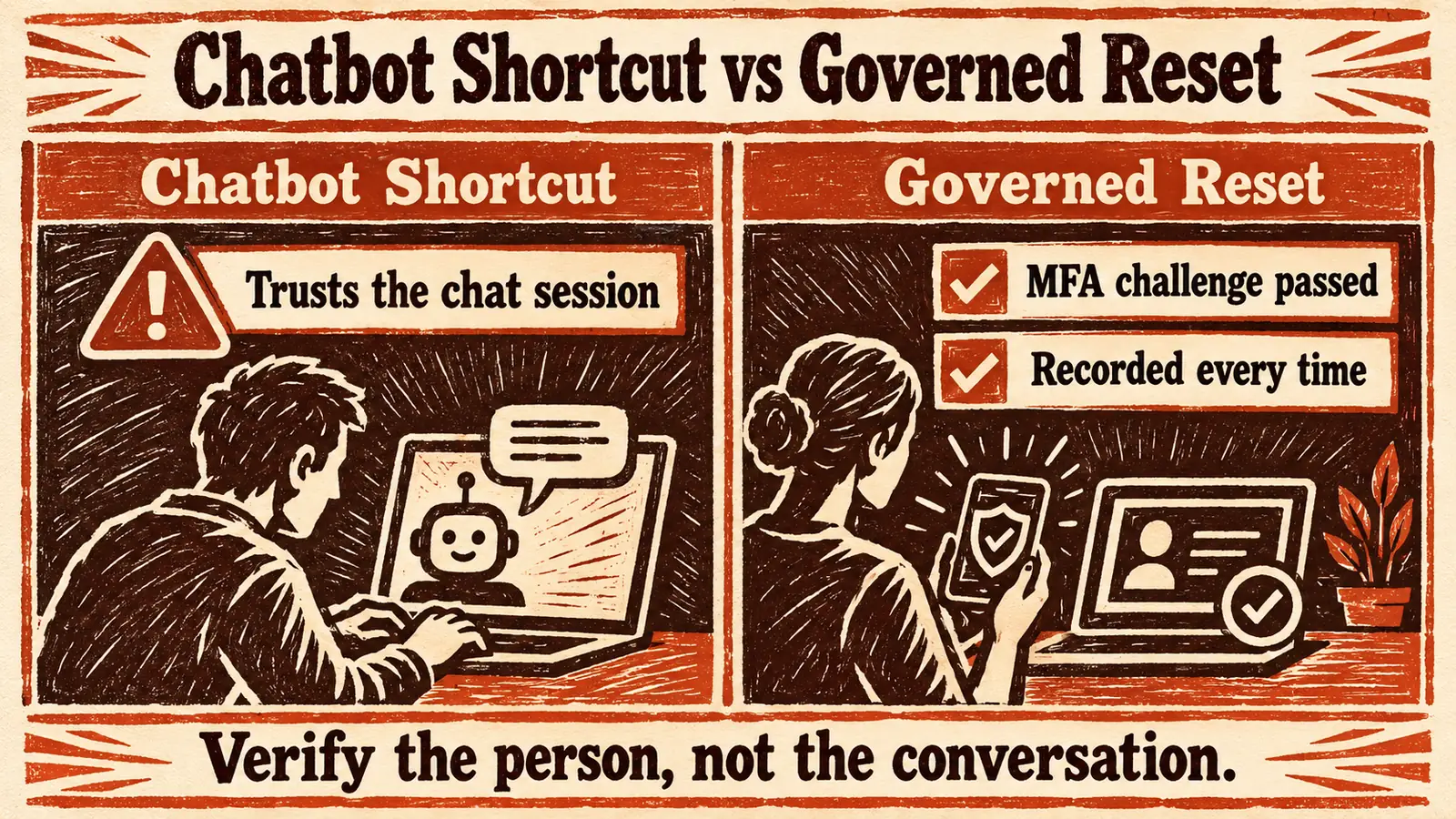 A shortcut trusts the conversation. A governed reset verifies the person, checks the password, and records what happened.
When a reset does need a person, the same principle applies. Avatier's Assisted Reset pillar routes the verification challenge to the user, so the agent only sees pass or fail instead of relying on judgment under pressure. The ICC guide to MFA fatigue attacks covers the related risk of people approving prompts they did not start, which is one more reason the challenge method matters.
For any assistant connected to identity tools, the general guidance is conservative: least privilege for the connection, an allow-list of callable tools, logging of every action, and awareness of prompt injection. The CGov guide on how to secure MCP servers goes deeper.
One reset, many channels, in 34 languages
People do not all ask in the same place: an office worker types in Teams, a manager asks Copilot, a field technician calls. A governed program gives all of them the same reset, not five resets with five sets of rules.
Avatier Identity Anywhere 2027™ names its channels as web, mobile, Microsoft Teams, Outlook, chat, voice, phone, APIs, and MCP-compatible AI assistants. For password self-service specifically, Avatier's Password Portal delivers reset, unlock, and enrollment across web, mobile, Teams, Outlook, and AI voice, with Copilot, call center, IVR, and deviceless recovery options among its access paths. On the voice side, Password Portal describes zero-hold-time call center resets through SIP-aware AI voice agents.
The point is not the count. With Password Portal, every action is MFA-verified, checked by Password Firewall, synchronized, and logged, whichever channel the person starts in, so an auditor can treat the channel as a detail.
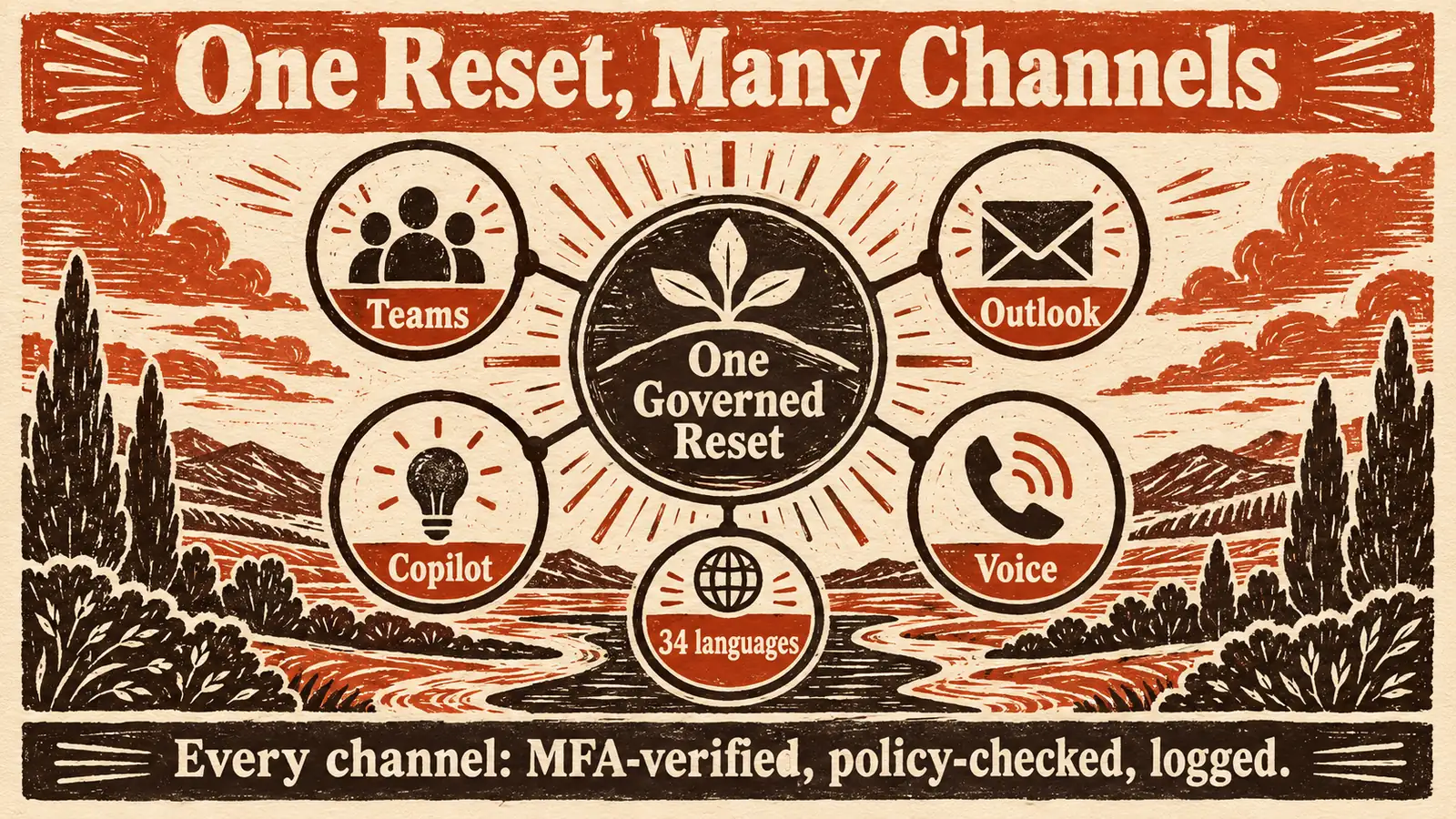 Many places to ask, one governed reset: the channel changes, but the verification, policy, and evidence do not.
A reset flow that only works in English sends everyone else to the service desk. Avatier supports 34 languages across every conversational channel, and Password Portal is available in 34 languages across web, Teams, Outlook, mobile, IVR, and AI voice. The printed Identity Challenge Card ships in the same 34 languages, including right-to-left Arabic and the Chinese, Japanese, and Korean scripts, so the deviceless fallback is localized too.
What Avatier ships toward this pattern
Avatier Identity Anywhere 2027™ is Avatier's AI-native identity platform built on the Model Context Protocol, the open standard that enables AI assistants to securely interact with enterprise software. The conversational reset described above maps onto four pieces of it.
Avatier Actions is an MCP connector that exposes more than 50 identity outcomes as MCP tools across eight modules. For conversational reset, the key one is Password Management: unlock, forgot password, change password, enrollment, account and activity views, and account linking. The Help Desk module covers the assisted side: assisted unlock, quick and full assisted reset, batch reset, verify user, enrollment email, activity, mapping, and un-enrollment. Avatier Actions works inside Claude, Claude Code, Microsoft Copilot, Avabot, and any MCP-compatible assistant. An employee asks in Teams, Outlook, Claude, or Copilot, and the outcome runs through the customer's existing policies, approvals, and roles. Nothing bypasses governance, because the assistant is the interface, never the authority.
Password Portal, Pillar 2 of Credential Governance, is the self-service layer. It gives users one governed place to unlock accounts, recover forgotten passwords, change passwords, and enroll recovery methods, and every action is MFA-verified, enforced by Password Firewall, synchronized across required systems, and logged for compliance. Its supported MFA methods include Microsoft Authenticator, Duo, Okta Verify, RSA, and the Identity Challenge Card, and it integrates with ServiceNow, Zendesk, and Jira Service Management for ticketing.
Password Firewall, Pillar 1, is the enforcement layer. It intercepts password-change requests and validates them against enterprise policy, NIST common passwords, and Have I Been Pwned before the change is accepted. When users reset or change passwords through Password Portal, Password Firewall can help enforce password policy before the new credential is accepted.
The Identity Challenge Card™ is the deviceless verification method for the people and moments device MFA cannot reach.
Setup is one administrator connection, and permissions are inherited from the identity platforms customers already run, including Microsoft Entra ID, Active Directory, Okta, and Ping. Avatier runs alongside those platforms rather than replacing them. Avatier's credential governance customers report help-desk password ticket reductions of up to 70 percent.
Every completed reset becomes evidence. Each Secure Outcome records the identity involved, the initiating agent or experience, the authorization context, the policy applied, the action taken, and the final result. Avatier Ledger, the second MCP connector, records who asked, what ran, under whose authority, and what policy allowed it, for human-initiated and agent-assisted actions alike, and its security-team briefing includes the vishing surface at the help desk. The CGov article on the AI agent audit trail in Avatier Ledger covers the evidence model. Avatier helps support the evidence needs of frameworks such as NIST, SOX, HIPAA, and GDPR; it does not certify you against them. Avatier's own SOC 2 Type II audit, completed with no exceptions noted, and its ISO/IEC 27001:2022 certification are published at the Avatier Trust Center.
On pricing, Pay Per Identity Action™ is Avatier's model in which customers pay only for completed, verified, policy-compliant identity outcomes. Avatier calls these Secure Outcomes, and password resets and account unlocks are among the examples it names. Getting started is free, deployment services are included, and a 45-day money-back guarantee applies. The CGov hub What is Pay Per Identity Action™ explains the model.
The platform is previewed at Avatier Identity Anywhere 2027™, the credential pillars live on Credential Governance™, and the wider Avatier platform is at avatier.com.
Rolling it out: what to decide before you switch it on
The connection is small. The decisions that make a conversational reset program work are made before it. Avatier's Password Portal rollout follows four phases, and each one carries a decision worth making deliberately.
- Connect identity sources. Connect Active Directory, Entra ID, and the systems whose passwords should stay in sync. Anything not connected will not be synchronized, which is exactly how repeat tickets start.
- Configure verification and policy. Choose the MFA methods people must pass, decide where step-up applies, and set the password policy Password Firewall will enforce. Decide in advance what happens for a person with no registered method, because "call the service desk" is the answer an attacker hopes for.
- Enable the access paths. Pick the channels to open first. Starting with the one where most lockout requests already arrive, often Teams or the phone line, shows value fastest. Coordinate with the people who own your Microsoft tenant, because enabling any app in Teams follows your organization's own app and consent governance.
- Synchronize, log, and review. Confirm that every path leaves a record of who verified, what changed, and where the credential was synchronized, and that those records reach the people who will be asked about them.
Two habits matter as much as configuration. Drive enrollment early, because self-service cannot verify someone who never registered a method; Password Portal supports forced and mass enrollment, including HR-feed-driven onboarding. And pilot before widening, comparing outcomes and evidence against the current queue.
What conversational password reset does not solve
Conversational reset is a real improvement, not a cure for every credential problem.
It does not fix weak enrollment. If people never registered a verification method, the assistant has nothing to verify them with. Enrollment coverage is the precondition, not an afterthought.
It does not make a hijacked session safe by itself. Verification before every credential change is what protects a reset. An organization that configures the assistant to trust the session alone has rebuilt the shortcut.
It does not remove the service desk. Some requests will always need a person: a new hire with no methods yet, a privileged account under stricter policy, a disputed identity. The goal is that those calls are verified too, which is what the Assisted Reset pattern is for.
It does not reach systems that are not connected. A password that is not synchronized to an application will still fail there. Connector coverage decides what "reset everywhere" means in practice.
It does not replace your identity platform. Avatier runs alongside Entra ID, Active Directory, Okta, and Ping, inheriting their permissions. Microsoft's own Entra reset remains Microsoft's feature; Avatier covers the governed, organization-wide self-service layer across channels.
It does not settle commercial questions on its own. How abandoned or failed reset attempts are treated under Pay Per Identity Action™ is a commercial question, and full commercial terms go to qualified organizations in the invitation-only preview. Ask.
Done well, a conversational password reset gives a locked-out employee an answer in the place they already work, in their own language, without a phone if need be, and gives security a reset that does not depend on anyone being talked into it. The conversation was never the hard part. Verification, policy, sync, and evidence are, and they stay exactly where they were.
About the author

More from Identity & Access Trends

Access Requests in Microsoft Teams: Governed Self-Service with Avatier
With Avatier, employees request access to business apps from a Microsoft Teams chat: verified, checked against policy, routed to the right approver, provisioned, and recorded as evidence.

Conversational Identity: Access, Resets & Verification by Chat & Voice
Conversational identity means unlocks, resets, and access requests completed by conversation in Teams, chat, and voice, under the same policy, approvals, and evidence as the portal.

AI-Driven Biometrics in 2026: Modalities, Liveness, and What's Next
AI has redefined what a biometric even is — turning static face and fingerprint checks into continuous, behavior-aware signal, and this is a field guide to the modalities behind that shift.